

AI Room Styles
Fractal-Apps Pvt Ltd · Image
AI Room Styles turns a single room photo into photorealistic interior concepts in seconds, with 62 interior design styles, a one-click Fast Mode, and an Advanced Mode for materials and lighting.
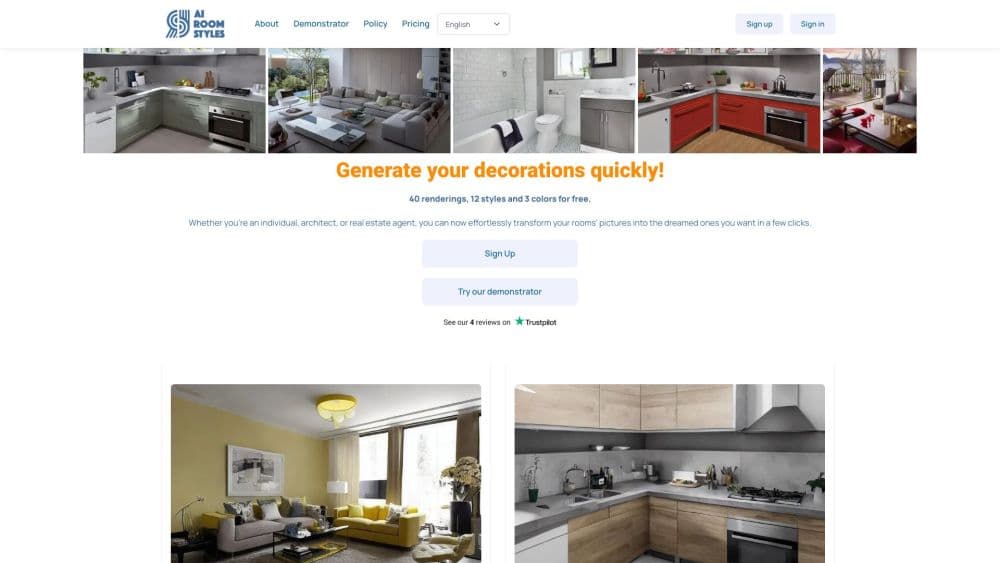
About AI Room Styles
What Is AI Room Styles
AI Room Styles is a web-based AI interior design and virtual staging tool run by Fractal-Apps Pvt Ltd. You upload one photo of a room, pick a look, and this AI room generator returns a new rendering of that same space with different furniture, finishes, and lighting. It works in English and Arabic.
The tool targets the gap between a mood board and a real renovation. Painting a wall or replacing a sofa costs money and time, and most people want to see the result before they commit. AI Room Styles gives you that preview from a phone photo, which makes it useful for homeowners, renters, architects, and agents staging a listing.
Its limits are practical rather than technical. Renders are concepts, not measured drawings, so dimensions and structural details stay approximate. The output also depends on the quality of your photo, and a dark, cluttered shot produces a weaker result than a wide, well-lit frame.
Getting Started
- Create a free account with an email address or a Google login. No card is needed for the free tier.
- Choose Fast Mode for a quick concept or Advanced Mode when you want control over furniture, materials, and lighting.
- Upload a room photo, then pick the room type and an interior style. Advanced Mode adds floor, wall, and ceiling materials plus time of day.
- Press Transform with AI, review the render, and download or share the version you like. Each transformation uses one credit.
Product Information
A quick look at AI Room Styles's pricing, supported platforms, and performance.
Best for
The users, tasks, and scenarios where this tool fits best.
Users
- Homeowners planning a renovation
- Renters with a limited budget
- Real estate agents and stagers
Tasks
- Testing interior design styles
- Virtual staging an empty property
- Exploring material and color changes
- Checking an exterior idea
Scenarios
- A weekend makeover plan
- A client presentation the next morning
- A listing that needs better photos
Key features
62 Interior Design Styles
The style library covers classic, modern, minimalist, industrial, bohemian, Scandinavian, and retro tropical looks, among others. Each style changes furniture, materials, and color together, so the render reads as a coherent room rather than a filter. Having that many options helps when a client asks for something specific and vague, such as warm but not rustic.
Fast Mode With One-Click Renders
Fast Mode is the shortest path from photo to concept. You choose the room type, tap a style, and the AI returns a result in under 10 seconds on the company's stated timing. It suits quick inspiration, family debates about a living room, or a first pass before you spend credits on detailed work.
Advanced Mode for Materials and Lighting
Advanced Mode opens controls for architectural style, floor, wall, and ceiling materials, color palette, lighting type, and time of day. You can also set a budget range and a rendering quality level, which keeps the concept closer to what you can actually afford. A free-text field accepts extra instructions for details the menus do not cover.
Interior and Exterior Room Types
The tool handles bedrooms, living rooms, kitchens, bathrooms, offices, and other interior spaces, and it also accepts exterior shots. Switching to the exterior type lets you preview a facade or an entryway, which broadens the use case beyond interior design styles and into light exterior planning.
Budget and Quality Controls
Budget and quality settings sit inside Advanced Mode. A lower budget tends to produce simpler furniture and finishes, while higher quality spends more credits for a more detailed image. This gives you a way to test a realistic plan instead of a dream room you can never build.
Credit System With a Free Start
New accounts receive free credits, and the free tier includes 3 monthly renderings with no credit card. Each transformation consumes one credit, and the balance stays visible at the top of the screen. Paid Basic and Pro plans add credits when you need more renders in a month.
Pros and cons
Pros
- Fast first draft: a usable room concept arrives in seconds, which is far quicker than a designer's first meeting.
- Wide style range: 62 options cover the usual requests and a few unusual ones, so you can test a direction without hunting for reference images.
- Real control in Advanced Mode: materials, lighting, budget, and a custom prompt make the output feel closer to a design brief than a random filter.
- Low-risk entry: 3 free monthly renderings and no card requirement let you judge output quality with your own photos.
- Works for staging: agents and landlords can furnish an empty room for a listing without renting furniture.
Cons
- Renders are concepts, not plans: you get a picture, not dimensions or a buildable layout, so you still need measurements before ordering anything.
- Photo quality drives results: a dim or cluttered shot can produce odd furniture placement, and you may need to retake the photo.
- Credits run out quietly: each transformation costs one credit, and a session of testing many styles can use up a month's allowance fast.
- No public API: the service is built for browser use, so teams that want to automate staging at scale have no documented route.
Frequently asked questions
AI Room Styles is a web tool that uses AI to redesign a room from one photo. You pick a style and it returns a photorealistic concept with new furniture, materials, and lighting.
Related content
Explore related tools, skills, and articles for AI Room Styles.
AI Room Styles Alternatives

Google EmbeddingGemma 2
Google DeepMind · Writing · Image · CodingGoogle EmbeddingGemma 2 is a 740M-parameter open model that turns text, code, images, audio, and video frames into vectors in one 768-dimension space, running on phones and laptops.

Tractionwave
TractionWave · Image · MarketingTractionWave is an AI attention heatmap tool for static ads. Upload a PNG or JPG and it returns predicted attention, ranked hotspots, and fixes before you spend budget.

Imejis.io
Imejis.io · Image · MarketingImejis.io is an AI design studio for agents and marketing teams. Describe an image in plain words, and it writes the copy, builds the layout, reflows it to every size, then exports a finished file.