

AI Workflow Generator
AIWorkflowHub · Productivity
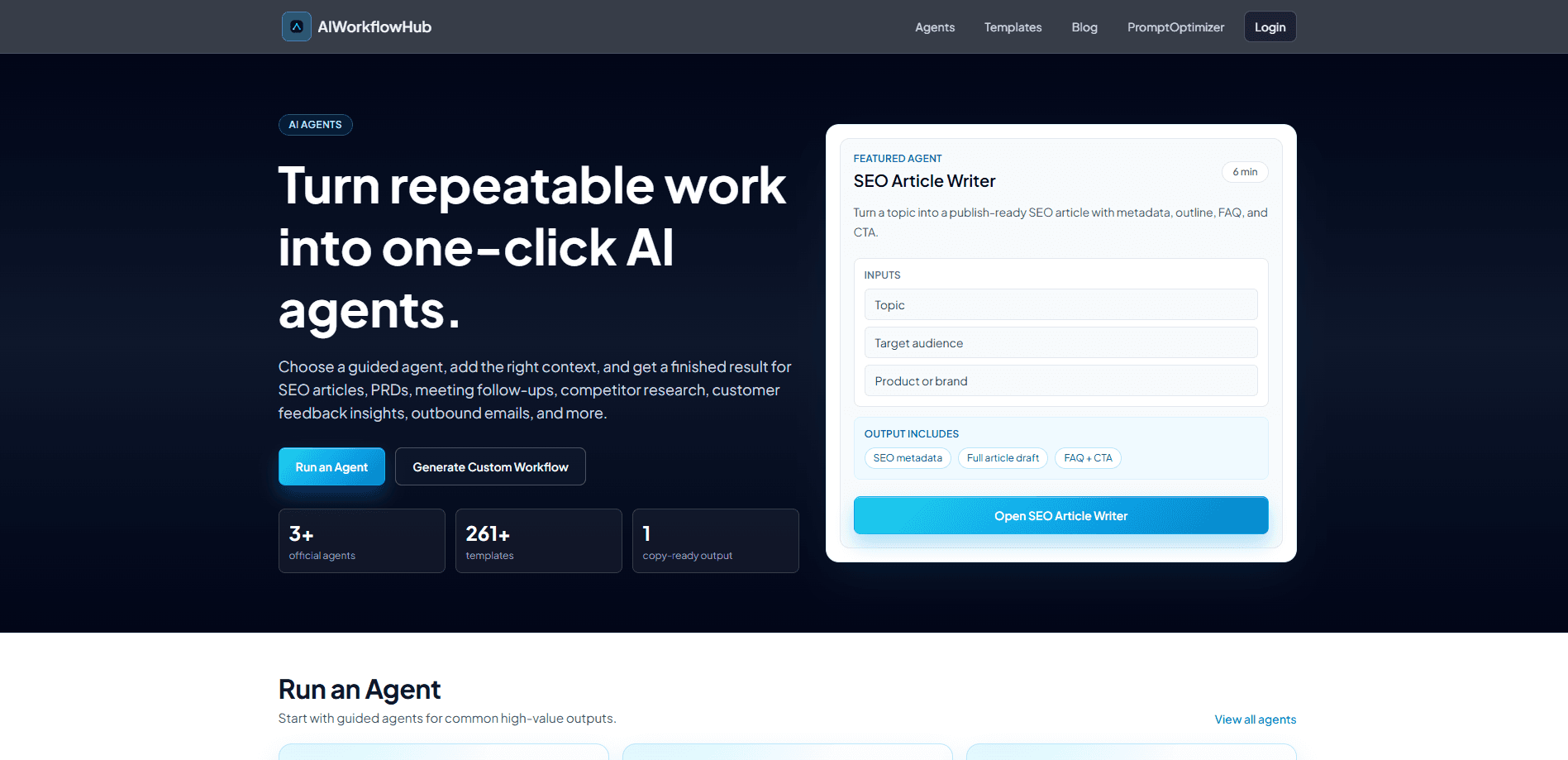
AI Workflow Generator is a web tool from AIWorkflowHub that turns a plain-language description of a task into a structured, production-ready workflow in under a minute. It hands you step-by-step instructions, ready-to-use prompts, and access to a library of 261+ workflow templates built for content, product, sales, operations, and research teams. You describe what you want done, and the generator builds the plan you can copy and run. Need workflow automation without wiring up a single node? That's the pitch here.
About AI Workflow Generator
What Is AI Workflow Generator
AI Workflow Generator is an AI workflow builder hosted at AIWorkflowHub. Instead of starting from a blank document, you pick the closest guided agent or template, then fill a short brief describing your task, audience, and product. The generator returns a finished workflow with ordered steps and the prompts to execute each one.
The main problem it solves is the blank-page problem for repeatable work. Teams know they need an SEO article, a PRD, a meeting follow-up, or an outbound email sequence, but the actual structure and prompts take time to assemble. This tool compresses that setup into a single generation step. That's the whole trick.
The biggest limit is that it produces plans, not finished work you can publish without review. Outputs are copy-ready drafts and prompts, so a human still needs to check facts, tone, and brand fit before anything goes live. The site also runs on a small team, so paid plan activation happens manually by email rather than instantly. Not ideal, but it's workable.
Getting Started
- Open AIWorkflowHub and choose a guided agent (such as SEO Article Writer) or browse the template library to find the closest workflow.
- Fill the short brief: your topic or task, the target audience, and the product or brand the result is for.
- Generate the workflow and review the ordered steps, prompts, and metadata it produces.
- Copy the output into your own document or tool, run the prompts, and edit the draft to match your voice.
- Save the agent to your account and reuse it next time the same task comes up.
Product Information
A quick look at AI Workflow Generator's pricing, supported platforms, and performance.
Best for
The users, tasks, and scenarios where this tool fits best.
Users
- Content marketers
- Product managers and founders
- Sales and growth teams
- Operations and admin staff
Tasks
- Drafting a publish-ready SEO article
- Writing a product requirements document
- Turning meeting notes into an action plan
- Summarizing customer feedback
- Planning competitor research
- First-pass business process automation
Scenarios
- Setting up a weekly content pipeline
- Onboarding a new hire on a repeatable process
- Preparing for a planning meeting
- Prepping outbound for a new segment
Key features
Guided Agents
The platform ships with named agents, including SEO Article Writer, Product Requirement Writer, Meeting Notes to Action Plan, Competitor Research Brief, Outbound Email Sequence, and Customer Feedback Insights. Each agent collects context first, then produces a structured result, so you don't have to design the workflow yourself. Which one fits your task? Start with the agent closest to the job you already do. The agents are the fastest entry point if your task fits a common shape.
Template Library
AIWorkflowHub lists 261+ workflow templates sorted by intent and category, covering content creation, marketing and sales, work and office, tech and dev, analysis and research, and education. Popular picks show usage counts, like the B2B SEO Article Production template used over 9,000 times. Pick by intent first. Browsing templates is the quickest way to see how a task is typically broken down before you run it.
Prompt Templates
Every generated workflow includes the prompts needed to execute each step, so you get more than a bare outline. This matters because the hard part of using an AI agent is usually the instructions, not the idea. You get usable prompts you can paste into your own model or workspace. Prompts included, always.
Custom Workflow Generation
Beyond the official agents, you can create your own guided generator. You choose the closest workflow as a starting point, create an agent, and fill a short brief to produce the finished output. Saved agents and results live in your account, so recurring tasks become one-click reruns. Build once, reuse forever.
Structured Output Formats
Results come back organized rather than as a wall of text. A content run returns SEO metadata, a full article draft, and a FAQ plus CTA. A meeting run returns decisions, an owner table, and a follow-up message. No loose ends. The fixed structure is what makes the output easy to drop into an existing process.
Pros and cons
Pros
- Turns a described task into an ordered, prompt-backed workflow in under a minute, which removes the blank-page start. Small win, big relief.
- 261+ templates across six categories give a concrete pattern for most common business tasks.
- Guided agents cover high-value jobs like SEO articles, PRDs, meeting follow-ups, and outbound email.
- Saved agents and results make repeatable work a rerun instead of a rebuild.
Cons
- Outputs are drafts and prompts, not publish-ready work, so someone still has to fact-check and edit before it's used.
- Paid plan activation is handled manually after checkout, so there's a delay before a subscription works.
- A free search isn't enough to verify every template; if your task is unusual, you may need to build a custom workflow from scratch.
Frequently asked questions
It produces a structured, step-by-step workflow for a task you describe, along with the prompts to run each step. Depending on the agent, that can include SEO metadata, a full article draft, a PRD, an owner table, or an email sequence. It's a plan, not magic.
Related content
Explore related tools, skills, and articles for AI Workflow Generator.
AI Workflow Generator Alternatives

Base Code
Base44 (Wix) · Coding · ProductivityBase Code is a shared cloud development environment from Base44. Teammates describe changes to an existing GitHub codebase in chat, preview them live and send them back as pull requests.

Knocket
Knocket (Tencent RTC team) · Productivity · Business · ChatbotKnocket is a free live chat and contact page tool that lets visitors message you from your website, app, or a shareable link, with every reply handled from Telegram or one inbox.

FloorGen
Vinit Kumar (FloorGen) · Productivity · China AIFloorGen is a browser-based floor plan maker that turns a sentence or a sketch into an editable 2D plan and a 3D walkthrough. Export to PDF, DXF or video, and draw without an account.