

ai4photos
Albert Simon · Image
ai4photos is an AI photo generator that trains a custom model from your pictures, then creates photorealistic headshots, selfies, and fashion shots in any pose. It also builds virtual AI models.
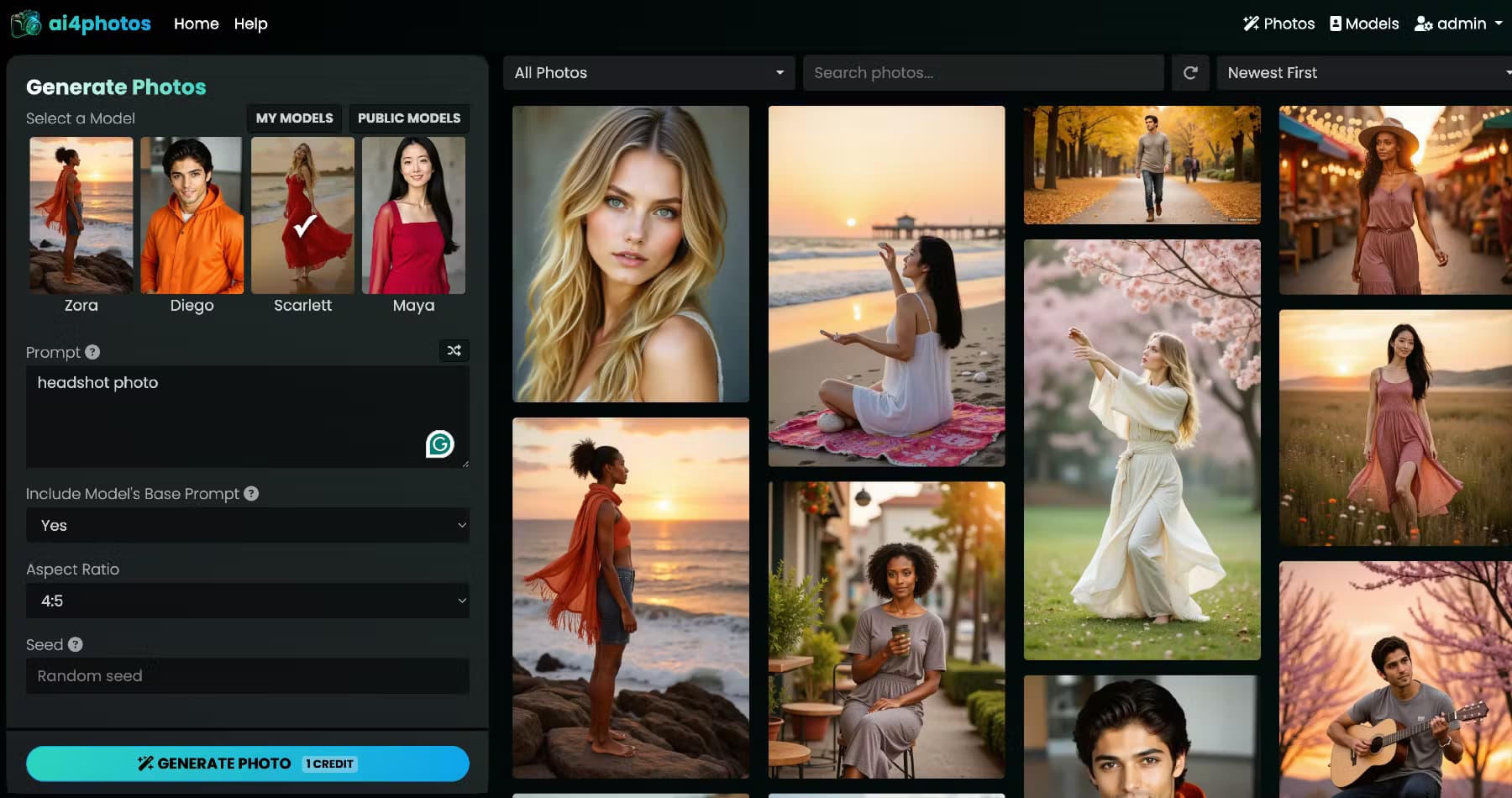
About ai4photos
What Is ai4photos
ai4photos is a web-based AI photo generator built around one idea: you shouldn't need a photographer, a studio, or a wardrobe to get professional-looking pictures of yourself. You upload a handful of photos, the platform trains a custom AI model that learns your face and features, and then you generate new images of that person on demand.
The platform fits two kinds of users. The first wants realistic photos of themselves for LinkedIn, dating profiles, or social media. The second wants a 100% virtual character that never existed, which is useful for AI influencers, brand ambassadors, and fictional projects.
Training a model takes 10 to 20 reference images. After that, you control pose, outfit, lighting, and background through the generation studio. ai4photos runs on a credit system, so each image you create draws down from a monthly allowance.
The biggest constraint is cost discipline. Credits are consumed the moment a generation request starts, even if you don't like the result, and the company doesn't issue refunds once credits are spent. There's also no public API, so teams hoping to wire the tool into their own software have to work through the web interface.
Getting Started
- Create an account on ai4photos.com and pick a plan. The free Trial tier is enough to test the studio, but it can't train or host a model.
- Open the generation studio and upload 10 to 20 clear reference photos. For a virtual character, generate a base image first and feed variations of it instead.
- Wait while ai4photos trains your custom model. Hosting limits depend on your plan, ranging from 3 models on Basic to 50 on Premium.
- Set the pose, outfit, lighting, and background you want, then submit the request. Each image consumes credits.
- Download your favorites. Commercial use is only covered on the Pro and Premium plans.
Product Information
A quick look at ai4photos's pricing, supported platforms, and performance.
Best for
The users, tasks, and scenarios where this tool fits best.
Users
- Job seekers and professionals
- Content creators and influencers
- Beginners with no editing skills
- Marketers building virtual personas
Tasks
- Refreshing a professional profile picture
- Building a virtual influencer
- Producing social media content at volume
- Testing creative ideas
Scenarios
- Updating your profile before a job search
- Running a faceless brand account
- Filling a content calendar on a deadline
- Mocking up client concepts
Key features
Custom Model Training
ai4photos learns a subject from 10 to 20 reference photos and turns it into a reusable AI model. This is how you train an AI model from photos rather than describing a face in text. Once trained, that model can generate an unlimited number of new images while keeping the same face and build. The Basic plan trains one model a month and hosts up to three, so it suits a single personal project rather than a whole team.
Photorealistic Photo Generation
The generation studio produces photorealistic photos that hold up as real images, from casual selfies to full-body fashion shots. You set the pose, facial expression, outfit, and environment, and the tool renders a fresh shot rather than editing an existing one. That AI portrait generator behavior is what separates ai4photos from a standard photo editor: the output is new, not retouched.
Virtual AI Model Creation
The virtual AI model tools let you build a character that's entirely AI-generated, with no personal photos involved, then train that character exactly like a real subject. Think of it as an AI influencer generator: brand ambassadors and any project that needs a face without a real person attached all fit here. It's included on every paid tier, not locked to the top plan.
Studio Controls for Posing and Lighting
Instead of typing long prompts, you steer the result with controls for pose, outfit, lighting, and background. That keeps the workflow approachable for people who don't want to learn prompt engineering. The trade-off is less fine-grained control than a raw text-to-image tool offers, so very specific scenes may take a few attempts.
Plan-Based Hosting and Throughput
Each plan sets how many models you can store and how many jobs run at once. Basic handles 1 simultaneous task, Pro runs 3, and Premium runs 10, which matters when you're generating hundreds of images in a session. Hosting scales from 3 models on Basic to 50 on Premium, so volume creators don't have to delete older characters.
Commercial Licensing on Higher Tiers
The Pro and Premium plans include commercial usage rights, which covers client work, ads, and monetized content. The Basic plan and the free Trial tier are personal use only, a limit that trips up freelancers who assume any paid plan lets them sell the output.
Pros and cons
Pros
- Trains a reusable model from as few as 10 reference photos.
- Works for both your own likeness and 100% virtual characters.
- Simple controls for pose, lighting, and background, so no prompt skills are needed.
- Free Trial tier lets you test generation before paying.
- Pro and Premium plans include commercial rights and priority support.
Cons
- Credits are spent the instant a generation begins, so failed or unwanted images still cost you.
- No refunds once credits are used, which makes overspending easy to regret.
- The free Trial tier can't train or host a model, so testing the core feature requires a paid plan.
- No public API, so automated or in-app use isn't possible.
Frequently asked questions
ai4photos is used to create AI-generated photos of a person, either from your own pictures or from a fully virtual character. You train a model once, then generate professional headshots, selfies, or fashion shots in the poses and settings you choose.
Related content
Explore related tools, skills, and articles for ai4photos.
ai4photos Alternatives

Google EmbeddingGemma 2
Google DeepMind · Writing · Image · CodingGoogle EmbeddingGemma 2 is a 740M-parameter open model that turns text, code, images, audio, and video frames into vectors in one 768-dimension space, running on phones and laptops.

Tractionwave
TractionWave · Image · MarketingTractionWave is an AI attention heatmap tool for static ads. Upload a PNG or JPG and it returns predicted attention, ranked hotspots, and fixes before you spend budget.

Imejis.io
Imejis.io · Image · MarketingImejis.io is an AI design studio for agents and marketing teams. Describe an image in plain words, and it writes the copy, builds the layout, reflows it to every size, then exports a finished file.