

AICamp
AICamp · Productivity · Marketing · Other · Chatbot
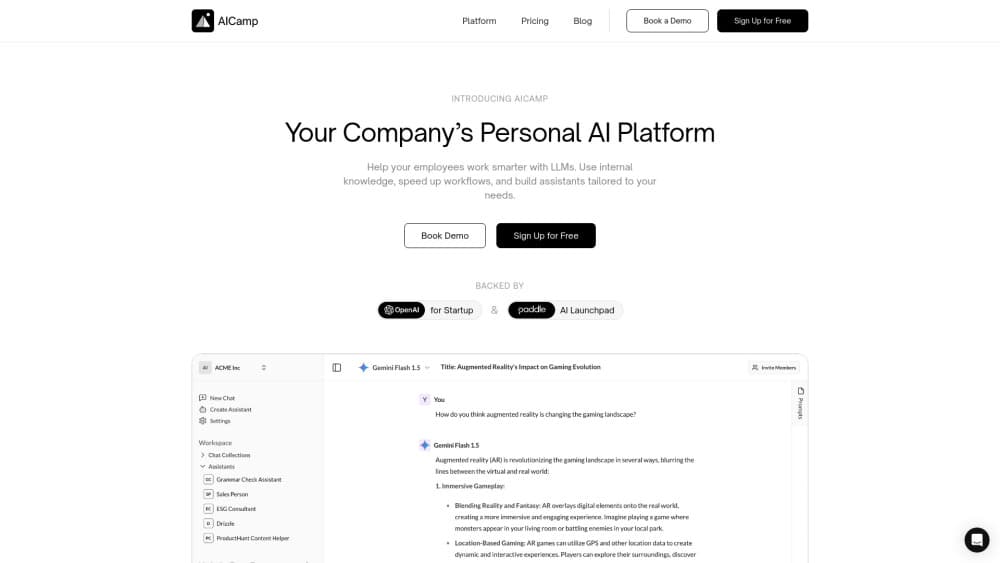
AICamp is a collaborative AI workspace for teams. It puts GPT-5.2, Claude, and Gemini in one chat, then adds shared prompts, assistants, and internal knowledge for a flat per-seat price.
About AICamp
What Is AICamp
AICamp is a web workspace where a whole team uses AI models in one place. Instead of each person juggling a personal ChatGPT account, a Claude tab, and a separate Gemini login, the team signs in here. Admins decide which models are on, who can reach them, and how prompts and assistants get shared.
The product targets companies rolling AI out to staff who aren't engineers, which is exactly where enterprise AI adoption tends to stall. It leans on a bring your own model setup: you plug in OpenAI, Anthropic, or Gemini keys, so billing stays on your own accounts and you keep control of quotas. A shared prompt library and custom assistants sit on top, so people don't rebuild the same workflow every week.
The limits matter too. It's a collaborative AI platform layered over other companies' models, not a model of its own, so output quality tracks whatever you connect. Several advertised pieces, like internal tool integrations and a data analyst view, are still marked coming soon. Treat the current product as chat, prompts, assistants, and knowledge in one shared space.
Getting Started
- Sign up at app.aicamp.so. The Starter tier runs a 14-day trial with up to three users, a small credit balance, and no card required.
- Connect models. Paste your OpenAI, Anthropic, or Gemini keys in admin settings if you want to bring your own model and keep usage on your own bill.
- Set up the workspace. Invite teammates, create groups by department, and assign roles so people see the projects and prompt libraries they need.
- Build the shared layer. Save the prompts your team reuses, then create assistants for repeat jobs like support triage or brand voice checks.
- Put it to work. Start a project for each client or campaign, drop in reference files, and chat against that context.
Product Information
A quick look at AICamp's pricing, supported platforms, and performance.
Best for
The users, tasks, and scenarios where this tool fits best.
Users
- Operations and HR leads
- Small and mid-sized teams
- IT and security admins
Tasks
- Drafting recurring business copy
- Answering questions from internal documents
- Standing up role-specific helpers
- Comparing model output
Scenarios
- Rolling AI out to a department without a big IT project
- Keeping client work separated
- Onboarding a new teammate onto AI tools
Key features
Unified Multi-Model Chat
One chat window switches between GPT-5.2, Claude 4, and Gemini without opening separate accounts or tabs. You pick the model per task, so a quick rewrite can go to a cheaper model while a long analysis goes to a stronger one. The gain is fewer logins and one history to search.
Shared Knowledge Base
You upload PDFs, Word files, spreadsheets, slides, and text, then ask questions against them. The team's documents become something searchable inside the chat, so answers come from your own material instead of general training data. Access follows the workspace, which keeps sensitive files out of the wrong hands.
Custom AI Assistants
You build assistants that carry fixed instructions and attached knowledge for a specific role, like ticket triage, code review notes, or brand voice checks. Assistants get shared with people, teams, or the whole organization under viewer or editor roles. That turns a good prompt into a reusable tool instead of a note someone has to remember to paste.
Project-Based Workflows
Chats and reference files sit inside projects, so a client or campaign keeps its own context and history. Teammates join a shared project and build on the same thread instead of emailing prompts around. It's the structure that keeps a busy workspace from becoming one long scroll.
Collaborative Prompt Library
People save prompts that work, refine them over time, and share them so the team's best phrasing doesn't restart from zero each week. A search view helps newcomers find the prompt that already solves their task. Over time it becomes the team's own playbook for how it talks to models.
Admin Controls and Security
Admins manage users, groups, and roles, and can limit which models a department reaches. On the Business and Enterprise tiers you get SSO and SAML, with SCIM for larger rollouts. AICamp states it's GDPR-compliant, ISO 27001 certified, and SOC 2 Type II audited, and says your data is never used for model training, which is the set of answers security teams ask about first.
Pros and cons
Pros
- One login covers several frontier models, so the team stops stitching together personal accounts.
- A bring your own model setup keeps usage on your own provider keys and bills, which helps control cost and data flow.
- Shared prompts and assistants spread good workflows across the team instead of leaving them with one power user.
- Granular roles, groups, and SSO give admins real control over who reaches which models and files.
- The compliance posture (GDPR, ISO 27001, SOC 2 Type II, no training on your data) is what most buyers need before a rollout.
Cons
- Per-seat pricing at $10 per user per month scales with headcount, so a large team pays a real bill before model usage is counted.
- Several advertised features, including internal tool integrations and a data analyst view, are still marked coming soon, so workflows that depend on them have to wait.
- It's a layer over other vendors' models, not a model itself, so quality and limits track the keys you connect, and you carry those quotas.
- There's no native desktop or mobile app. Everything runs in a browser, which is fine at a desk and less so on the move.
Frequently asked questions
AICamp is a web workspace where a team uses several AI models in one place. It combines multi-model chat, shared prompts, custom assistants, and a searchable knowledge base, with admin controls for who can reach what.
Related content
Explore related tools, skills, and articles for AICamp.
AICamp Alternatives

Base Code
Base44 (Wix) · Coding · ProductivityBase Code is a shared cloud development environment from Base44. Teammates describe changes to an existing GitHub codebase in chat, preview them live and send them back as pull requests.

Knocket
Knocket (Tencent RTC team) · Productivity · Business · ChatbotKnocket is a free live chat and contact page tool that lets visitors message you from your website, app, or a shareable link, with every reply handled from Telegram or one inbox.

FloorGen
Vinit Kumar (FloorGen) · Productivity · China AIFloorGen is a browser-based floor plan maker that turns a sentence or a sketch into an editable 2D plan and a 3D walkthrough. Export to PDF, DXF or video, and draw without an account.