

Ai Colors
AIColors · Image
AIColors is a free browser based AI color palette generator. Type a mood or theme and it returns a five to eight color palette with hex codes. No account, no limits.
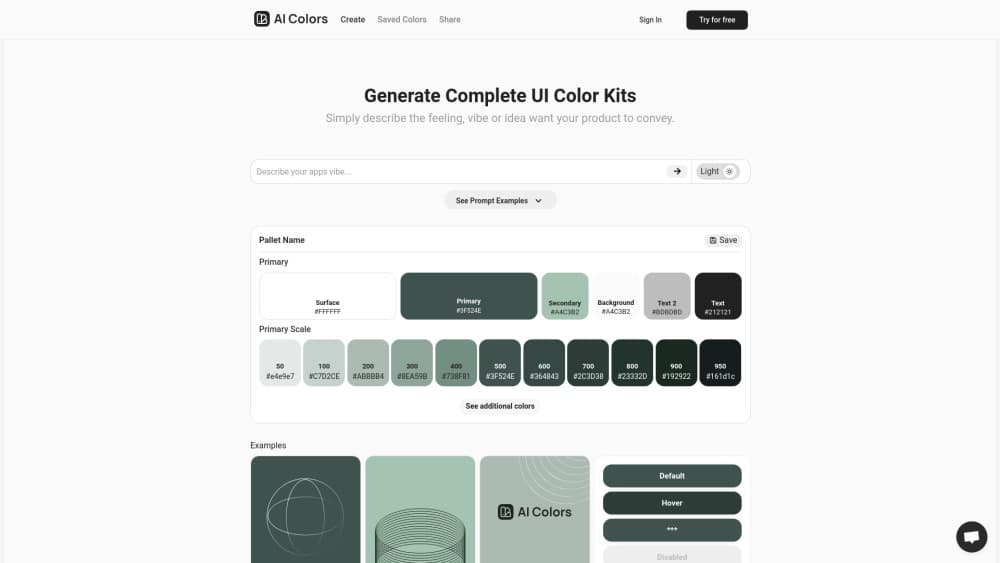
About Ai Colors
What Is AIColors
AIColors is a website that builds color schemes from a written description. You type something like "quiet coastal morning" or "retro arcade at midnight", press a button, and the AI color palette generator answers with a set of swatches. Each palette comes with a name and a short note on the mood it aims for, which makes it easier to judge the result before you paste anything into a design file.
The palette generator is only one part of the site. AIColors also ships a set of browser based color tools: a contrast checker, a converter that reads HEX, RGB, HSL, HSV, CMYK, and OKLCH, a CSS gradient builder, a mesh gradient builder, an image color extractor, and a palette visualizer. Most of the work runs inside your browser. Color values and uploaded images aren't sent to an account system, because there is no account system.
The limits matter as much as the features. Palettes aren't saved on the server, so you have to copy hex codes or export a PNG yourself. There's no public API for the generator. Output quality depends on how well you describe the mood, and a vague prompt tends to produce a generic set of colors. Nothing here replaces a designer's eye, and that's fine. It's a starting point that saves the blank page moment.
Getting Started
- Open aicolors.app in any modern browser. There's no signup step and nothing to install.
- Type a mood, theme, or scene into the prompt box on the homepage. Concrete words work better than abstract ones, so "faded denim and warm sand" beats "nice colors".
- Generate the palette. AIColors returns a five to eight color palette with a name and a short description of the look.
- Copy a single hex code by clicking a swatch, or copy the whole palette in one click. Use the PNG export if you need an image for a slide or a client message.
- Move into the color tools when the palette needs work: check text contrast, convert OKLCH values, or drop the palette into the visualizer to see it on a layout.
Product Information
A quick look at Ai Colors's pricing, supported platforms, and performance.
Best for
The users, tasks, and scenarios where this tool fits best.
Users
- Independent designers who need a starting palette fast
- Front end developers filling in a theme
- Students and hobbyists learning color theory
Tasks
- Turning a brand brief into a first draft
- Checking if text stays readable
- Pulling colors out of a photo or screenshot
Scenarios
- A project kickoff with no moodboard yet
- A late accessibility pass
- A client revision round
Key features
Prompt to Palette in One Step
The core loop is short by design: describe the mood, get colors. AIColors reads the wording for tone and setting, then returns a five to eight color palette with a name and a short description. That naming step is more useful than it sounds. It gives you language to use with a client, so the debate stays about the direction rather than about hex values nobody can picture yet.
Copy and PNG Export
Every swatch copies on click, and the full palette copies as one block. That covers the common cases: dropping values into Figma, pasting into a stylesheet, or sending a teammate the list. The PNG export handles the cases where a screenshot won't do, such as a slide deck or a PDF brief. There's no native Figma plugin or design token export, so the last mile is manual.
Color Converter With OKLCH Support
The converter reads and writes HEX, RGB, HSL, HSV, CMYK, and OKLCH. OKLCH support is the part that matters for newer work, since it keeps lightness perceptually even across hues and makes palette steps look more regular. If a design system already uses modern CSS color syntax, this saves a round trip through a separate calculator. The same values feed the gradient tools.
Contrast Checker for WCAG 2.2 and APCA
The contrast checker reports both WCAG 2.2 ratios and APCA scores. Those two systems disagree often enough that seeing both is useful: WCAG answers the compliance question, and APCA gives a closer read on how the text actually looks at a given size and weight. It's a checker, not a fixer, so you still decide which color to change.
Image Color Extraction and Palette Visualizer
Upload an image and the extractor lists its dominant colors. The processing happens in the browser, which matters when the file is a client's unreleased product shot. The visualizer then shows a palette applied to a layout, so you can see the colors working as background, text, and accent instead of as five squares in a row.
A Reference Shelf of Color Tools
Beyond the generator, the site collects the utilities people usually search for one at a time: a color picker, a shade and tint generator, a color mixer, a color blindness simulator, CSS color names, the full Tailwind palette, brand color references, and individual color pages with conversions, harmonies, and contrast values. None of it is groundbreaking on its own. Having it on one page with the same interface is what saves time.
Pros and cons
Pros
- Free with no account, no credit card, and no visible generation cap, so you can test an idea without a signup wall.
- Returns five to eight colors with a name and description, which is enough to judge a direction and enough language to explain it.
- Copy per swatch or the whole palette, plus a PNG export for decks and client messages.
- OKLCH, APCA, and WCAG 2.2 support puts it ahead of simple palette generators that only speak HEX and RGB.
- The wider tool set covers contrast checks, gradients, image extraction, and color blindness simulation in the same interface.
Cons
- Palettes aren't saved anywhere. Close the tab and the result is gone unless you copied it, which hurts when you're comparing several rounds.
- No public API and no Figma plugin, so teams that want the palette inside a design pipeline do the transfer by hand.
- Prompt quality drives output quality. Vague descriptions return safe, familiar combinations that feel like every other template.
- There's no way to lock a color and regenerate around it, so a palette you half like still means starting over.
Frequently asked questions
It generates color palettes from a written description, then gives you tools to check and adjust them. Typical uses are brand exploration, landing page themes, and quick accessibility checks before a design ships.
Related content
Explore related tools, skills, and articles for Ai Colors.
Ai Colors Alternatives

Google EmbeddingGemma 2
Google DeepMind · Writing · Image · CodingGoogle EmbeddingGemma 2 is a 740M-parameter open model that turns text, code, images, audio, and video frames into vectors in one 768-dimension space, running on phones and laptops.

Tractionwave
TractionWave · Image · MarketingTractionWave is an AI attention heatmap tool for static ads. Upload a PNG or JPG and it returns predicted attention, ranked hotspots, and fixes before you spend budget.

Imejis.io
Imejis.io · Image · MarketingImejis.io is an AI design studio for agents and marketing teams. Describe an image in plain words, and it writes the copy, builds the layout, reflows it to every size, then exports a finished file.