

AIDesign
AIDesign · Image
AIDesign is a free AI image generator that turns a text prompt into logos, avatars, wallpapers, and product shots in seconds. You can start as a guest, and paid credit packs begin at $1.
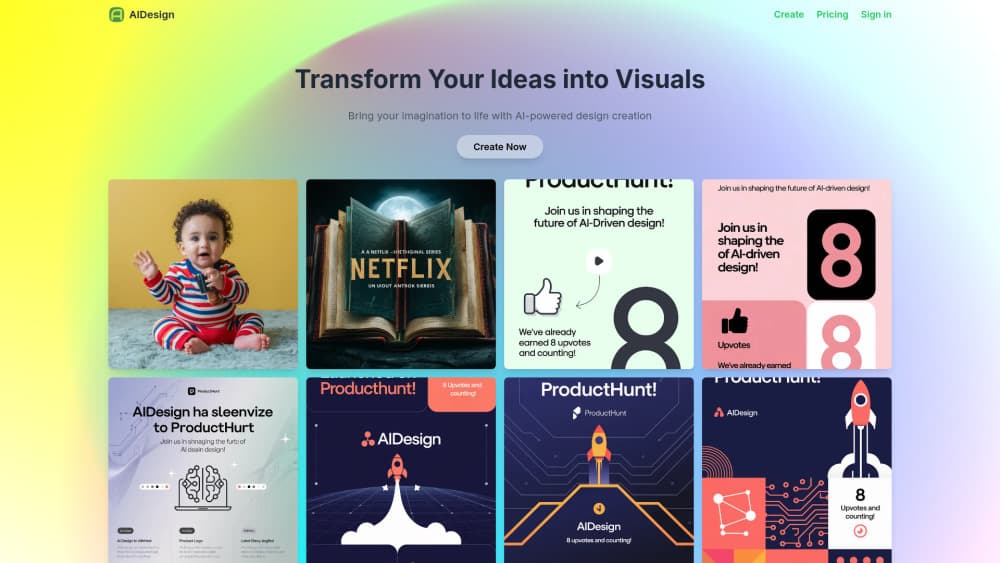
About AIDesign
What Is AIDesign
AIDesign is a browser-based AI image generator. You type a description, pick a style, pick a shape, and the site returns finished artwork. There's no install, no design software, and no account needed for a first try.
The point is speed for people who don't draw. A shop owner needs a product shot for a listing. A streamer needs an avatar. A founder needs a logo they can look at before hiring a designer. AIDesign answers all three from the same prompt box, and each answer arrives in a few seconds.
Two things shape how you use it. First, quality tracks the model you pick. The free GLM Image model is fine for drafts and quick ideas, while the paid models (GPT Image 2, Nano Banana 2, Seedream 5 Pro) cost credits and need a login. Second, nothing here is an editor. You get images, not layers. If you need to move a logo two pixels left, you regenerate or finish the file somewhere else.
Getting Started
- Open aidesign.click. You can generate as a guest on the home page before you sign up.
- Type what you want in the prompt box. Be specific about subject, colors, and mood. Choose a style from the six presets, or leave it on no style.
- Pick a model and an aspect ratio. GLM Image is free. Premium models need an account and draw on your credit balance.
- Hit Generate and wait a few seconds. If the result misses, adjust the wording and run it again. Magic Prompt can expand a short phrase for you.
- Download the image at full resolution. Free credits cover the first run, and one-time packs from $1 top up the balance when they run out.
Product Information
A quick look at AIDesign's pricing, supported platforms, and performance.
Best for
The users, tasks, and scenarios where this tool fits best.
Users
- Small business owners
- Content creators
- Hobbyists and beginners
Tasks
- Drafting a logo direction
- Making marketplace and ad images
- Filling a content calendar
Scenarios
- A launch with no design budget
- Testing a visual idea before committing
- Classrooms and family activities
Key features
Forty Task-Specific Generators
AIDesign wraps the same text to image engine in more than 40 preset entry points. There's an AI logo generator, an AI avatar generator, an AI wallpaper generator, an AI product photo generator, and an AI art generator, plus heads for headshots, interior design, t-shirts, tattoos, coloring pages, posters, stickers, comics, pixel art, and packaging. Each preset loads a template that already asks for the right details, so you write a shorter prompt. A logo preset asks about your business, a packaging preset asks about material and shelf context.
Free Model Plus Premium Picks
The model menu runs from GLM Image, which costs nothing, to GPT Image 2, Nano Banana 2, Seedream 5 Lite, and Seedream 5 Pro, which draw on credits. Earlier versions (V1, V1 Turbo, V2, V2 Turbo) sit in the same list. This is the most useful dial on the page: draft on the free model, then rerun the prompt you like on a premium one when the image has to be good.
Magic Prompt
Short prompts usually produce vague images. Magic Prompt rewrites your sentence into a fuller description before generation, and you can set it to auto, always on, or off. Leave it on when you're starting from three or four words. Turn it off when you've already written a precise prompt and don't want the site changing your wording.
Style and Aspect Ratio Controls
Six style presets (general, realistic, design, 3D render, anime, or no style) sit next to seven aspect ratios covering 1:1, 16:9, 9:16, 4:3, 3:4, 3:2, and 2:3. The ratio list matters more than it looks: a phone wallpaper needs 9:16, a YouTube thumbnail needs 16:9, and a poster needs 2:3. You pick the shape up front instead of cropping later.
Guest Mode With Commercial Rights
You can generate without an account. A free login adds image history and a single place to hold your credits. Images you create are licensed for personal and commercial use, which covers websites, ads, products, and social posts. That's the part most free generators fumble, and AIDesign states it plainly on the FAQ.
Pay-As-You-Go Credits
There's no subscription. New users get free credits, and when those run out you buy one-time packs starting at $1. Credits expire one year after they're granted, so a light user isn't locked into a monthly bill. Heavy use of premium models will run the balance down faster, and that's the real cost of the tool.
Pros and cons
Pros
- Free to start with no credit card, and the free GLM Image model stays free, so you can judge output quality before spending anything.
- More than 40 task presets shorten the prompt work, which matters if you've never written an image prompt.
- Commercial rights are included, so logos, thumbnails, and product shots can go straight into a business.
- One-time credit packs instead of a subscription suit occasional users who need a handful of images a month.
Cons
- Premium models need an account and credits, so the best-looking output isn't the free output.
- No editing tools. There are no layers, no inpainting brush, and no text placement, which means a small fix costs another generation.
- Generated logos and product shots arrive as flat images, not vector or layered source files, so a printer or a developer may ask for something AIDesign can't hand over.
- Credits expire after a year, which is easy to forget if you buy a large pack for one project.
Frequently asked questions
Yes, with a caveat. New users get free credits with no card required, and the GLM Image model doesn't cost credits at all. Premium models such as GPT Image 2 and Seedream 5 Pro do cost credits, and you need an account to use them.
Related content
Explore related tools, skills, and articles for AIDesign.
AIDesign Alternatives

Google EmbeddingGemma 2
Google DeepMind · Writing · Image · CodingGoogle EmbeddingGemma 2 is a 740M-parameter open model that turns text, code, images, audio, and video frames into vectors in one 768-dimension space, running on phones and laptops.

Tractionwave
TractionWave · Image · MarketingTractionWave is an AI attention heatmap tool for static ads. Upload a PNG or JPG and it returns predicted attention, ranked hotspots, and fixes before you spend budget.

Imejis.io
Imejis.io · Image · MarketingImejis.io is an AI design studio for agents and marketing teams. Describe an image in plain words, and it writes the copy, builds the layout, reflows it to every size, then exports a finished file.