

AiEditor
AiEditor Team · Coding · Productivity
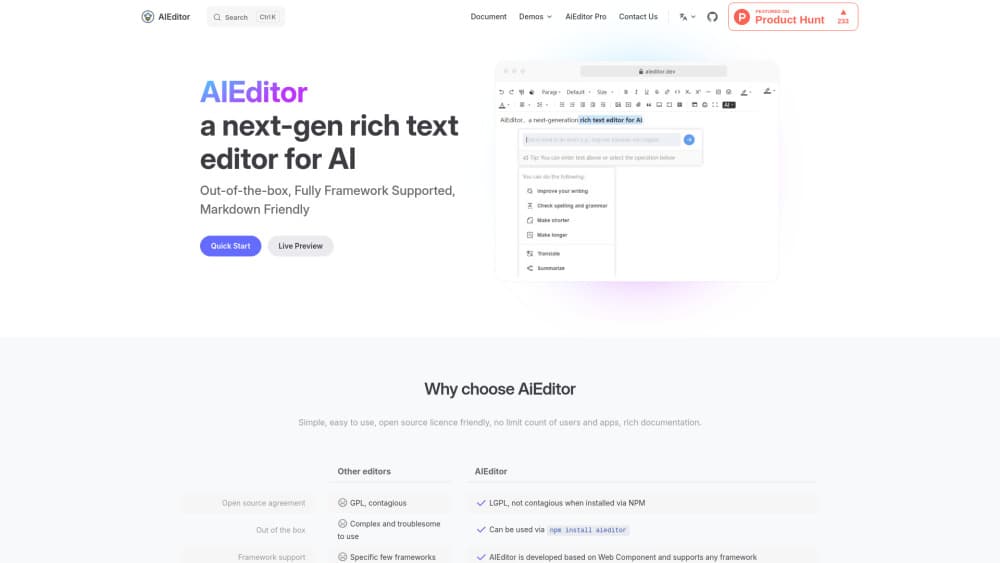
AiEditor is an open source AI rich text editor for web products. It puts writing, rewriting, translation and chat inside the document, and it installs with one npm command.
About AiEditor
What Is AiEditor
AiEditor is a rich text editor for AI products, built as a Web Component, so it runs inside Vue, React, Angular, Svelte, Layui or plain JavaScript projects. It also works as a full AI document editor once you connect a model. Instead of parking a chat window next to a text box, it keeps AI actions in the document: select a paragraph, ask for a rewrite, then accept or reject the result.
The core covers the boring parts well. Headings, tables, code blocks, math, images, audio, video and attachments all ship in the box, along with light and dark themes, a mobile layout and a bilingual interface. Uploads pass through your own handler, so files land in your storage and not someone else's.
Limits first. The open source rich text editor is licensed under LGPL-2.1, which allows commercial use if you follow the license terms. Pagination, live collaboration and document comparison sit in the paid Pro package. Government style formatting, with red headers, seals and fixed layouts, needs the official edition. A small team that only wants a writing surface won't miss either. Anyone building contract review or co-editing will.
Getting Started
- Install the package with
npm install aieditorand import the stylesheet. - Create an instance on a container element, then set the placeholder, theme and starting content.
- Connect AI: point the editor at an OpenAI compatible endpoint, or write your own generate service.
- Route uploads to your storage, choose toolbar items, then ship.
Product Information
A quick look at AiEditor's pricing, supported platforms, and performance.
Best for
The users, tasks, and scenarios where this tool fits best.
Users
- Frontend developers who need an editor with AI hooks
- Product teams shipping an AI writing editor
- Enterprise document teams working on contracts and reports
Tasks
- Drafting marketing copy or course notes
- Cleaning up a rough document
- Adding an embeddable editor to a CMS, OA or CRM backend
Scenarios
- Building an internal knowledge base
- Localizing content across markets
- Preparing a report that several people will mark up
Key features
AI actions inside the document
Select text and the bubble menu offers continue, expand, shorten, polish, translate or ask. Replies stream in, and you can stop generation, regenerate, copy, insert at the cursor or replace the selection. Custom prompts and extra menu entries let you expose only the actions your users actually need.
Bring your own model
AiEditor doesn't ship a model. You connect an OpenAI compatible endpoint or implement the generate service yourself, which keeps keys, audit logs and routing under your control. That matters for teams that can't send customer text to an outside vendor.
Chat with document context
The AI panel can work from the full document, the current selection or no context at all. Follow-up questions keep the thread alive, so a writer can push on one paragraph without restating the brief. It feels like a reviewer sitting in the file.
Framework agnostic embedding
The editor is a Web Component. Vue, React, Angular, Svelte, Layui and vanilla JavaScript projects mount it the same way, and the content model stays identical on desktop and mobile. You won't rewrite the integration when the frontend stack changes.
Structured content that survives reuse
Headings, lists, tables, code blocks, math, mentions and media are real nodes, not HTML soup. Tiptap JSON powers the document model, block IDs stay stable, and pasted Markdown converts cleanly. Content holds up through export, search and later editing.
Configurable editor shell
Three toolbar layouts, classic, compact and ribbon, ship with the core, along with dark mode, read-only mode, full screen and a bilingual interface. Menus, uploaders and extensions are configurable, so one package can look like a minimal comment box or a full document workspace.
Pros and cons
Pros
- Open source core under LGPL-2.1, so you can read the code and ship it in commercial products.
- AI features run on your own model and prompts, which keeps data handling and cost predictable.
- Works across major frontend frameworks without a wrapper library.
- Strong document model: tables, code, math, media and stable block IDs.
Cons
- The AI panel stays quiet until you connect a model, so setup takes longer than a hosted writing app.
- Pagination, live collaboration and document comparison require the paid Pro package.
- Documentation leans Chinese first, so English readers may find thin pages for advanced options.
Frequently asked questions
Yes. The core editor is open source under LGPL-2.1 and free for personal and commercial projects that follow the license. Pro and the official document edition are paid add-ons.
Related content
Explore related tools, skills, and articles for AiEditor.
AiEditor Alternatives

OpenPilot
ibmshaikh · Coding · ProductivityOpenPilot is a free, MIT-licensed desktop AI agent that runs on your own model. Point it at an OpenAI-compatible API, open a folder, and it edits files, runs shell commands, and searches the web.

Udon
Udon · Coding · ProductivityUdon turns an Apple Silicon Mac into a home server you run from a browser, with container controls, file shares, and an optional AI sysadmin.

offstage
offstage cloud · Coding · Productivityoffstage gives AI coding agents and CI jobs a real Mac: a fresh macOS account on Apple silicon, driven over an API and billed by the second.