

AIFreeBox
Matt Liu / AIFreeBox · Productivity · Other
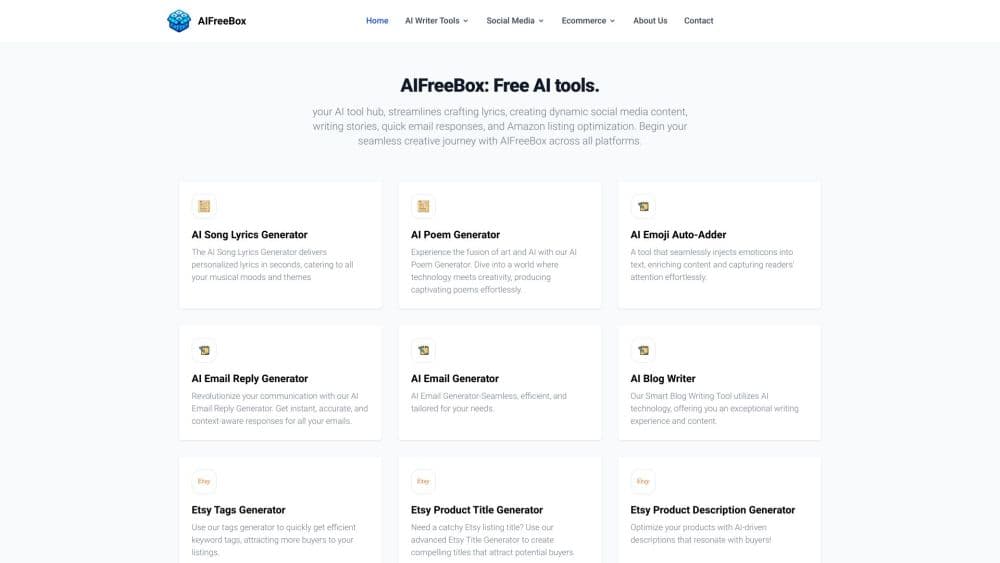
AIFreeBox is a web platform bundling 500+ free AI tools for writing, images, and files, from email drafts to image compression. Most work without an account, and a paid Ultra tier adds unlimited use.
About AIFreeBox
What Is AIFreeBox
AIFreeBox is a browser-based collection of free AI tools built by founder Matt Liu, who launched it in October 2023. Instead of one narrow generator, it packs hundreds of small utilities into a single site: text generators for emails, stories, and social posts, plus image, document, audio, and video tools that run in the browser.
The draw is the price. Every tool is free to use, and most work without signing up, which is why people treat it as a hub for no sign-up AI tools. You get daily generation limits on the free tier rather than a hard paywall, so you can try a task before deciding whether to create an account.
The tradeoff is depth. Many tools are lightweight and aimed at quick everyday jobs, so people who need studio-grade control over output will hit limits. The free plan also shows ads and applies a short cooldown between generations, which slows down anyone working at volume.
Getting Started
- Open aifreebox.com in any browser. No download is required, and most tools work on desktop and mobile.
- Pick a tool from the categories, such as AI Writing, AI Image, or the general Free Tools list.
- Enter your prompt or upload a file. Text tools ask for a short brief; file tools accept images, documents, or media.
- Generate the result and copy or download it. Free users get 100 daily text generations and 20 daily images.
- Create a free account if you want to save history, or move to the Ultra plan for unlimited runs.
Product Information
A quick look at AIFreeBox's pricing, supported platforms, and performance.
Best for
The users, tasks, and scenarios where this tool fits best.
Users
- Content writers and bloggers
- Social media managers
- E-commerce sellers
Tasks
- Drafting routine emails and replies
- Compressing and resizing images
- Generating song lyrics or stories
Scenarios
- A quick task with no tool installed
- Trying an AI tool before committing
- Working across several languages
Key features
500+ Tools in One Place
AIFreeBox gathers more than 500 generators across text, image, design, and marketing categories. You can move from writing a caption to compressing the thumbnail for it without opening a second site. The breadth is the main reason people bookmark it.
Free Access for Core Tools
Every tool on the site is free, and most work with no account. Free users get 100 daily text generations and 20 daily images with a short cooldown between runs. That covers casual use but slows down high-volume work.
AI Writing Generators
The writing set covers emails, replies, stories, lyrics, and blog copy. You describe the topic and tone, and the tool returns a draft you can refine. It suits people who want a fast starting point rather than a finished document.
Image and File Utilities
Beyond AI text, the site bundles practical free online tools: an image compressor, a resizer, a converter, a cropper, and a merger. These process files in the browser, which helps when you need a format change without installing anything.
Ad-Free Ultra Tier
The Ultra plan at $4.99/mo removes ads and the generation cooldown, and unlocks 400+ premium models. It also grants unlimited text and image runs plus commercial-use rights. The regular price is $7.99/mo, with $4.99 as a limited offer.
Multi-Language Support
The platform outputs in more than 30 languages and serves users in 150+ countries. You can draft the same post for several markets and check the phrasing before publishing.
Pros and cons
Pros
- Every tool is free to try, and most run without an account.
- More than 500 tools cover writing, images, files, and marketing in one place.
- The image and file utilities process locally in the browser, so you don't upload to a server.
- Ultra unlocks unlimited runs and 400+ premium models for $4.99/mo.
- Support for 30+ languages makes it usable for multi-market content.
Cons
- The free tier caps you at 100 text generations and 20 images a day, which limits heavy use.
- Ads and a cooldown between generations interrupt the free workflow.
- Many tools favor speed over fine control, so detailed editing is limited.
- No public API means you can't wire the tools into your own apps.
Frequently asked questions
Yes. Every tool is free to use, and most work without an account. The free tier includes 100 text generations and 20 images a day, with a short cooldown between runs.
Related content
Explore related tools, skills, and articles for AIFreeBox.
AIFreeBox Alternatives

Base Code
Base44 (Wix) · Coding · ProductivityBase Code is a shared cloud development environment from Base44. Teammates describe changes to an existing GitHub codebase in chat, preview them live and send them back as pull requests.

Knocket
Knocket (Tencent RTC team) · Productivity · Business · ChatbotKnocket is a free live chat and contact page tool that lets visitors message you from your website, app, or a shareable link, with every reply handled from Telegram or one inbox.

FloorGen
Vinit Kumar (FloorGen) · Productivity · China AIFloorGen is a browser-based floor plan maker that turns a sentence or a sketch into an editable 2D plan and a 3D walkthrough. Export to PDF, DXF or video, and draw without an account.