

AIQuizGen
AIQuizGen · Leaning
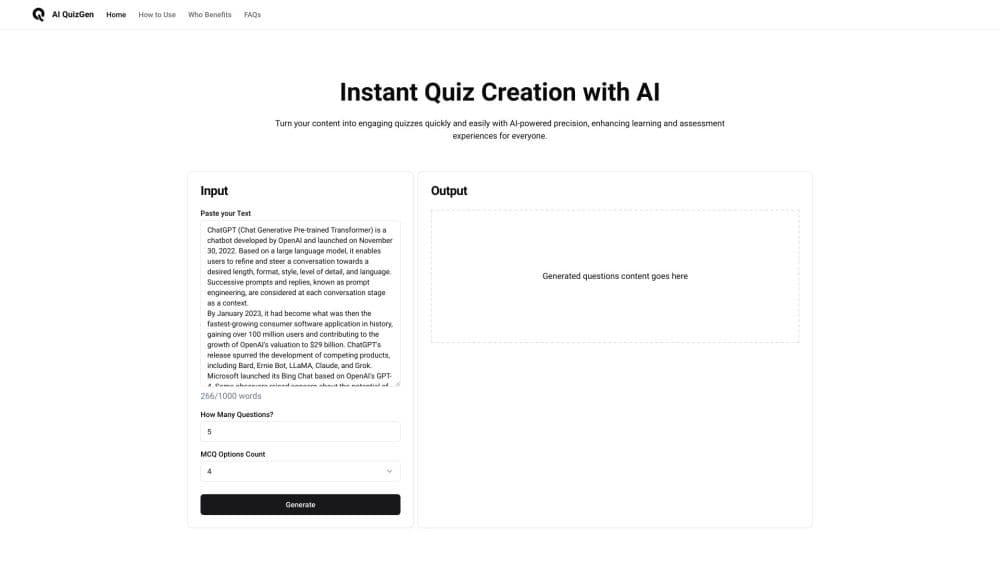
AIQuizGen is a web AI quiz generator that turns a topic, pasted text or a PDF into editable multiple choice, true or false and short answer quizzes, then exports them as PDF or Word.
About AIQuizGen
What Is AIQuizGen
AIQuizGen is an online quiz creator for teachers, students and workplace trainers who need a set of questions before the next class or session. You hand it material in one of three forms: a topic name, a block of text, or a PDF upload. It reads the material, drafts questions, and gives you an editable quiz.
The design centers on one job. Turning source content into questions without retyping the source. Question count, choices per question, difficulty, grade level and output language are settings, not prompt instructions, so the same document can produce a five-question warm-up or a 60-question final.
The limits matter too. It runs in a browser, with no mobile app and nothing that works offline. The free tier caps you at 5 basic AI quizzes a day, 10 questions per quiz and 5 pages per document. Advanced quizzes and public sharing come with the paid plans.
The company says its users come from more than 100 countries, which fits a tool built for multilingual classrooms rather than a single school system.
Getting Started
- Sign up at aiquizgen.com and open the dashboard.
- Pick a question format: multiple choice, true or false, fill in the blank, or short answer.
- Add the source: type a topic, paste text, or upload a PDF.
- Set the details: number of questions, number of choices, grade level from nursery to university, difficulty, and language.
- Generate the quiz, fix any question that reads awkwardly, then export it or share it.
Product Information
A quick look at AIQuizGen's pricing, supported platforms, and performance.
Best for
The users, tasks, and scenarios where this tool fits best.
Users
- Teachers
- Students
- HR and training teams
- Tutors and test prep coaches
Tasks
- Turning a textbook chapter into a practice quiz
- Writing a weekly classroom check
- Building an onboarding assessment
- Generating vocabulary drills
Scenarios
- Sunday night lesson prep when the week's quiz has not been written yet. One PDF and a question count gets you a draft to edit.
- Covering a class at short notice. You can build a quiz from the chapter the students already have open.
- Self-testing three days before an exam, when rereading notes has stopped helping and you need questions instead.
Key features
Quiz Generation From a Topic, Text or PDF
The input field takes a bare topic such as the water cycle, a pasted passage, or a PDF up to the page limit of your plan. The generator reads that material and drafts questions tied to it, so a quiz stays inside the scope of the chapter you uploaded. A topic prompt gives you broader coverage and needs more editing on the back end.
Four Question Types in One Place
One quiz can hold multiple choice, true or false, fill in the blank and short answer items, and each type has its own settings. That mix covers recall and reasoning without switching tools. The multiple choice question generator also lets you set how many answer options each item gets, which matters when you want three plausible distractors instead of five.
Control Over Count, Difficulty and Grade Level
Question count, difficulty (easy, medium or hard) and grade level from nursery to university are exposed as dropdowns. Setting a grade level changes the vocabulary and the assumed background, which is the difference between a usable primary school quiz and one that reads like a college exam. The free plan stops at 10 questions, the Basic plan at 20, and Pro at 60.
Editing After Generation
Every generated question stays editable. You can reword a stem, swap a distractor, drop an item, or add your own. This is the part that decides whether an AI quiz generator is usable in a real classroom, since no model gets every question right on the first pass.
Sharing by Link or iframe Embed
Finished quizzes can be published to a public URL or embedded in a site with an iframe. Teachers put them in a learning management system, trainers drop them into an intranet page, and both keep the same quiz. Sharing and embedding are paid plan features, not free ones.
Study Mode With Automatic Scoring
Study mode flips the tool from author to student. A learner loads their own text or document, answers the questions, and gets a score at the end for multiple choice and true or false items. Short answer responses are not graded automatically, so a teacher still has to read those.
Pros and cons
Pros
- A full quiz from a PDF takes about a minute, which is the entire reason to use a quiz maker instead of a word processor.
- The free tier is genuinely usable for a trial week: 5 quizzes a day is enough to judge output quality.
- Grade levels run from nursery to university, so the same account covers primary teachers and lecturers.
- Every question is editable, and the export options (PDF, Word, text) fit printouts, shared drives and paste-in workflows.
- Multilingual output means one source document can serve a bilingual class without a second rewrite.
Cons
- The 10-question and 5-page caps on the free plan push anyone past a short warm-up into a $6/month subscription.
- There's no app and no offline mode, so a classroom with weak Wi-Fi is a real problem.
- Public sharing and iframe embedding are locked to paid plans, which rules out the free tier for homework distribution.
- Automatic scoring stops at multiple choice and true or false questions, so short answer quizzes still cost grading time.
Frequently asked questions
Yes, there's a free plan with no card required. It gives you 5 basic AI quizzes a day, up to 10 questions per quiz and 5 pages per document, with export and history included.
Related content
Explore related tools, skills, and articles for AIQuizGen.
AIQuizGen Alternatives

HireKey
HireKey · Voice & Language · Productivity · LeaningHireKey is an AI job search copilot built by a former tech recruiter. It checks role fit, tailors resumes, runs interview practice and tracks every application.

Lune
Retrograde Labs · Productivity · LeaningLune is a research search engine for scientific AI agents. It runs as an MCP server that lets Claude, ChatGPT and Cursor search peer-reviewed computer science papers and cite them.
Coddy
Coddy · Coding · LeaningCoddy is a gamified platform to learn to code through short interactive lessons in 20+ languages, with a browser editor, an AI tutor and free certificates.