

AiTattoo Ink
AiTattoo Ink · Image
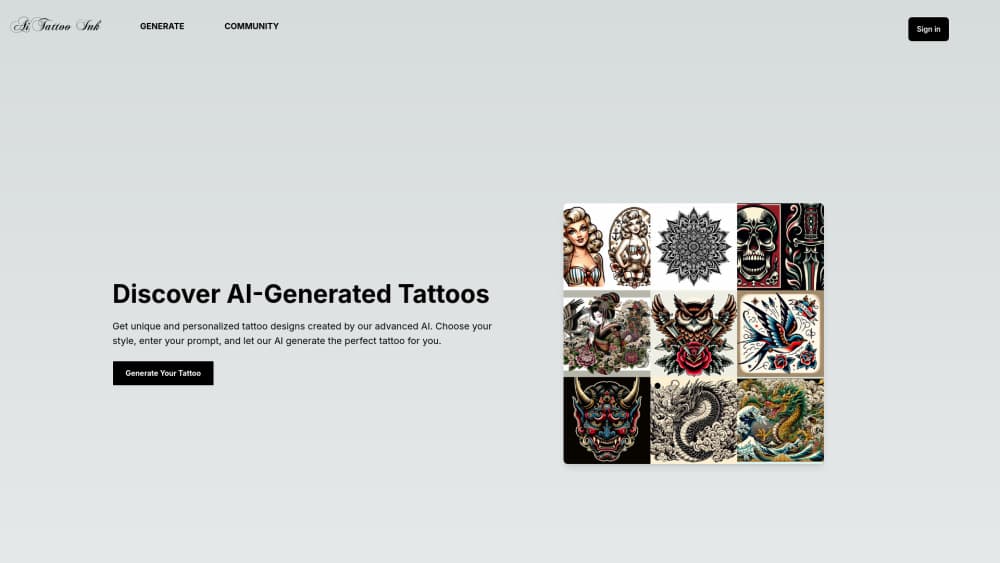
AiTattoo Ink is a browser-based AI tattoo generator that turns a written prompt into custom tattoo designs across eight styles, including Japanese, Chicano, and Dotwork. Credit packs start at $5.
About AiTattoo Ink
What Is AiTattoo Ink
AiTattoo Ink is a web app for people who have a tattoo idea and can't draw it. You describe the piece in words, choose one of eight styles, and the generator returns finished design concepts in seconds. What comes back is a flat image you can download in HD and bring to an artist, not a stencil file and not a booking service.
The selling point is style range rather than volume. Most generators push one general look. AiTattoo Ink splits the work into Japanese, Old School, Realism, Anime, Dotwork, Geometric, Neo Traditional, and Chicano, and each style has its own page explaining the visual rules that make that look readable, such as strong outlines for Old School or controlled dot shading for Dotwork. That matters when you already know the direction you want and need to see it rendered properly instead of approximately.
The limits are the familiar ones for image generators. Credits are bought upfront, there's no free tier, so you pay before you see your first result. Nothing in the tool checks whether a design still holds up at three centimeters on a wrist, and no generated image replaces an artist's line work. Treat the output as a draft for a consultation.
Getting Started
- Create an account at aitattoo.ink. Signing in is required before the generator unlocks, so there's no anonymous preview.
- Buy a credit pack. The smallest is 50 credits for $5, and one generation costs one credit.
- Write the prompt and pick a style. Describe the subject, mood, and detail level, then choose Japanese, Old School, Realism, Anime, Dotwork, Geometric, Neo Traditional, or Chicano.
- Generate and refine. Run the prompt, look at the concepts, and adjust the words or the style when a result misses.
- Download the design and take it to a studio. Files come out in HD, which is enough for a consultation and for an artist to redraw from.
Product Information
A quick look at AiTattoo Ink's pricing, supported platforms, and performance.
Best for
The users, tasks, and scenarios where this tool fits best.
Users
- First-time tattoo planners
- Tattoo artists collecting references
- People who already know their style
Tasks
- Turning a vague idea into something visible
- Testing a direction before the studio
- Building a reference sheet for a consultation
- Exploring a style you don't know
Scenarios
- Planning a first tattoo on a budget
- Choosing between two ideas
- Preparing matching designs for friends
Key features
Eight Distinct Tattoo Styles
The generator covers Japanese, Old School, Realism, Anime, Dotwork, Geometric, Neo Traditional, and Chicano. Each style changes the prompt handling, not just a filter on top of one model, so a Japanese composition gets flowing backgrounds and bold silhouettes while a Chicano piece comes back in black and grey with fine lines. Style range is the main reason to pick this tool over a single-style generator.
Prompt to Design Generation
Type a description and get finished concepts, usually several variations per run. The prompt accepts subject, mood, and detail cues in plain language, and one credit covers one generation. Short, concrete prompts work better than long ones, since the model has no way to ask follow-up questions.
Style Guides That Explain the Look
Every style has a page covering composition, contrast, and typical subjects, written as design guidance rather than marketing. Read one tattoo style guide before you prompt and the descriptions get more specific. The Japanese page, for instance, explains why the main subject should connect to waves, clouds, and flowers so the piece reads as one tattoo instead of separate drawings. For someone new to tattoo design, that context is more useful than a gallery.
HD Downloads
Results download at high resolution, which covers showing a design on a phone at the studio and giving an artist something to trace from. There's no separate export for stencil lines, so the artist still does the conversion.
Community Gallery
A community page collects concepts generated on the platform, browsable without an account. It works as a starting point when you have no idea what you want, and as a check on what each style actually produces before you spend credits.
Credit Packs Instead of Subscriptions
Payment is one-time: 50 credits for $5, 100 for $9, or 200 for $16, which works out to $0.10, $0.09, and $0.08 per generation. Credits don't expire on a monthly cycle the way a subscription does, so occasional users aren't paying for idle months. AI tattoo generator pricing in this category is usually subscription-based, and that difference is the practical argument for the pack model.
Pros and cons
Pros
- Eight styles with real differences in composition and shading, not recolored versions of one output.
- One-time credit packs from $5, so a single project doesn't lock you into a monthly bill.
- Style pages explain the design logic, which helps you write better prompts and speak to an artist.
- HD downloads are included at every pack size, with no watermark mentioned in the pricing terms.
Cons
- No free tier or trial credit. You pay before you see whether the output suits your idea, and refunds depend on the posted policy.
- Designs are images, not stencils or vector files, so an artist has to redraw the line work. That adds studio cost.
- The interface and support run in English only, which is a barrier if you'd rather work in another language.
Frequently asked questions
It generates tattoo design concepts from a written prompt. You describe the piece, pick one of eight styles, and the tool returns images you can download and take to a tattoo artist. It doesn't book appointments or connect you with studios.
Related content
Explore related tools, skills, and articles for AiTattoo Ink.
AiTattoo Ink Alternatives

Google EmbeddingGemma 2
Google DeepMind · Writing · Image · CodingGoogle EmbeddingGemma 2 is a 740M-parameter open model that turns text, code, images, audio, and video frames into vectors in one 768-dimension space, running on phones and laptops.

Tractionwave
TractionWave · Image · MarketingTractionWave is an AI attention heatmap tool for static ads. Upload a PNG or JPG and it returns predicted attention, ranked hotspots, and fixes before you spend budget.

Imejis.io
Imejis.io · Image · MarketingImejis.io is an AI design studio for agents and marketing teams. Describe an image in plain words, and it writes the copy, builds the layout, reflows it to every size, then exports a finished file.