

Algor Education
Algor Education · Productivity
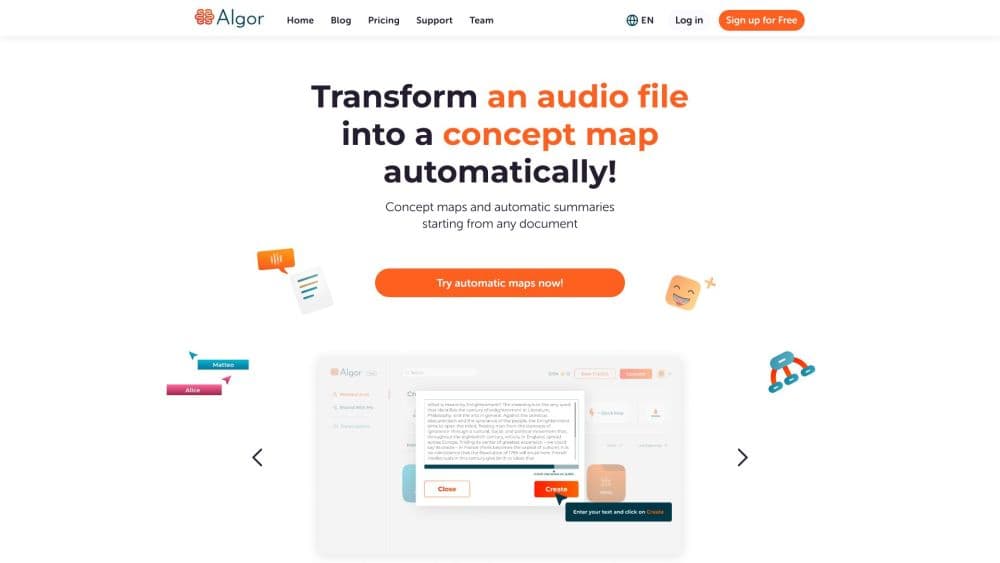
Algor Education is an AI study platform that turns notes, files, and videos into concept maps, flashcards, quizzes, and summaries, with a free plan that needs no credit card.
About Algor Education
What Is Algor Education
Algor Education is an AI study tool that converts the material you already have, a PDF, a photo of notes, a YouTube link, into visual study aids. It builds concept maps, mind maps, flashcards, quizzes, and summaries from that input, then keeps everything in one organized Set you can revise later.
The audience is anyone facing a pile of material: students prepping for exams, teachers building lesson resources, and lifelong learners picking up a new subject. Instead of making a diagram by hand or retyping notes into a flashcard app, you upload the source and let the AI structure it.
The main limit is the credit system. Free accounts get 30 AI credits and can upload up to 15,000 characters, which is enough to test the workflow but not to run a full semester of studying. Heavy users and educators move to a paid plan for more credits and longer uploads.
Getting Started
- Create a free account on the Algor Education site. No credit card is required to start.
- Upload your source material, such as a PDF, Word document, image, or audio file, or paste a text, web, or YouTube link.
- Set the language, style, and level of detail, then review the outline before you generate.
- Generate the Set, then edit the text, tweak the concept map nodes, and add media where useful.
- Start a flashcard session or a quiz from the Set, track your progress, and ask the built in assistant about your material.
Product Information
A quick look at Algor Education's pricing, supported platforms, and performance.
Best for
The users, tasks, and scenarios where this tool fits best.
Users
- Students
- Teachers
- Parents
- Lifelong learners
Tasks
- Turning a PDF into flashcards
- Building a concept map from a topic
- Summarizing a long video
- Preparing a quiz to self test
- Organizing scattered notes into one study set
Scenarios
- The night before an exam, when a stack of chapters needs to become review cards fast
- A teacher planning a week of lessons
- A professional starting a certification course
Key features
AI Concept Map and Mind Map Generator
Algor extracts the key concepts and subtopics from any input, whether text, a photo, a file, audio, or video, and arranges them into a structured map. You edit the text, adjust colors, and style the nodes, and you can add images, video, or audio to any node. Long or dense material gets split into several focused maps so the result stays readable.
AI Flashcard Maker
The flashcard tool turns your content into cards built for fast memorization. You start a flashcard session straight from your Set and work through the cards at your own pace. This suits definitions, vocabulary, and any material you need to recall rather than just read.
AI Quiz Generator
Algor builds quizzes from your own material, so the questions match what you actually studied. You take the quiz inside the platform, and the results feed into progress tracking that shows where you stand. That loop of study, test, and adjust is the core of exam prep.
AI Study Notes and Summaries
The study notes maker condenses a document or video into structured notes in seconds. Instead of a wall of text, you get the key points pulled out and organized so you can skim and revisit. This is the fastest path when you want the gist of a long report or lecture.
Transcribe for Audio and Video
Algor accepts audio and video files and uses a Transcribe feature to convert them into text you can study from. A recorded lecture or a webinar becomes material for maps, notes, and quizzes, so you are not stuck with a long recording you have to sit through again.
One Set That Holds Everything
Every generation lives in a Set, a study guide organized into sections and pages. Maps, text, flashcards, and quizzes sit in one place, and you can collaborate on it or ask the assistant questions about your content. Keeping revision in a single workspace is what separates Algor from single purpose tools.
Pros and cons
Pros
- A free plan with no credit card, so you can run the full workflow on a small upload before paying.
- One platform for maps, flashcards, quizzes, and notes, which removes the need to juggle several study apps.
- Accepts many input types, including PDFs, Word files, images, audio, video, and YouTube links, so you work from the material you already have.
- Institution plans for schools and universities, with onboarding and pricing tailored to a class or campus.
- Export and print options on paid plans, so maps and notes work offline and on paper.
Cons
- The credit system adds up. Each generation spends credits and they scale with the length and complexity of your upload, so a long course can drain a monthly allowance quickly.
- Free accounts cap uploads at 15,000 characters and, for PDFs, 25 pages, which rules out long textbooks without a paid plan.
- There is no public API, so teams that want to build generation into their own tools or LMS cannot wire Algor in.
- Output still needs a review pass. The AI can miss a nuance or flatten a subtle link, so anything you plan to submit deserves a quick check.
Frequently asked questions
Algor Education turns your study material into visual aids. You upload a PDF, photo, file, audio, or video, or paste a topic, and the AI builds concept maps, mind maps, flashcards, quizzes, and summaries. It is built for studying, teaching, and organizing material you want to learn or share.
Related content
Explore related tools, skills, and articles for Algor Education.
Algor Education Alternatives

Base Code
Base44 (Wix) · Coding · ProductivityBase Code is a shared cloud development environment from Base44. Teammates describe changes to an existing GitHub codebase in chat, preview them live and send them back as pull requests.

Knocket
Knocket (Tencent RTC team) · Productivity · Business · ChatbotKnocket is a free live chat and contact page tool that lets visitors message you from your website, app, or a shareable link, with every reply handled from Telegram or one inbox.

FloorGen
Vinit Kumar (FloorGen) · Productivity · China AIFloorGen is a browser-based floor plan maker that turns a sentence or a sketch into an editable 2D plan and a 3D walkthrough. Export to PDF, DXF or video, and draw without an account.