

Ambient AI Assistant
Ambient · Productivity
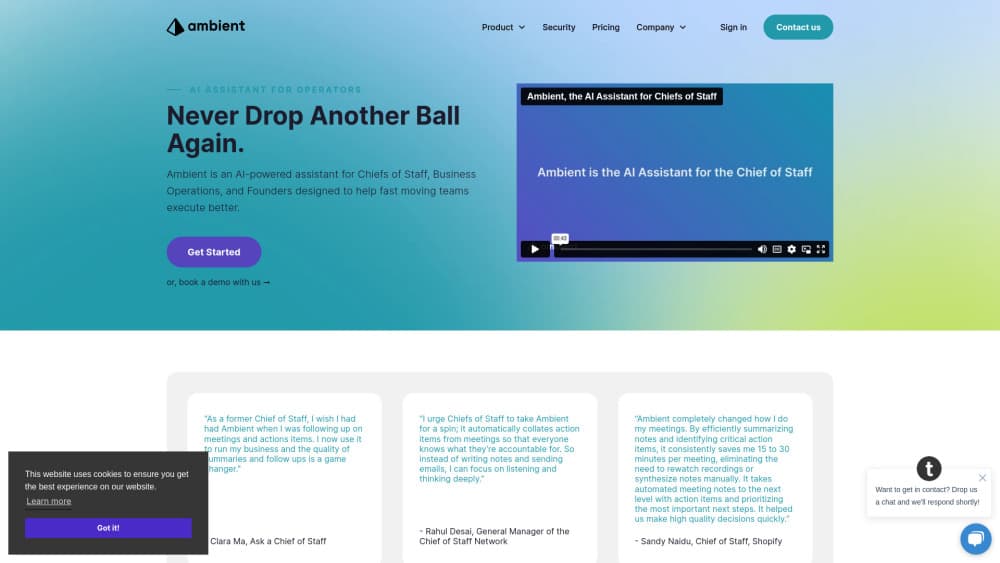
Ambient is an AI assistant for chiefs of staff and executive teams. It captures meetings, keeps a shared memory of decisions and commitments, and briefs you before each day starts.
About Ambient AI Assistant
What Is Ambient AI Assistant
Ambient is a web-based AI assistant that builds a shared memory for a leadership team. It listens to meetings, reads the systems your team already works in, and turns the two into one searchable record of what was decided, who owns it, and when it's due.
The company sells to chiefs of staff, founders, and operating leads, and it pitches the product as an AI chief of staff for executive teams. That focus shows in the product: the work it automates is the prep, note taking, and follow up that normally eats a chief of staff's week. Ambient doesn't try to be a general chatbot, and it doesn't ask your team to move into a new workspace.
Two limits matter before you sign up. Buying is sales-led, so there's no self-serve checkout and no public price list. The product also assumes a team with real meeting volume and connected tools. A solo user with a quiet calendar won't get much out of it.
Getting Started
- Book a consult with the Ambient team and get your workspace provisioned. Log in at app.ambient.us once the account is live.
- Connect your calendar so Ambient can see which meetings to prep for and capture.
- Link the systems where work happens, such as your CRM, project tracker, and team chat. Each connection widens the context the assistant can draw on.
- Set access rules for who can read which meetings and records. Single sign-on and role-based controls are part of the setup.
- Open the Daily Briefing each morning, then query the record from Claude, ChatGPT, Cowork, or Gemini during the day.
Product Information
A quick look at Ambient AI Assistant's pricing, supported platforms, and performance.
Best for
The users, tasks, and scenarios where this tool fits best.
Users
- Chiefs of staff
- Founders and CEOs
- Operating and strategy leads
- Executive assistants
Tasks
- Meeting prep and recap
- Commitment tracking
- Answering questions about the business
Scenarios
- A weekly leadership meeting where decisions pile up and nobody remembers the open items
- Fundraising or board preparation
- Customer and account reviews
Key features
Daily Briefing
The AI daily briefing is a morning digest that pulls together your calendar, open commitments, and recent decisions. It replaces the manual scan of notes, email, and dashboards that many executives do before their first meeting. The value depends on how much you feed it, since a thin data set produces a thin briefing.
Meeting Capture and Notes
Once your calendar is connected, Ambient captures meetings, writes summaries, and separates decisions from discussion. Notes land in a shared record instead of someone's personal document. The official help center describes the flow as connect once, then let Ambient capture, prep, and recap every meeting automatically.
Shared Memory Across Systems
Ambient sits behind your CRM, project tools, and chat, and pools what it learns into one place. That's the core idea behind the product: AI meeting notes are more useful when they link to the account, the project, and the people involved. Your team keeps working in the same tools, and the record builds itself in the background.
Answers Inside Your Existing AI Assistant
You can query the record through Claude, ChatGPT, Cowork, or Gemini rather than opening another chat window. Ambient supplies the context those tools lack, so a question about an account returns an answer grounded in real meetings and CRM entries. It's a smart division of labor: keep the assistant you like, add the memory it's missing.
Decision and Commitment Tracking
The assistant logs owners and dates for the commitments made in meetings, then resurfaces them. This is the part teams usually handle with a spreadsheet that goes stale within a month. Tracking isn't a separate module you maintain by hand, which is the main reason it tends to survive.
Enterprise Security Controls
Ambient states SOC 2 Type II, GDPR, and CCPA alignment, with data stored in the United States. Role-based access control, single sign-on, and device certificates are part of the setup. The company also says neither it nor its vendors train models on customer data, a claim worth confirming in your own security review.
Pros and cons
Pros
- The memory compounds: every meeting and connected system makes later answers more specific.
- The Daily Briefing removes a recurring hour of manual prep for people who live in their calendar.
- Commitment tracking ties decisions to owners and dates, which is the failure point most note tools ignore.
- Security posture fits enterprise buying: SOC 2 Type II, SSO, role-based access, no training on customer data.
- It works inside Claude, ChatGPT, Cowork, and Gemini, so nobody has to adopt another chat app.
Cons
- There's no free plan and no public pricing, so evaluating it means a sales conversation first.
- Setup leans on calendar hygiene and connected tools. Sparse or messy systems produce sparse briefs.
- The product is built around executive and chief of staff workflows, which makes it a poor fit for small teams or individual users.
- Public documentation is thin, so most of what you learn before a demo comes from marketing pages and a help center.
Frequently asked questions
Ambient captures your meetings, keeps a shared record of decisions and commitments, and briefs you before your day starts. It then lets you query that record from Claude, ChatGPT, Cowork, or Gemini.
Related content
Explore related tools, skills, and articles for Ambient AI Assistant.
Ambient AI Assistant Alternatives

Base Code
Base44 (Wix) · Coding · ProductivityBase Code is a shared cloud development environment from Base44. Teammates describe changes to an existing GitHub codebase in chat, preview them live and send them back as pull requests.

Knocket
Knocket (Tencent RTC team) · Productivity · Business · ChatbotKnocket is a free live chat and contact page tool that lets visitors message you from your website, app, or a shareable link, with every reply handled from Telegram or one inbox.

FloorGen
Vinit Kumar (FloorGen) · Productivity · China AIFloorGen is a browser-based floor plan maker that turns a sentence or a sketch into an editable 2D plan and a 3D walkthrough. Export to PDF, DXF or video, and draw without an account.