
AI Animate Old Photos
Animate Old Photos · Image · Video
AI Animate Old Photos is a browser tool that turns scanned family photos into short videos with movement, voice and music. A few free runs are available daily.
About AI Animate Old Photos
What Is AI Animate Old Photos
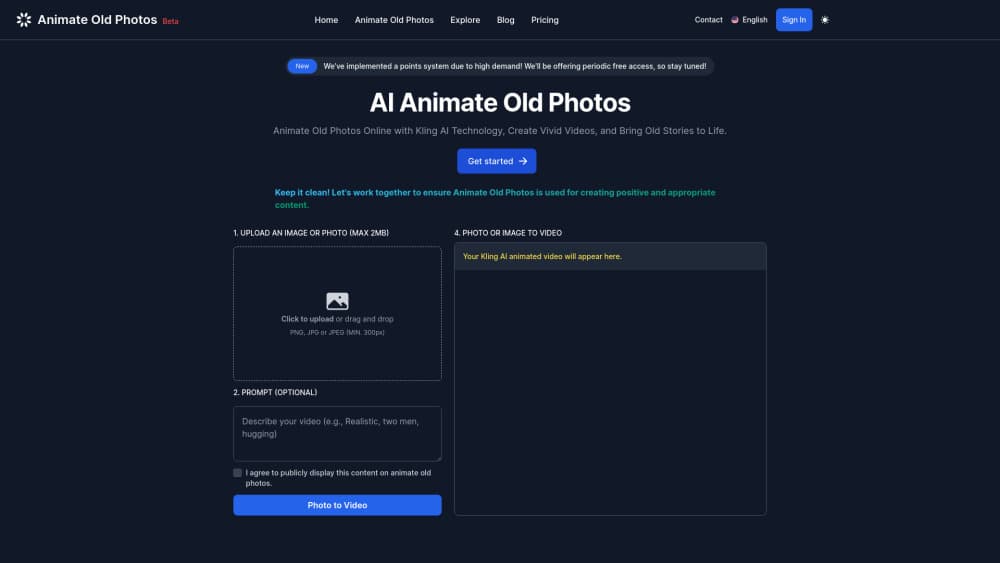
AI Animate Old Photos is a web app built for one job: making a still photograph move. You upload a scan or a phone picture of a print, describe what should happen, and the service returns a clip where faces smile, blink, tilt their heads or lean into a hug. It has been online since July 2024, and the same team runs a small set of sibling tools for restoration, image merging and family portraits.
Most visitors arrive with a shoebox of prints and no video editing skills. The workflow is shaped around that. There's no timeline, no keyframes and no export settings to learn, and the result is a file you can drop straight into a family group chat. The cost of that simplicity is control. You can't direct camera moves, stack clips into a longer edit, or hand-fix a frame that comes out wrong, and even the top mode caps out at 30 seconds.
Billing runs on credits instead of a flat monthly fee. A standard clip costs 2 to 4 credits, the HD mode with audio costs 3 to 8, and Pro mode costs 5 to 30 depending on the model and length you pick. One-time packs start at $14.99 for 30 credits. That's enough for a dozen standard clips, yet a single long Pro render can eat the whole pack, so match the purchase to the mode you plan to use.
Getting Started
- Open animateoldphotos.org in any browser. The upload box sits on the homepage, and the free daily runs don't ask for an account.
- Add a photo. A flat scan works best, and a phone photo of a print is acceptable if the face is sharp and evenly lit.
- Type a short action in the prompt field, something like "she smiles and waves," or leave it empty and let the tool write one for you.
- Choose a mode. Standard is the cheap default, Advanced adds HD and sound, and Pro adds speech plus clips up to 30 seconds.
- Generate, then download from My Creations. Files stay there for 30 days, so save anything you want to keep.
Product Information
A quick look at AI Animate Old Photos's pricing, supported platforms, and performance.
Best for
The users, tasks, and scenarios where this tool fits best.
Users
- Families working through a box of old prints
- People who inherited a folder of digital scans
- Creators making nostalgia posts for social feeds
- Anyone assembling a memorial or anniversary tribute
Tasks
- Animating a single portrait into a smile, blink or wave
- Making a grandparent say a short line or sing a few bars
- Repairing damage before animating
- Building an AI hug video from two separate pictures
Scenarios
- A birthday slideshow where one portrait suddenly turns and smiles at the room
- A family history project spanning several generations
- A quiet memorial video for relatives who couldn't travel
Key features
Motion Prompts for Photo Animation
The prompt box takes a plain sentence and turns it into movement. Write "the two people wave at the camera" and you get a wave, not a generic zoom. Leave the field blank and the tool reads the photo and suggests an action, which helps when you're staring at a portrait and can't think of anything. Short, physical instructions work better than mood descriptions, and the site's own guide says so.
Pro Mode With Speech and Sound
Pro is the only mode that produces native audio with lip sync, and it pushes clips to 30 seconds. You can have a subject speak a line or sing a phrase, with background music underneath. Speech is supported in six languages, so a photo of a relative from Naples can speak Italian even if you write the prompt in English. Every Pro video includes sound, and the vendor doesn't charge extra credits for the audio layer.
AI Hug Video Generator
The hug tool takes a photo of two people and animates them embracing. If the pair only exists in separate pictures, Merge Images combines them into one frame first, which is the part most people miss. Hug videos cost a flat 3 credits regardless of mode, which makes them the cheapest way to see what the motion model does with two faces in frame.
Photo Restoration Inside the Same Workflow
Restoration is a separate tool on the same account and the same credit balance. It colorizes black and white prints and repairs fading, scratches and creases at 1 credit in standard mode or 2 in advanced mode. The vendor markets the output as keeping a person's real features rather than producing the smoothed, plastic look that some restoration apps leave behind. Running a damaged photo through this step first usually improves the animation.
Add Loved One to Photo
This feature places a person from one photo into a group shot, a wedding picture or a memorial portrait. It costs 2 credits in standard mode and 3 in advanced mode, and advanced mode raises the clarity. The use case is specific and emotional: a family photo where one person is missing, or a portrait where the grandchildren never stood beside the subject. Results depend on having a clear, front-facing image of the person being added.
Free Daily Runs Without an Account
You can animate old photos free of charge every day, and the first runs don't require a login. The number of free spots is limited and shrinks at busy times, which is the honest catch. It's still the right way to start, because you learn how the model reads prompts before you buy credits. Once the free allotment runs out, packs and subscriptions take over.
Pros and cons
Pros
- No editing skills needed. Upload, prompt, download, and the whole loop fits in a browser tab on a phone.
- Speech and lip sync in six languages on Pro, which is rare at this price level.
- Restoration, the hug tool and the merge tool all draw on the same credit balance as animation, so one purchase covers the full chain.
- Free daily runs without an account make the trial genuinely free, not a card-required demo.
- Photos aren't used to train models, according to the vendor, and uploads are deleted after 30 days.
Cons
- Pro mode burns 5 to 30 credits per video, so a 30-credit Lite pack can cover a single render.
- Clips stop at 30 seconds, and standard mode is shorter and silent, which rules out anything resembling a full scene.
- Free slots are rationed and slow during peak hours, so the no-cost path isn't reliable for a deadline.
- There's no app, no API and no timeline editor, so the output has to be finished elsewhere if you need captions, cuts or music beds.
Frequently asked questions
Yes, up to a point. You get a limited number of free animations each day with no login, and the site restricts how many spots are open when traffic spikes. Beyond that you buy credits, either as a one-time pack from $14.99 or as a monthly plan from $11.99.
Related content
Explore related tools, skills, and articles for AI Animate Old Photos.
AI Animate Old Photos Alternatives

Google EmbeddingGemma 2
Google DeepMind · Writing · Image · CodingGoogle EmbeddingGemma 2 is a 740M-parameter open model that turns text, code, images, audio, and video frames into vectors in one 768-dimension space, running on phones and laptops.

Tractionwave
TractionWave · Image · MarketingTractionWave is an AI attention heatmap tool for static ads. Upload a PNG or JPG and it returns predicted attention, ranked hotspots, and fixes before you spend budget.

Imejis.io
Imejis.io · Image · MarketingImejis.io is an AI design studio for agents and marketing teams. Describe an image in plain words, and it writes the copy, builds the layout, reflows it to every size, then exports a finished file.