

APOB
APOB AI · Image
APOB AI is a browser-based AI influencer generator that builds a consistent virtual persona from one photo or a text prompt, then animates it with talking-avatar, lip-sync, and face-swap video.
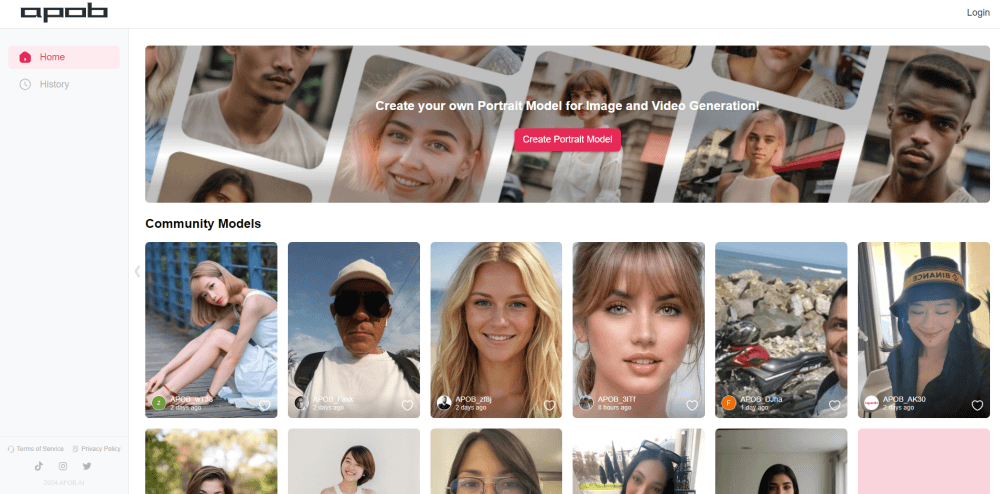
About APOB
What Is APOB AI
APOB AI is a web studio for people who want a social media presence without showing their face. You give it a single reference photo, or you describe the kind of person you want, and it produces a realistic AI portrait you can reuse across posts. From there the same character can be turned into video, given a voice, and kept visually identical across dozens of clips.
The product targets a specific crowd: faceless creators, affiliate marketers, and small brands who need a steady stream of photo and video content but can't book a photographer every week. Instead of one static image, the pitch is a whole studio that carries one face from a still shot to a talking video and out to TikTok, Instagram, or YouTube.
The clearest limit is that you're renting models, not owning one. Generation runs on shared infrastructure, so heavy creators hit credit ceilings, and some controls like the strongest face-lock and commercial rights sit behind the paid plans. Output quality also depends on the reference photo you start with.
Getting Started
- Open the APOB AI web app and sign up for the free membership, which includes 80 credits a day.
- Create a portrait. Upload a photo as a reference, or use the AI Influencer Generator and pick gender, age, nationality, eye color, and hairstyle.
- Name the model and choose a style, such as Anime or a LinkedIn-style headshot, then generate the portrait set.
- Push the character further with Video: run Image to Video, add a Talking Avatar or Lip Sync, and pick a voice.
- Download the clip in the resolution your plan allows, then post it to social channels or a faceless YouTube account.
Product Information
A quick look at APOB's pricing, supported platforms, and performance.
Best for
The users, tasks, and scenarios where this tool fits best.
Users
- Faceless content creators
- Affiliate marketers
- Small brands and solo shops
- Anime and character artists
Tasks
- Building a consistent character
- Turning a still into motion
- Producing talking-head video
- Face swapping for parody and mockups
Scenarios
- Running a faceless YouTube channel
- Testing a new brand angle
- Filling a slow content week
- Localising one persona for a new market
Key features
AI influencer generator from photo or prompt
You start either by uploading a reference photo or by building a model from scratch. The generator lets you set gender, age, nationality, eye color, and hairstyle, so the character matches the niche you're chasing. It's the fastest path from nothing to a usable face.
Face-lock for consistent characters
Face consistency is the whole point of an influencer account, and face-lock is APOB AI's answer. The paid tier offers the strongest version, which holds the same look across hundreds of posts. Without it, a long-running account starts to look like a different person every week.
Talking avatar and lip sync
These two features turn a still character into a presenter. You type a script, choose a voice and accent, and the avatar speaks with matched lip movement. It's aimed at ads, tutorials, and product reviews, and it lets an anonymous creator stay off camera.
Image to video and text to video
Image to Video animates a single portrait with short prompts like "dance" or "smile," while Text to Video builds a clip from a written description. Both produce the vertical short-form video that Reels and TikTok reward, without a camera or a shoot day.
Face swap for video and images
Video Face Swap and Image Face Swap put your AI character into existing clips or photos. Use cases run from brand demos and digital doubles to parody content, which is a common reason creators reach for the tool.
Image studio with simple and expert modes
Beginners pick a Complete Set of trending styles, while prompt writers get Build Your Own and an Expert mode with positive and negative prompts. Edit Image adds background removal and clothing changes, giving pixel-level control without leaving the browser.
Pros and cons
Pros
- Free membership hands you 80 credits a day, enough to test the generator before paying
- Face-lock keeps one face consistent across image sets and videos, which is what a real channel needs
- One account covers portraits, talking video, face swap, and subtitle work, so you don't stitch together four apps
- Image, video, and voice features sit in a browser, so nothing heavy gets installed
- Styles and prompt modes scale from total beginner to someone who writes detailed prompts
Cons
- Credits run out fast on video tasks, and the free tier resets daily rather than banking for a big batch
- Commercial rights and the strongest face-lock sit behind paid plans, so the free tier is really a trial
- Output quality tracks the reference photo, and a weak upload shows up in the final clips
- No public API means you can't wire the generator into your own publishing pipeline
- There's no download limit stated on the site, so heavy exporters should check the plan terms first
Frequently asked questions
It's a web platform for creating AI influencers and virtual personas. You generate a consistent character from a photo or a description, then turn it into talking videos, face swaps, and portraits for social media or ads.
Related content
Explore related tools, skills, and articles for APOB.
APOB Alternatives

Google EmbeddingGemma 2
Google DeepMind · Writing · Image · CodingGoogle EmbeddingGemma 2 is a 740M-parameter open model that turns text, code, images, audio, and video frames into vectors in one 768-dimension space, running on phones and laptops.

Tractionwave
TractionWave · Image · MarketingTractionWave is an AI attention heatmap tool for static ads. Upload a PNG or JPG and it returns predicted attention, ranked hotspots, and fixes before you spend budget.

Imejis.io
Imejis.io · Image · MarketingImejis.io is an AI design studio for agents and marketing teams. Describe an image in plain words, and it writes the copy, builds the layout, reflows it to every size, then exports a finished file.