

Brilliant Labs
Brilliant Labs Ltd. · Image
ARGPT for Monocle is Brilliant Labs' companion app that links Monocle AR glasses to ChatGPT and Whisper, so you tap to speak and read the answer in your field of view.
About Brilliant Labs
What Is ARGPT for Monocle
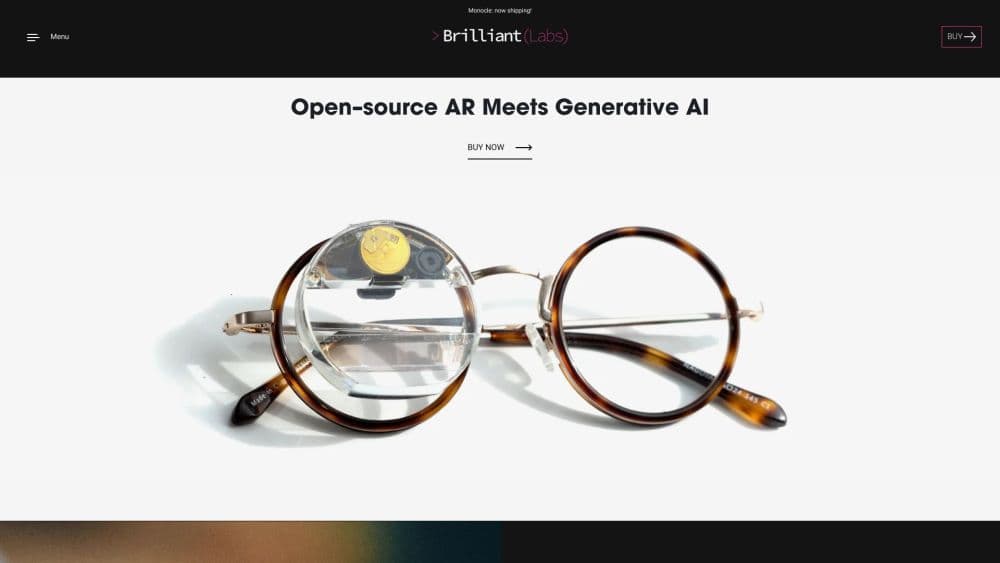
ARGPT for Monocle is the mobile app that connects Brilliant Labs' Monocle smart glasses to ChatGPT and Whisper. Tap the side of the Monocle, speak a question, and the reply lands on the small display clipped to your frame. The app also runs on its own as a plain chat window if you do not have the glasses with you.
The company later branded the app Noa by Brilliant, and the two names point at the same thing: the GitHub repositories are still titled noa-for-ios and noa-for-android, while the store listing keeps the original argpt name. It grew out of Brilliant Labs' habit of shipping open hardware, and the source for both apps is published under a BSD 3-Clause license, so you can read exactly how the connection to Monocle works.
One limit shapes the whole experience. ARGPT ships no AI of its own. You bring your own OpenAI API key, the app relays your voice and questions to OpenAI, and OpenAI bills you directly. That keeps the app free and open, but it also means the assistant is only as good as the model you pay for and the connection you have.
Getting Started
- Install the app on iOS or Android. The App Store listing carries the name argpt, and Google Play uses the package xyz.brilliant.argpt.
- Get an OpenAI API key from the OpenAI platform. You need an OpenAI account with billing set up, and Brilliant Labs suggests low usage limits like a $5 soft cap and a $10 hard cap for casual use.
- Open the app and power on Monocle. Lift it out of the case and it wakes up and advertises over Bluetooth. The app pairs to the nearest unit.
- Let the app finish its first-run setup. It uploads the Python scripts Monocle needs, checks the firmware and FPGA versions, and updates them if they are behind.
- Tap to talk or type. Speak a question through Monocle, or type in the chat window, and the answer shows up on the display and in the app.
Product Information
A quick look at Brilliant Labs's pricing, supported platforms, and performance.
Best for
The users, tasks, and scenarios where this tool fits best.
Users
- Tinkerers and early adopters who own Monocle
- People who want a hands-free AI assistant on the move
- Hobbyists hunting for an AI assistant for smart glasses
- Developers who want a working reference
Tasks
- Asking quick questions hands-free
- Translating speech into English
- Turning casual notes into text prompts
- Getting firmware and scripts current
Scenarios
- Cooking and following a recipe
- Traveling somewhere you do not speak the language
- Biking or hiking with your hands busy
- Standing in a museum or gallery
Key features
Speak and Read in Your Field of View
The core loop is simple and it is the reason the app exists. You tap Monocle, ask a question out loud, and the answer appears on the display in front of your eye. Audio runs from the glasses to your phone, where Whisper transcribes it and ChatGPT writes the reply, and the phone sends the text back to be shown. It turns a device you wear into a hands-free AI assistant you can ask something of and get an answer from.
Voice and Text Chat Modes
ARGPT works two ways. Through Monocle, your voice is the input and the display is the output. Open the app on its own, and it behaves like a normal ChatGPT client where you type with the phone keyboard and read the conversation on screen. That second mode matters when the glasses are charging or you simply left them at home.
Whisper Translation to English
Turn on translation in the settings and the app switches from an assistant to a translator. Say something in another language, and Whisper translates it to English without handing the task to ChatGPT. It covers any language Whisper supports, which makes the glasses useful for travel and for reading signs and menus you cannot parse. The tradeoff is direction: the translation lands in English, not back into the other language.
Automatic Firmware and Script Updates
Before you can talk to it, Monocle needs the right MicroPython firmware, FPGA image, and Python scripts, and ARGPT loads them for you. Each time the glasses connect, the app checks the firmware version, then the FPGA version, then the scripts, and updates whatever is out of date. Updates that would be a fiddly manual chore are handled as part of pairing.
Bring Your Own OpenAI Key
The app has no subscription because it has no model of its own. You paste in an OpenAI API key, and the app sends your queries to OpenAI using your account and your billing. A settings menu lets you pick which GPT model to use, so you can trade speed against capability on your own terms. Brilliant Labs recommends small spending caps to keep a casual habit from running up a bill.
Open Source on iOS and Android
Both the iOS and Android apps are published on GitHub under the BSD 3-Clause license. The iOS app is a SwiftUI project and the Android app is native, and the repositories walk through the Bluetooth protocol Monocle speaks. If you want to build your own AR app rather than use the stock one, these are a starting point, not a black box.
Pros and cons
Pros
- Puts ChatGPT into the field of view of Monocle, so answers show up hands-free instead of on a screen you have to hold.
- Whisper translation handles many spoken languages to English, which is the feature that makes the glasses genuinely useful abroad.
- Both the iOS and Android apps are open source, so the Bluetooth link and the app logic are readable and forkable.
- The app itself costs nothing, and Brilliant Labs has kept it running well past the original Monocle launch.
Cons
- You must supply your own OpenAI API key and pay OpenAI for usage, so "free app" does not mean free AI.
- It only works fully with Monocle hardware. Without the glasses you are left with a basic ChatGPT client you could get elsewhere.
- Translation only goes one direction, into English, so it will not help an English speaker be understood in another language.
- The 8-bit, 8 kHz audio Monocle sends keeps transmission light but loses dynamic range and picks up background noise, which shows in transcription accuracy.
Frequently asked questions
ARGPT for Monocle is a companion app from Brilliant Labs that connects its Monocle AR glasses to ChatGPT and Whisper. You tap the glasses, speak, and read ChatGPT's answer on the display in your field of view. It is now branded Noa by Brilliant, and the store listing still uses the argpt name.
Related content
Explore related tools, skills, and articles for Brilliant Labs.
Brilliant Labs Alternatives

Google EmbeddingGemma 2
Google DeepMind · Writing · Image · CodingGoogle EmbeddingGemma 2 is a 740M-parameter open model that turns text, code, images, audio, and video frames into vectors in one 768-dimension space, running on phones and laptops.

Tractionwave
TractionWave · Image · MarketingTractionWave is an AI attention heatmap tool for static ads. Upload a PNG or JPG and it returns predicted attention, ranked hotspots, and fixes before you spend budget.

Imejis.io
Imejis.io · Image · MarketingImejis.io is an AI design studio for agents and marketing teams. Describe an image in plain words, and it writes the copy, builds the layout, reflows it to every size, then exports a finished file.