

Artadum
Listadum · Image
Artadum is a wall art mockup generator that drops your artwork into realistic room scenes, so you can build product images for Etsy, Shopify, or eBay in seconds.
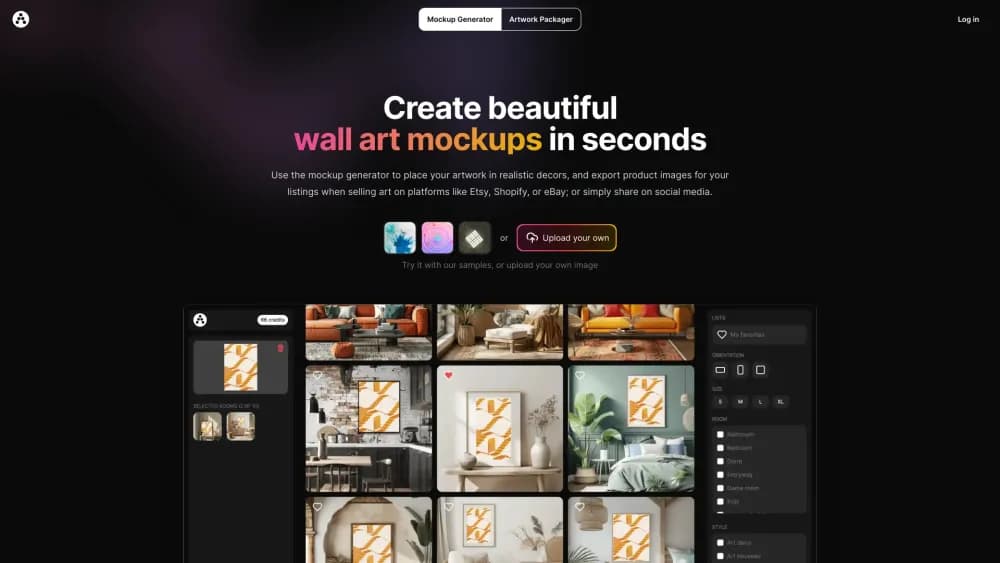
About Artadum
What Is Artadum
Artadum is a browser tool that turns a flat image of your art into a believable product photo. You upload a painting, print, or photograph, pick a room and a frame style, and the platform composites your artwork onto the wall of that scene. The result looks like the piece is actually hanging in a home, which is what a blank product photo can't show a buyer.
It's built by the team behind Listadum, an Etsy shop analytics tool, so the workflow leans toward sellers. Think of it as an AI mockup generator aimed at makers rather than a general design suite. Want to list a print on Etsy or run an Instagram post for a new drop? You generate a few mockups instead of hiring a photographer or buying pre-made PSD files. One credit equals one image, and you get 10 free credits when you sign up.
Two limits shape who it suits. It's web-only, so there's no phone app. And the output is a rendered scene, not a photo of your real print, which means you should label AI-generated listing images as computer-generated rather than a true-to-life preview of the physical item.
Getting Started
- Sign up at artadum.com. You get 10 free credits to test the generator, and an account is needed to save favorites and keep your credits.
- Upload your artwork. Use a JPG or PNG, ideally a high-resolution file that's under 20MB.
- Pick your scene. Filter by room, decor style, frame size, and frame orientation, then select the rooms you want your art to appear in.
- Export the images. Choose a resolution, set an optional watermark, and download a single image or a batch in JPG.
- Reuse or resize. Save your favorite templates, or open the Artwork Packager to crop one file into the aspect ratios you need for digital downloads.
Product Information
A quick look at Artadum's pricing, supported platforms, and performance.
Best for
The users, tasks, and scenarios where this tool fits best.
Users
- Print-on-demand sellers
- Independent artists and photographers
- Etsy and Shopify shop owners
Tasks
- Building product images for a new print
- Creating social media posts
- Batch-producing listing images
- Resizing art for digital downloads
Scenarios
- Refreshing an Etsy shop's visuals before a seasonal push
- Testing how a piece reads in different interiors
- Prepping a print release without a photographer
- Standing up a digital download product
Key features
Wall Art Mockup Generator
This is the core tool. You upload your artwork and it's placed on the wall of a photo-realistic room, complete with a frame and the lighting of the scene. Artadum reports over 196,000 mockups generated on its landing page, which gives a sense of how much the room library gets used. You control the frame size and orientation so a portrait print lands in a portrait frame, and you can preview how a piece sits in a room before you commit credits.
Hundreds of Rooms Across Many Styles
The room library covers the whole house, from living rooms and bedrooms to kitchens, nurseries, and home offices, and you can filter by room type to narrow the list. On top of room types, Artadum groups scenes by decor style, with categories like art deco, bohemian and eclectic, coastal and tropical, contemporary, gothic, industrial, mid-century, minimalist, and southwestern. That range matters when your art has a clear aesthetic and you want the setting to match it.
Bulk Generation and Export
Instead of creating images one at a time, you select your artwork, tick several rooms, and export the whole batch in a single action. For a seller listing the same design across sizes, this is the difference between a few minutes and an afternoon. You can also mark favorite templates so the rooms you return to are easy to find the next time you generate.
Export Controls and Watermark Options
Before downloading you set the resolution and choose whether to add a watermark. Images come out watermark-free by default, which keeps listing photos clean, but you can switch on the default Artadum mark or upload your own PNG watermark up to 4096x4096. You export as JPG, and the generated files are high quality, with at least 2048 pixels on one side, which covers what Etsy asks for in a listing image.
Artwork Packager
The packager is a companion tool for digital download sellers. You upload one full-size piece, and Artadum crops it into common aspect ratios for you, grouped as wide, tall, and square. You adjust the zoom and position for each ratio, add extra files like a print instruction sheet or a thank-you card, and download everything as a zip. It's aimed at creators who sell a single design in multiple sizes rather than physical prints.
Invite-Only API
Artadum offers an API to generate images programmatically, but it's invite only, so you request access rather than signing up for a key. It's aimed at shops, developers, and resellers that want to wire mockup generation into their own pipeline, and it pairs with the commercial license the site mentions for resellers working with clients.
Pros and cons
Pros
- Uploading one artwork and getting realistic room scenes is far faster than running a real photo shoot or editing PSD mockups by hand.
- The room and style library is deep, so you can match the decor to the art instead of forcing every piece into the same generic interior.
- Bulk export turns a repetitive listing task into a single click, which matters when you publish many prints at once.
- Generated images come out at listing-ready resolution with no watermark unless you add one, and credits bought as a pack don't expire.
- The Artwork Packager handles the resize job for digital downloads in the same place, so you don't need a separate tool.
Cons
- It's web-only. There's no mobile app, so any mockup work has to happen in a browser on a desktop or laptop.
- The images are computer-generated scenes, not photos of your actual print, so you should disclose that in listings to stay honest with buyers.
- The API is invite only, which means you can't spin up programmatic generation on your own without approval.
- Free credits are limited to a starter set, so a shop producing images at any volume will move onto paid credits or the $8/mo unlimited plan quickly.
Frequently asked questions
Artadum creates wall art mockups. You upload a piece of artwork and it places the image into a realistic room scene with a frame, so you get product photos for listings on Etsy, Shopify, or eBay, or content for social media, without a photo shoot.
Related content
Explore related tools, skills, and articles for Artadum.
Artadum Alternatives

Google EmbeddingGemma 2
Google DeepMind · Writing · Image · CodingGoogle EmbeddingGemma 2 is a 740M-parameter open model that turns text, code, images, audio, and video frames into vectors in one 768-dimension space, running on phones and laptops.

Tractionwave
TractionWave · Image · MarketingTractionWave is an AI attention heatmap tool for static ads. Upload a PNG or JPG and it returns predicted attention, ranked hotspots, and fixes before you spend budget.

Imejis.io
Imejis.io · Image · MarketingImejis.io is an AI design studio for agents and marketing teams. Describe an image in plain words, and it writes the copy, builds the layout, reflows it to every size, then exports a finished file.