

ARTROBOT
ARTROBOT · Image
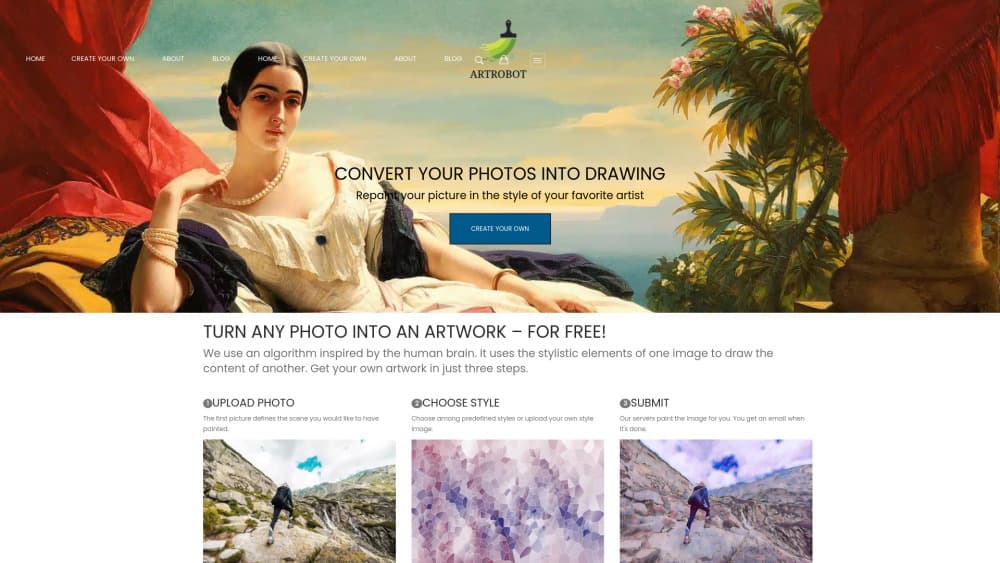
ARTROBOT turns photos into paintings with AI style transfer. Upload an image, pick one of the listed art styles or supply your own reference, and the finished picture arrives by email.
About ARTROBOT
What Is ARTROBOT
ARTROBOT is a browser based AI art generator built around one job: taking a photograph you already own and repainting it in the style of a painter, an era, or an image you supply. The homepage pitches it as AI art style transfer in three steps, and that is close to the whole product. If you want to turn photo into painting without picking up a brush, that is the whole offer. There's no editor with layers, no canvas to paint on, and nothing to install.
The method it describes is the classic one. One image provides the content, another provides the stylistic elements, and a neural network blends them. You can pick from the site's library of art styles or upload your own style picture. That second option matters, because a reference image gives you a look the preset list doesn't cover.
The limits show up quickly too. Processing runs on the company's servers, so you wait for a result instead of watching it paint. Free accounts start with a small credit balance, and the paid plans meter output by credits rather than by time. Watermark free 4K files sit on the top plan only, so anyone printing a poster should read the pricing table before uploading a batch.
Getting Started
- Register an account on artrobot.ai. New signups get 10 credits, which the site describes as three times what a visitor without an account receives.
- Upload the photo you want to have repainted. Family shots, pets, landscapes and single portraits all work, and the site groups styles by subject if you want a starting point.
- Choose an art style from the library, or upload your own reference image if you have a specific painting in mind.
- Submit the job and close the tab. ARTROBOT emails you when the artwork is ready, so there's no reason to sit and watch a progress bar.
- Download the result from your gallery. Paid plans unlock higher resolution exports, phone wallpapers and profile avatars sized for each platform.
Product Information
A quick look at ARTROBOT's pricing, supported platforms, and performance.
Best for
The users, tasks, and scenarios where this tool fits best.
Users
- People with a photo and no painting skills
- Gift shoppers on a deadline
- Hobbyists testing styles before they commit
Tasks
- Turning a phone photo into wall art
- Making matching profile avatars
- Restyling a pet portrait
Scenarios
- A last minute birthday present
- Testing a look for a real commission
- Sorting a holiday photo backlog
Key features
Style Transfer From a Photo
This is the core function, and it works the way the name suggests. One image supplies the content, a second supplies the style, and the network redraws the first in the manner of the second. You keep the composition of your photo and swap the rendering, which is why a snapshot of a street can come back looking like a painted study of that street.
A Library of Art Styles
The site's navigation lists 129 art styles, grouped into eras and movements running from Renaissance and Baroque through Impressionism, Cubism, Pop Art and Ukiyo-e, plus modern looks like pixel art, anime and cartoon. Artist pages cover names such as Da Vinci, Van Gogh, Monet and Bob Ross. It's a browsing experience, not a spec sheet, and that suits a photo to painting tool.
Upload Your Own Reference Style
Presets run out fast once you have a specific picture in mind. ARTROBOT lets you upload the style image yourself, so a museum photo, a book cover or a fabric pattern can become the visual target. This is the feature that separates the product from one-tap filter apps.
Style Suggestions by Subject
Pet portrait, family portrait, single portrait and scenic view pages each get their own section with styles that tend to work on that subject. Pets and group shots are the usual failure cases for style transfer, so having a curated shortlist removes some of the guesswork from the first run.
Email Delivery and Cloud Gallery
Jobs run on the server, and the site emails you when the artwork is done. Finished pieces stay in a cloud gallery tied to your account, so you can come back weeks later and pull the same file without rerunning the job.
Export Formats for Screens and Print
Exports include HD files on the entry plans and 4K files with no watermark on the Pro plan, along with avatar crops and phone wallpapers. For anyone turning a photo into a painting to hang on a wall, the 4K export and the commercial license are the two lines worth checking.
Pros and cons
Pros
- Three steps from upload to result, with no editor to learn and no plugin to install.
- The custom reference upload takes it past preset filters and into real style transfer.
- Email notification means you can submit a job and get on with your day.
- Subject based style suggestions cut down on wasted credits from styles that don't suit the photo.
- A cloud gallery keeps past work retrievable instead of forcing a rerun.
Cons
- Credits run out. Every render costs one, and the cheapest plan covers 50 a month, so a large batch needs the $40 tier.
- The Pro plan is the only one that removes watermarks and adds a commercial license, which rules out selling prints on the cheaper tiers.
- Rendering happens on their servers, so turnaround depends on queue load and there's no offline option.
Frequently asked questions
ARTROBOT repaints a photo in an artistic style. You upload an image, choose a style from its library or upload your own reference picture, and the service returns a new file rendered in that style.
Related content
Explore related tools, skills, and articles for ARTROBOT.
ARTROBOT Alternatives

Google EmbeddingGemma 2
Google DeepMind · Writing · Image · CodingGoogle EmbeddingGemma 2 is a 740M-parameter open model that turns text, code, images, audio, and video frames into vectors in one 768-dimension space, running on phones and laptops.

Tractionwave
TractionWave · Image · MarketingTractionWave is an AI attention heatmap tool for static ads. Upload a PNG or JPG and it returns predicted attention, ranked hotspots, and fixes before you spend budget.

Imejis.io
Imejis.io · Image · MarketingImejis.io is an AI design studio for agents and marketing teams. Describe an image in plain words, and it writes the copy, builds the layout, reflows it to every size, then exports a finished file.