

AVA | AI
AVA (getava.io) · AI Assistant · Chatbot
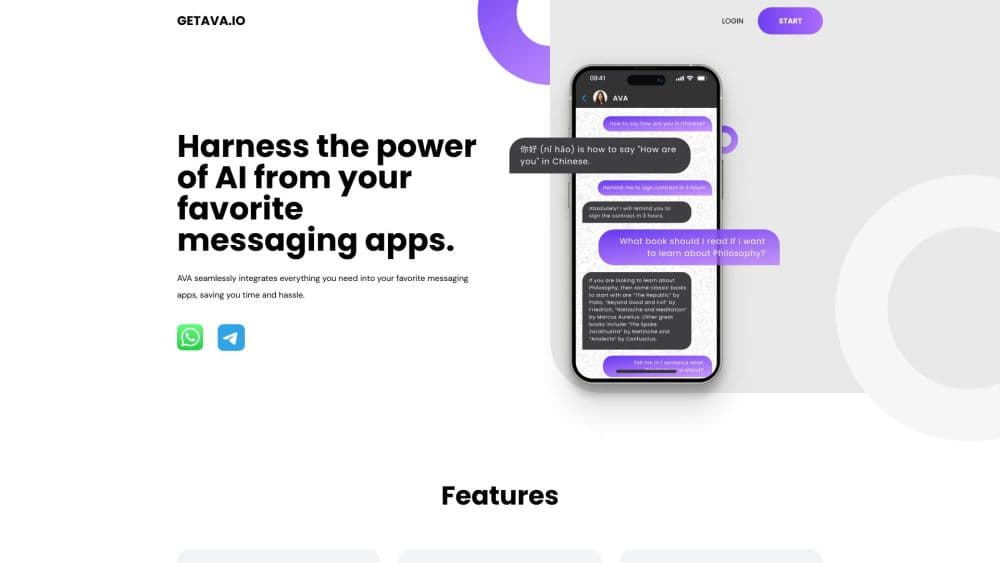
AVA was an AI assistant that lived inside WhatsApp and Telegram, handling chat, voice note transcription, YouTube summaries, and reminders from one thread.
About AVA | AI
What Is AVA
AVA was an AI messaging assistant from getava.io that turned a chat app into a workspace. You added one contact, sent a message, and got answers, transcripts, and summaries back in the same thread. There was no dashboard to learn and no browser tab to keep open. The pitch was simple: meet the assistant where you already spend your day.
The assistant covered the small jobs that eat an afternoon. A 40 minute YouTube video became a few paragraphs. A rambling voice note became readable text in another language. A reminder landed in the chat where you would actually see it. For people who live in WhatsApp, that combination saved more time than a more capable tool behind a login screen.
The limits showed up fast. AVA ran on OpenAI's Davinci generation of models, which dates the product to 2023. It worked only through messaging apps, so long documents and file handling were out. And the service is no longer running: as of October 2026, the getava.io domain redirects to an unrelated site, and the assistant does not respond. Treat this page as a record of what AVA offered, not a live buying guide.
Getting Started
- Open getava.io and pick a plan: Free, Individual, Team, or Enterprise.
- Create an account with your email address and a password.
- Connect the messaging app you use, then send AVA your first message to start a thread.
- Forward a YouTube link or a voice note to see how the assistant handles longer input.
Product Information
A quick look at AVA | AI's pricing, supported platforms, and performance.
Best for
The users, tasks, and scenarios where this tool fits best.
Users
- Heavy WhatsApp users
- Students working through lecture videos
- Small teams sharing updates
Tasks
- Summarizing long videos
- Reading voice messages in another language
- Setting one-off reminders
Scenarios
- Commute research
- Client conversations across time zones
- Quick errands
Key features
Chat Without Leaving the App
AVA worked as a contact inside WhatsApp and Telegram. You sent plain messages and got replies in the same thread, which meant no new interface and no separate login for daily use. The AI messaging assistant handled follow-up questions in context, so you could ask it to shorten an answer without restating the request.
YouTube Video Summaries
The YouTube video summarizer ran a four step process: transcribe the audio, extract key phrases, select the sentences that carried the main points, then trim the result for length. It was built for a quick overview, not for note taking. Videos with clear speech and a single speaker came out well. Panel discussions with overlapping voices did not.
Voice Message Transcription and Translation
Forward a voice note and AVA returned text, with translation available for messages in another language. This was the feature that made the assistant worth keeping for anyone who trades voice messages all day. Transcription quality depended on the recording: fast talkers, strong accents, and street noise all hurt the output.
Reminders That Fire Where You Chat
Instead of a separate calendar app, AVA set reminders through conversation and delivered them as messages. That placement matters more than it sounds, because a reminder in a chat you check hourly gets seen, and a notification in an app you open weekly does not. One-off reminders worked; repeating schedules were limited.
Encryption on Every Plan
Even the free tier included end-to-end encryption according to the pricing page. For people forwarding work voice notes and personal messages to an AI, that detail carried weight. It did not change what the assistant could do, but it lowered the hesitation around sending sensitive audio.
Pros and cons
Pros
- No new app to install: the assistant lives inside WhatsApp and Telegram.
- Voice message transcription with translation covers a real daily need for international teams.
- Free tier exists, with 10 messages a month for testing before paying.
- End-to-end encryption is included on every plan, not just the paid ones.
- Pricing is flat per user, from $9 to $21 a month, with no usage metering to watch.
Cons
- The service is offline. The getava.io domain no longer serves the assistant, so new users cannot sign up.
- No API, which rules out building AVA into your own product or automation.
- Answers ran on older Davinci era models, so reasoning and long context lag behind current assistants.
- Messaging only. There was no file upload, no document workspace, and no screen sharing.
Frequently asked questions
AVA is an AI assistant that worked through messaging apps rather than a website dashboard. You chatted with it in WhatsApp or Telegram and it handled summaries, transcripts, translations, and reminders.
Related content
Explore related tools, skills, and articles for AVA | AI.
AVA | AI Alternatives
Agibot
Agibot · Productivity · AI Assistant · ChatbotAgibot is a personal AI agent for Mac that keeps running after you close the window, runs routines on a schedule, and works from Telegram or Slack with your own API keys.

Foley
Hanamori Labs, LLC · Voice & Language · Productivity · AI AssistantFoley is a voice to-do list that turns a spoken sentence into a filed task, complete with project, date and time, then helps you plan the day around what is already there.

Ghost Core
Ghost · Productivity · AI AssistantGhost Core is a $3,499 screenless personal AI computer that runs local AI models on its own hardware, builds context from your apps and devices, and acts without waiting for a prompt.