

Bad Workflows
Oli Frost · Productivity · AI Assistant
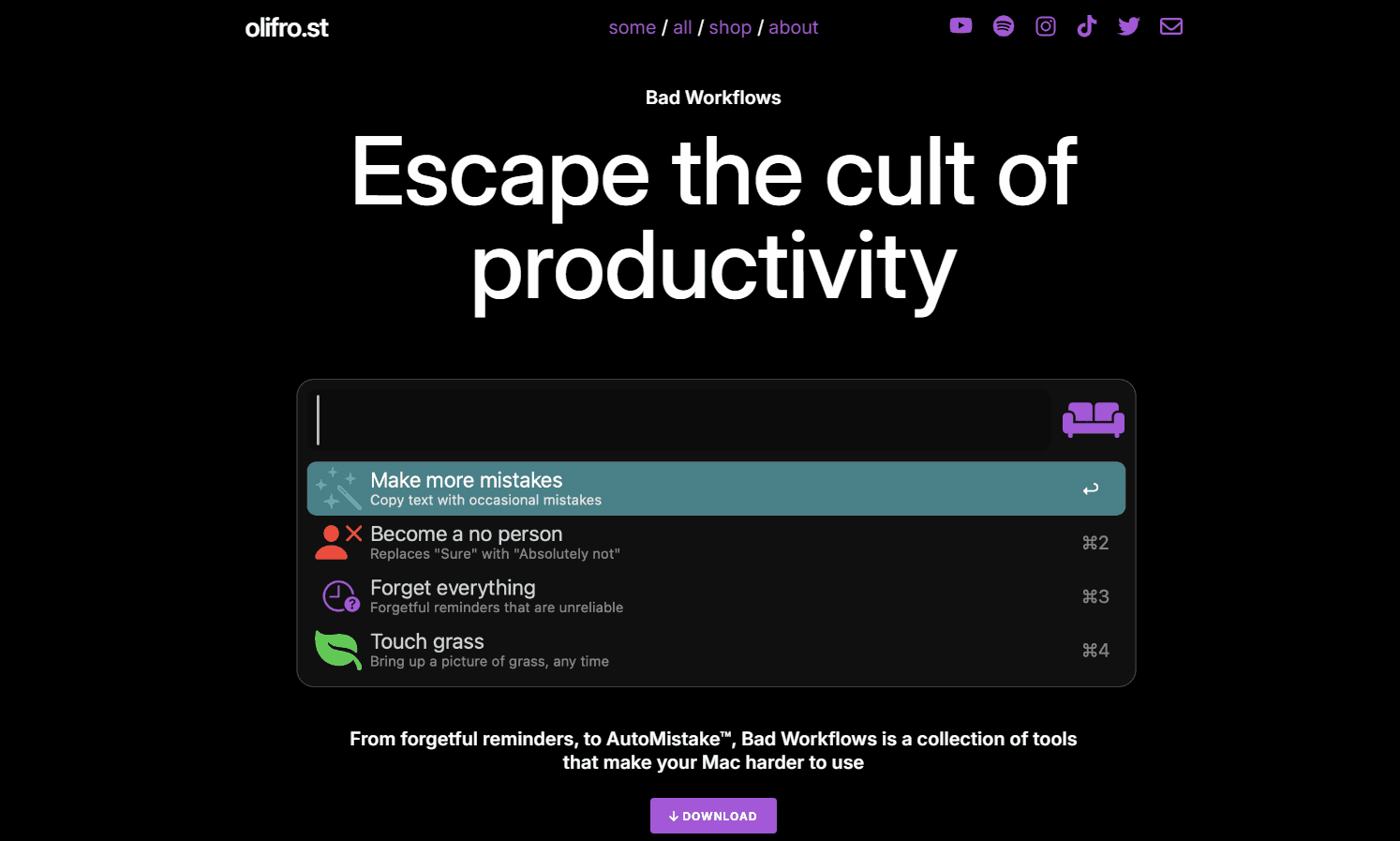
Bad Workflows is a free collection of Mac tools by Oli Frost that make your computer harder to use on purpose, from AutoMistake typos to a space bar that screams.
About Bad Workflows
What Is Bad Workflows
Bad Workflows is a satirical toolset for Mac that does the opposite of every productivity app. Oli Frost built it around a simple joke: if software is sold on making you faster, what happens when it makes you slower? The answer is a set of nine small tools that sabotage your day in amusing ways, from reminders that forget to a to-do list that deletes itself.
The collection targets people who spend their lives inside productivity software and want a break from the grind. Nothing here is a real business tool, and that's the point. Think of it as productivity satire dressed as a Mac app, or a set of anti-productivity tools you install on purpose. It runs on Alfred, the Mac launcher, so each workflow is a command you trigger rather than an app you keep open. The tools are free, and Frost describes them as an escape from what he calls the cult of productivity.
There are limits worth knowing before you install anything. Bad Workflows is Mac only, and it needs Alfred with the Powerpack license, which is a paid add-on to Alfred itself. Some workflows go as far as shutting down your Mac or moving your files to random folders, so the fun comes with real consequences if you trigger one by accident.
Getting Started
- Install Alfred on your Mac and activate the Powerpack, since every workflow depends on it
- Download the Bad Workflows collection from the official page and open the workflow files to add them to Alfred
- Trigger a tool by typing its keyword in Alfred, such as the copy tool or the to-do list
- Watch what happens, undo the damage where you can, and pick the tools you want to keep
Product Information
A quick look at Bad Workflows's pricing, supported platforms, and performance.
Best for
The users, tasks, and scenarios where this tool fits best.
Users
- Productivity app skeptics
- Mac power users already running Alfred
- Content creators and streamers
- Developers and designers
Tasks
- Pranking a coworker's Mac
- Making a demo video
- Testing your own patience
- Breaking a copy-paste habit
Scenarios
- A friend keeps bragging about their productivity stack
- You need a five-second gag for a livestream
- You're filming a parody review of productivity tools
- Someone asks what the opposite of a productivity app looks like
Key features
AutoMistake
AutoMistake is the signature tool in the collection. It takes the text you have selected and rewrites it with the kinds of typos a tired human makes, swapping "because" for "becuase" and jumbling letters the way a real keyboard slip would. You trigger it through Alfred, so it becomes a one-keystroke way to add a human touch to text that otherwise looks too polished. It's the workflow most people try first, and it's the one the whole project is named after.
Screaming Space Key
This workflow makes your space bar play the Wilhelm scream, the stock sound effect used in film and TV for decades. Every time you hit the space key, the scream goes off, which makes typing anything a losing battle. It's a physical, audible gag rather than a visual one, and it works because the space bar is the key nobody thinks about until it betrays them.
The Worst To-Do List
Instead of tracking your tasks, this workflow deletes them. Anything you enter is either removed or replaced with aimless activities like pondering and stargazing. The joke lands hardest for anyone who lives in a task manager, because it strips out the one thing those apps promise to protect. You can still type an entry, and that's what makes it funny and infuriating at once.
Copy Text, Badly
The copy tool adds randomly generated errors to your copy and paste. Select text, run the workflow, and pasted content arrives with small mistakes baked in. Frost frames it as adding a human touch to copy that looks machine-perfect. In practice it's a way to make a clean document feel like it was typed by someone in a hurry.
Shutdown Progress
Opening apps like Zoom or Slack triggers an immediate system shutdown on your Mac. The name is the joke: the productivity progress you were about to make stops at the login screen. It's the most disruptive tool in the set, so it's also the one to install with care and remove fast if a scheduled call is coming.
Unorganise Your Files
This workflow takes the file you have selected and moves it to a random location on your disk. The file isn't deleted, but finding it again becomes a hunt through your folders. It targets people who keep a tidy desktop on purpose, and it turns that tidiness into work you didn't plan for.
Focus, Briefly
Setting a focus timer usually buys you deep work. Here it buys seven seconds, after which the workflow opens web games instead. The gag works because focus timers are sold as a serious way to protect your attention, and this one hands that attention straight to a browser tab.
Human Stupidity
Human Stupidity is a mock personal assistant. Frost describes it as imprecise, unhelpful and slow to reply, which is the reverse of how AI assistants are marketed. It sits alongside the other tools as a jab at the wave of assistants that promise to handle your work, and it answers with the opposite of efficiency.
Pros and cons
Pros
- Free to download, with nine distinct tools in a single collection
- Built on Alfred, so each tool runs as a quick keyword command rather than a separate app
- The gags are specific and well observed, which lands them better than generic "bad app" jokes
- Easy to pick one tool and ignore the rest instead of committing to the whole set
Cons
- Mac only, so Windows and Linux users are shut out
- Needs Alfred with the Powerpack, a paid license, before anything works
- Some tools shut down your Mac or move your files, which is a real risk if you trigger one by mistake
- No API, no integrations and no support beyond the download page, since it's a personal project rather than a product
Frequently asked questions
Bad Workflows is a free collection of Mac tools by Oli Frost that make your computer harder to use on purpose. It includes a copy tool that adds typos, a to-do list that deletes your tasks, a focus timer that lasts seven seconds and a space bar that plays a scream.
Related content
Explore related tools, skills, and articles for Bad Workflows.
Bad Workflows Alternatives

Base Code
Base44 (Wix) · Coding · ProductivityBase Code is a shared cloud development environment from Base44. Teammates describe changes to an existing GitHub codebase in chat, preview them live and send them back as pull requests.

Knocket
Knocket (Tencent RTC team) · Productivity · Business · ChatbotKnocket is a free live chat and contact page tool that lets visitors message you from your website, app, or a shareable link, with every reply handled from Telegram or one inbox.

FloorGen
Vinit Kumar (FloorGen) · Productivity · China AIFloorGen is a browser-based floor plan maker that turns a sentence or a sketch into an editable 2D plan and a 3D walkthrough. Export to PDF, DXF or video, and draw without an account.