
BasedLabs.ai
BasedLabs · Image · Video
BasedLabs.ai is an AI image and video generator that puts 50+ models from names like FLUX and Google Veo behind one account and one credit balance, with free tools and a built-in editor.
About BasedLabs.ai
What Is BasedLabs.ai
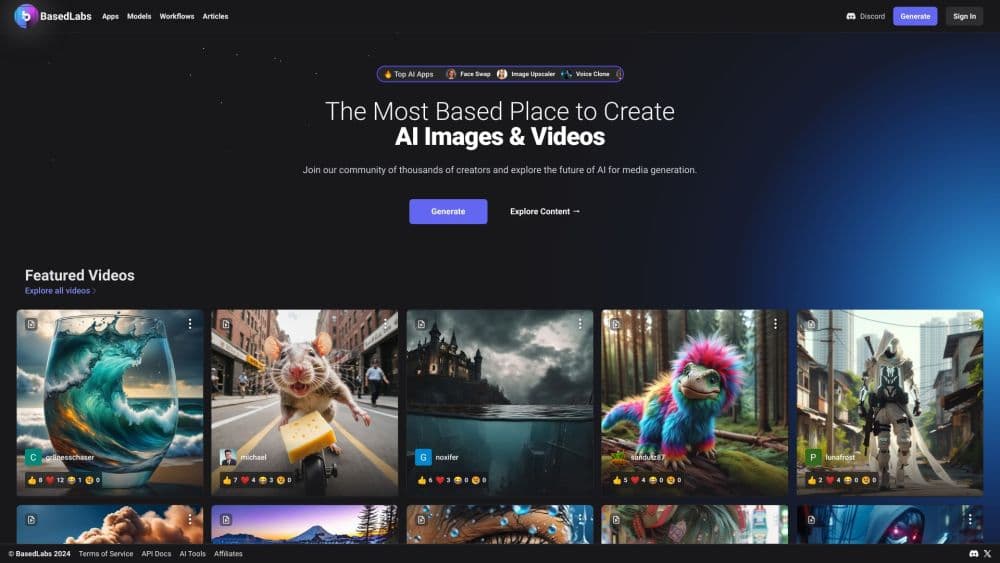
BasedLabs.ai is a web-based creative platform for AI image and video generation. It does not build its own models. Instead it gathers models from several providers into a single workspace, so you pick the tool that fits the job rather than juggling separate subscriptions.
The company launched in December 2023 and has grown quickly by leaning on free, shareable tools. Face swap, an AI baby generator, profile picture makers, and name generators pull in casual visitors, while the paid model credits serve regular creators.
The main limit is that access is credit-based. Every image, video second, or upscale draws from a shared balance, so heavy output adds up. There is no public API documentation either, and enterprise access runs through a sales contact rather than a self-serve key.
Getting Started
- Create a free account with an email address or a social login.
- Pick an Image or Video generator from the tools menu, then choose a model such as FLUX or Veo 3.1.
- Type a prompt, adjust settings, and generate. Credits are deducted per render.
- Edit the result in the built-in editor, or upscale and export it for social and commercial use.
Product Information
A quick look at BasedLabs.ai's pricing, supported platforms, and performance.
Best for
The users, tasks, and scenarios where this tool fits best.
Users
- Social media creators
- Indie marketers
- Casual hobbyists
Tasks
- Generating product or ad images
- Turning a script into a short clip
- Upscaling and editing existing assets
Scenarios
- Producing a batch of thumbnails for a channel
- Building a virtual influencer
- Testing an ad concept on a tight budget
Key features
One Workspace for 50+ Models
BasedLabs.ai gathers image and video models from multiple providers into a single dashboard. You can compare FLUX, Imagen, Nano Banana, Veo, Kling, and Wan without leaving the site. That saves the hassle of managing several provider accounts and separate bills.
Text-to-Image Generation
The AI image generator turns written prompts into visuals across several styles. FLUX Pro and Nano Banana Pro target photorealistic results, while Ideogram V2 and Recraft V3 handle text-in-image and vector work. Each model has its own credit cost, so you trade quality against spend per render.
Text-to-Video and Image-to-Video
The AI video generator creates clips from a prompt or a still image, with some models adding sound. Veo 3.1 sits at the premium end, while Wan 2.6 and Seedance cover stylized and budget options. Video credits scale with clip length, so longer shots cost more.
AI Face Swap
Face swap lets you drop one face onto another in an image or video. It is one of the free, shareable tools that brought in early users. Results depend on lighting and angle, so clean source photos give the best output.
Video and Thumbnail Editors
Built-in editors let you trim clips and design YouTube thumbnails without exporting to another app. The workflow stays inside the browser, which cuts the number of tools a solo creator needs to keep open.
Image Upscaling and Editing
Upscale tools raise resolution up to 4x, while GPT Image Edit and FLUX 2 Edit handle targeted changes. This is useful when a generated image is close but needs a sharper finish or a small fix before publishing.
Free Tools and Generators
A set of free utilities, including an AI baby generator, name generator, and profile picture maker, sits alongside the paid models. They act as a low-risk entry point and feed the broader platform.
Pros and cons
Pros
- Hosts 50+ image and video models from several providers behind one account and one credit balance.
- Free tier and free utility tools let new users try the platform before spending.
- Credits are pay-as-you-go, so you can top up rather than commit to a fixed monthly bill.
- Commercial use is included with paid plans, which suits creators selling their output.
- Built-in editors keep image, video, and thumbnail work in one browser tab.
Cons
- Costs are credit-based and differ per model, so a batch of premium renders can drain a balance quickly.
- There is no public API documentation, and enterprise access requires contacting sales.
- Video credits scale with duration, which makes longer clips noticeably more expensive than still images.
Frequently asked questions
Yes. You can sign up for free, use the free tools, and access 50+ models without a watermark on the free tier. Unlimited generation needs paid credits.
Related content
Explore related tools, skills, and articles for BasedLabs.ai.
BasedLabs.ai Alternatives

Google EmbeddingGemma 2
Google DeepMind · Writing · Image · CodingGoogle EmbeddingGemma 2 is a 740M-parameter open model that turns text, code, images, audio, and video frames into vectors in one 768-dimension space, running on phones and laptops.

Tractionwave
TractionWave · Image · MarketingTractionWave is an AI attention heatmap tool for static ads. Upload a PNG or JPG and it returns predicted attention, ranked hotspots, and fixes before you spend budget.

Imejis.io
Imejis.io · Image · MarketingImejis.io is an AI design studio for agents and marketing teams. Describe an image in plain words, and it writes the copy, builds the layout, reflows it to every size, then exports a finished file.