

BitePal: AI Calorie Counter
Pookies · Leaning · AI Assistant
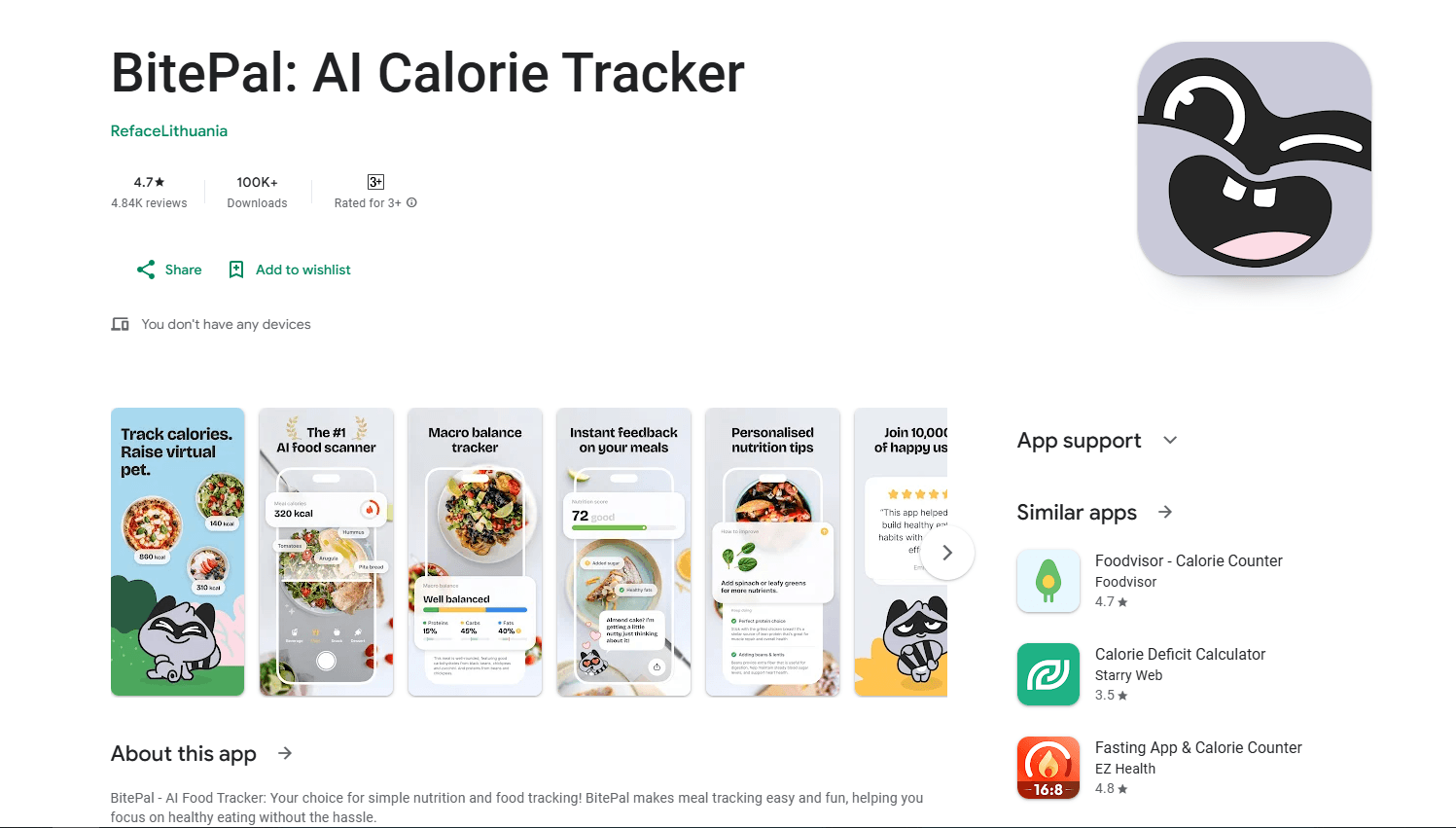
BitePal is an AI calorie tracker that logs meals from a photo and pairs macro tracking with a virtual raccoon companion that nudges you toward healthier choices.
About BitePal: AI Calorie Counter
What Is BitePal
BitePal is a mobile calorie and macro tracker built around a simple idea: point your camera at a plate, and let the app do the counting. The AI reads the food in the image and estimates calories alongside protein, carbs, and fat, so you skip the manual search and weighing that older trackers demand.
The hook is the raccoon. Instead of a sterile dashboard, BitePal gives you a virtual pet character that reacts to your meals and offers short nutrition tips. That companion angle is the product's whole pitch, aimed at people who quit calorie counting because the numbers felt like a chore. The site says its plans reach 1M+ users worldwide, and third-party app-intelligence firm Sensor Tower reported strong download and revenue growth through early 2026. We could not confirm those figures on the official site.
BitePal is the work of Pookies, the studio behind the photo and video app Reface. It runs on iOS, Android, and the web, and it's free to download with auto-renewing subscriptions for the full feature set. It also adds tools beyond basic logging, including an intermittent fasting tracker and a weekly statistics view that surfaces patterns in how you eat.
The main thing to know is scope. BitePal counts food and offers general nutrition tips. It does not diagnose, treat, or replace a dietitian, so it fits everyday weight and habit goals rather than clinical nutrition.
Getting Started
- Download BitePal from the App Store for iOS or Google Play for Android, then open the app.
- Complete the short onboarding and set goals such as weight, activity level, and a daily calorie or macro target.
- Log a meal by snapping a photo, picking an image from your library, or entering the food by text.
- Review the estimated calories and macros, then adjust servings or correct any item the AI misread.
- Check the raccoon's tips and your daily rings, and open the statistics screen to track progress over time.
Product Information
A quick look at BitePal: AI Calorie Counter's pricing, supported platforms, and performance.
Best for
The users, tasks, and scenarios where this tool fits best.
Users
- Beginners who find food databases overwhelming
- People who quit calorie counters before
- Gym-goers watching macros
- Anyone trying intermittent fasting
Tasks
- Logging a meal from a photo
- Catching a habit pattern
- Setting up a fasting window
- Getting a quick nutrition nudge
- Tracking without spreadsheet math
Scenarios
- Lunch at a restaurant with no barcode to scan
- Kicking off a weight-loss routine after a long break
- Cutting weight for a sport or event
- Testing fasting for the first time
Key features
AI photo logging
The core of BitePal is photo-based calorie counting. You point your camera at a meal, the AI identifies the food, and it returns calories plus a macro split. The app supports logging by voice and text too, so a fast food entry doesn't depend on a good photo. For anyone who abandoned an older tracker because logging was slow, this is the piece that makes the habit stick.
Virtual raccoon companion
BitePal wraps the numbers in a raccoon character that responds to your meals and shares short, everyday nutrition tips. The idea is to replace guilt with encouragement, which matters because most calorie counting apps lose users the moment tracking starts to feel like pressure. The companion, a virtual pet in place of a sterile dashboard, is the clearest reason to pick BitePal over a plain food tracker.
Macro tracking with daily rings
Each logged meal feeds a daily calorie ring and separate protein, carb, and fat rings. Seeing the four rings fill gives an instant read on your pace, which is more useful than a raw list of entries. It's aimed at users who care about body composition, not just a calorie ceiling.
Intermittent fasting tracker
BitePal includes an intermittent fasting feature alongside food logging. You set an eating window and the app tracks it, so a fasting routine and a food log live in one place instead of two apps. That combination suits people who pair time-restricted eating with calorie monitoring.
Progress statistics
A dedicated statistics screen charts your intake over days and weeks so patterns surface. Rather than guessing why the scale stalled, you can look back and see which meals accounted for the excess. It turns a pile of logged meals into something you can actually act on.
Simple onboarding and targets
The setup is short: you enter your goal, body details, and activity level, and BitePal builds a calorie and macro target to work against. A guided target removes the guesswork for first-time trackers, who otherwise stall at the step of figuring out how much to eat.
Pros and cons
Pros
- This photo calorie counter cuts the manual entry that makes most calorie counting apps feel like work.
- The raccoon companion adds a motivational layer, which helps users stay consistent past the first week.
- Calories plus protein, carbs, and fat are tracked per meal, so it suits macro goals and not just calorie limits.
- An intermittent fasting tracker sits in the same app, so time-restricted eating and food logging don't need separate tools.
- It runs on iOS, Android, and the web, and the download is free with subscriptions for full access.
Cons
- It doesn't publish a price list on the site, so you can't see what a subscription costs without opening the app or checking the store listing.
- AI photo estimates are not exact, and portion sizes are the hardest part to read, so tallies can drift unless you correct entries.
- It offers general nutrition tips only, so anyone managing a medical condition still needs a dietitian's guidance.
Frequently asked questions
BitePal is an AI calorie tracker that logs meals mainly from photos. The app identifies the food in the picture and estimates calories, protein, carbs, and fat, and it adds a virtual raccoon companion that shares simple nutrition tips.
Related content
Explore related tools, skills, and articles for BitePal: AI Calorie Counter.
BitePal: AI Calorie Counter Alternatives

HireKey
HireKey · Voice & Language · Productivity · LeaningHireKey is an AI job search copilot built by a former tech recruiter. It checks role fit, tailors resumes, runs interview practice and tracks every application.

Lune
Retrograde Labs · Productivity · LeaningLune is a research search engine for scientific AI agents. It runs as an MCP server that lets Claude, ChatGPT and Cursor search peer-reviewed computer science papers and cite them.
Coddy
Coddy · Coding · LeaningCoddy is a gamified platform to learn to code through short interactive lessons in 20+ languages, with a browser editor, an AI tutor and free certificates.