

Blood Sugar Journal
Dmitry Mashkin · AI Assistant
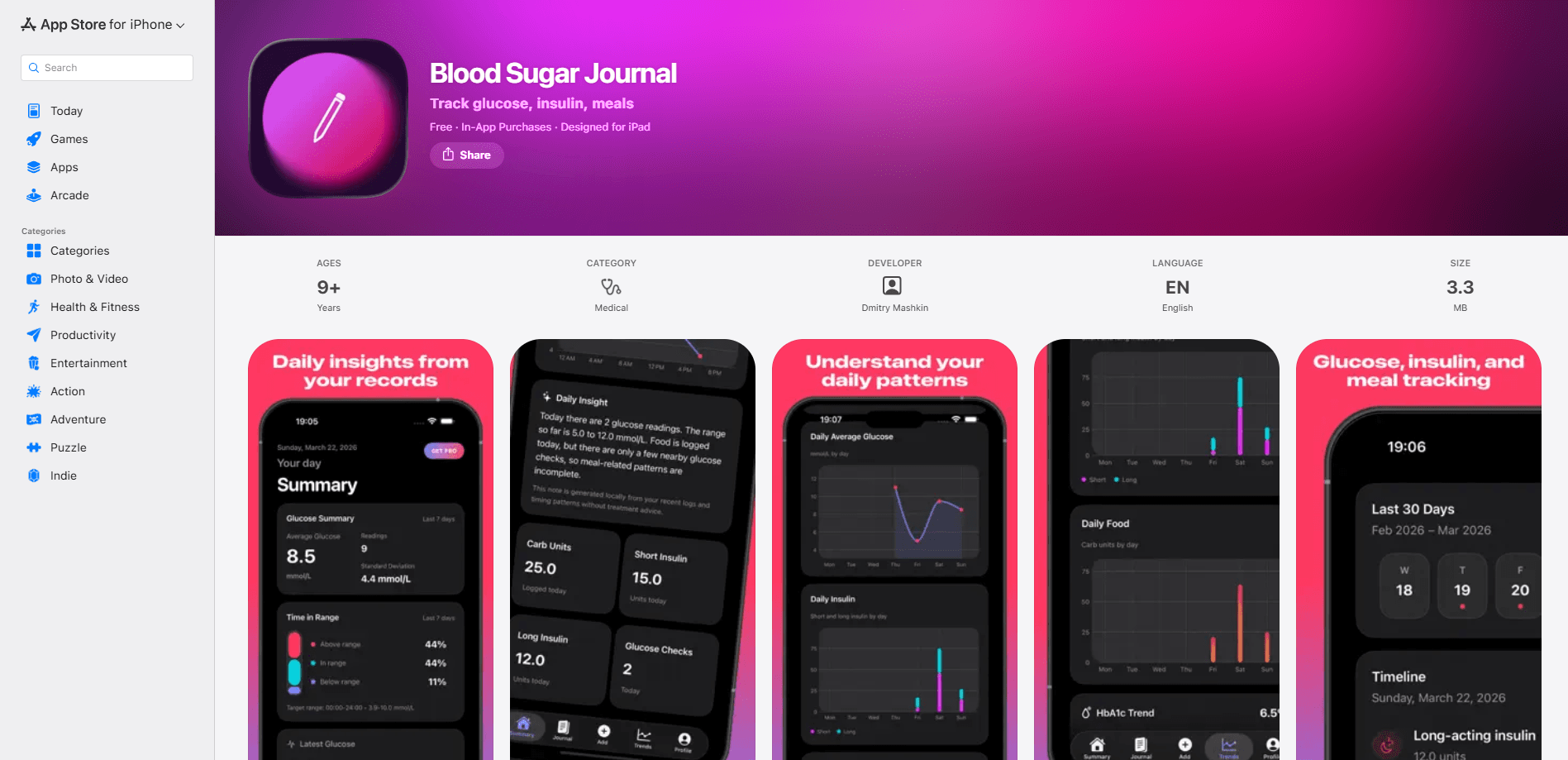
Blood Sugar Journal is a note-taking style diabetes tracking app for iPhone, iPad, and Apple Watch that lets you log glucose readings, insulin doses, meals, carbs, and HbA1c values in one place. The free version covers the core diary, charts, PDF export, and on-device observations, while a Pro tier adds AI-written summaries of your journal data. It suits people who want a clear picture of their daily patterns without a heavy medical workflow.
About Blood Sugar Journal
What Is Blood Sugar Journal
Blood Sugar Journal is a personal blood glucose diary built by independent developer Dmitry Mashkin. It doubles as an insulin tracker and handles the everyday job of writing down what you eat, what you inject, and what your meter says. Then it turns those entries into charts and simple observations so you can spot patterns across days.
The app is deliberately not a medical tool. It doesn't give treatment advice, doesn't suggest doses, and won't replace your doctor or diabetes educator. What it does well is keep your numbers organized and readable, which matters when you're trying to explain a rough week to a clinician.
Everything you enter stays on your device. There's no account to create, and the free tier is genuinely usable rather than a locked demo. So what's the catch? The main limitation is platform. It's an iOS-only app, so Android users are out of luck.
Getting Started
- Download Blood Sugar Journal from the App Store and open it. No sign-up or login is required to start.
- Add your first glucose reading by tapping the log button and entering the value. The app supports manual entry, so you type what your meter shows.
- Set up separate entries for short-acting and long-acting insulin, plus any meal or carb notes you want to compare against your readings.
- Save your most recent HbA1c result so the app can track it alongside your daily numbers.
- Open the daily overview to see your latest value, the day curve, and recent observations, then export a PDF when you need to share data with your care team.
Product Information
A quick look at Blood Sugar Journal's pricing, supported platforms, and performance.
Best for
The users, tasks, and scenarios where this tool fits best.
Users
- People managing type 1 diabetes
- People with type 2 or prediabetes
- Caregivers and family members
Tasks
- Tracking daily glucose readings
- Comparing meals against glucose changes
- Preparing for a doctor's visit
Scenarios
- A week where your readings swing a lot and you want to see the pattern on one screen.
- Reviewing how a new meal routine affects your morning numbers over a couple of weeks.
- Keeping a running HbA1c trend next to your daily entries so the long-term picture isn't lost.
Key features
Glucose, Insulin, and Meal Logging in One Timeline
The core of the app is a single chronological feed where every entry carries a time and a type. You log glucose values, short-acting and long-acting insulin separately, and meals with carb counts. Keeping insulin types apart is the useful part: it turns a messy glucose log into something you can actually read. It lets you compare rapid doses against long-acting ones when you look back at glucose changes. Entering a value takes a few seconds. That's the whole point of a daily diary.
Daily Overview and Trend Charts
The daily overview gives you your latest glucose value, the day curve, and a few recent observations the moment you open the app. Weekly views show how readings shift across recent days. That's more useful than any single number. Charts are clean and readable rather than packed with dense analytics, so you can glance at your phone and get the shape of your day.
HbA1c Tracking Alongside Daily Records
Think of it as an HbA1c tracker that sits right next to your daily entries. You store HbA1c results and follow the long-term trend without switching screens. Seeing the three-month average in the same view as your day-to-day readings helps you connect the two, especially when a good HbA1c hides a lot of daily swings. It's a small feature. It also fixes a common complaint about logbooks that treat long-term and daily data as separate worlds.
On-Device Observations and AI Summaries in Pro
The free version produces simple on-device summaries based on your recent data and event timing. These run locally, so nothing leaves your phone. Blood Sugar Journal Pro adds AI-written text summaries built from your journal data, focused on patterns and context rather than treatment advice. If the free observations feel too basic, the Pro summaries are the main reason to consider paying.
Pros and cons
Pros
- No account or login required, so you can start logging within seconds of installing.
- Free tier includes the core diary, charts, PDF export, and local insights, which is more than many diabetes trackers give away.
- Separate logging for short-acting and long-acting insulin makes comparing doses against glucose changes straightforward.
- Available on iPhone, iPad, and Apple Watch, so entries aren't tied to one device.
- Data stays on your device, which matters for anyone uneasy about health data leaving their phone.
Cons
- iOS only, so there's no Android version and no way to use it on a Windows or Android tablet.
- All glucose values are entered manually. There's no direct CGM sync, which means the app is only as accurate as what you type in.
- No public API, so you can't pull your journal into another health tool or automate your own reports.
- Pro unlocks AI summaries, so the most interesting analysis sits behind a subscription.
Frequently asked questions
It's a manual diabetes logbook for iOS. You enter glucose readings, insulin doses, meals, carbs, and HbA1c values, and the app turns them into charts, trends, and short summaries so you can spot patterns over time.
Related content
Explore related tools, skills, and articles for Blood Sugar Journal.
Blood Sugar Journal Alternatives

Iplan AI
Iplan AI · Productivity · AI AssistantIplan AI is an AI travel planner that turns a few trip details into a full day-by-day itinerary in seconds. You answer questions about your destination, interests, budget, and travel companions, and the tool builds a plan you can edit, share, and carry with you on any device. It targets travelers who want a solid draft without spending hours in spreadsheets and browser tabs. Think of it as an itinerary generator that does the tedious part for you.

Screenhelp
Screenhelp · Productivity · AI AssistantScreenhelp is an AI screen assistant that turns a single keyboard shortcut into real-time help. You press Ctrl+Shift+Space, it captures what's on your screen, and it streams an answer into a private panel in about two seconds. Think of it as an AI screenshot helper you trigger on demand. It runs on Mac, Windows, and the web, starts free with 30 answers a month, and stays invisible during screen sharing on Zoom, Teams, and Google Meet.

Rainbow
Rainbow · AI AssistantRainbow is an AI weather forecast app built around short-term precipitation nowcasting. Its engine pushes min-by-min rain and snow predictions up to four hours ahead, blending live satellite and radar feeds into hyperlocal forecasts. The app adds live rain radar, a seven-day outlook, precipitation alerts, home-screen widgets, and a hurricane tracker, and it runs on both Android and iOS with a free tier plus paid upgrades.