

BloxGPT
BloxGPT · Productivity · Chatbot
BloxGPT is an AI canvas where ChatGPT-style blocks, notes and images share one infinite board. Teams use it to brainstorm and keep research in view instead of juggling browser tabs.
About BloxGPT
What Is BloxGPT
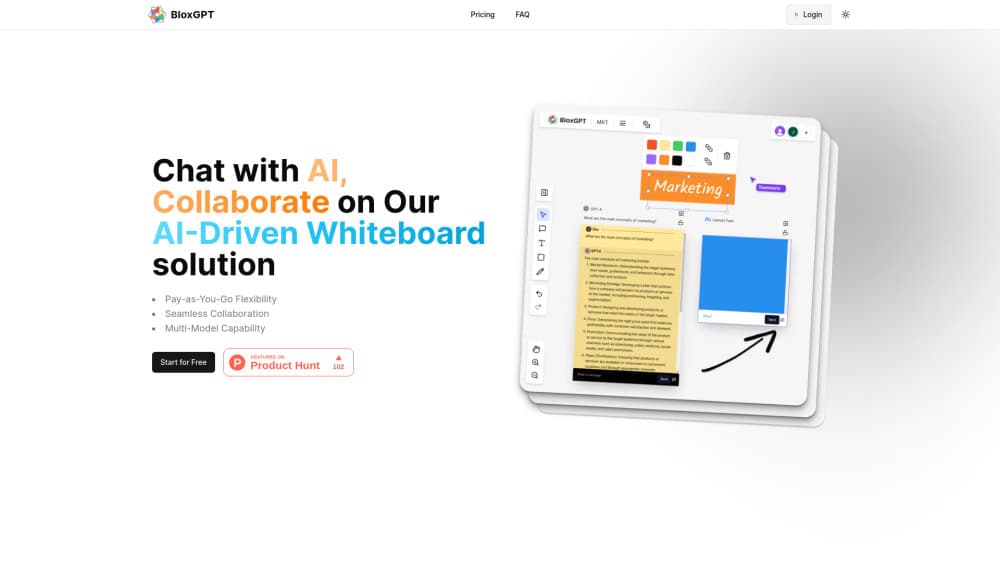
BloxGPT is a browser workspace built for people who spend the day in AI chat and lose track of what came back. Each conversation sits in its own movable block on an infinite canvas. You drag blocks where you want them, drop notes beside them, and keep a whole project visible at once.
For a team that meets every week, that makes it an AI brainstorming tool with a memory. A prompt and its answer can sit next to a competitor screenshot, a half-written outline and a note from a call. Group the pieces, zoom out, and the shape of the thinking becomes obvious. Product Hunt commenters kept making the same point at launch: it replaces ten open tabs with one board.
BloxGPT sells AI usage by coins rather than by monthly seat. New accounts start with 500 coins, billed against tokens as models produce answers. Coins don't expire, so a light month costs nothing beyond what you already bought. That model also means heavy usage has no ceiling and no discount, which separates it from flat subscriptions.
Two limits matter before you commit. Everything runs in the browser, so there is no offline mode and no desktop app. And the free tier caps you at three boards, 200 layers and one team, which is fine for a trial and tight for ongoing work.
Getting Started
- Sign up with an email address and collect the 500 free coins.
- Create a board, then drag a GPT block from the toolbar onto the canvas.
- Type a prompt in the block, pick a model, and let the answer land next to your question.
- Add notes, images and extra blocks around it, then draw the links between ideas.
- Invite teammates into the board and edit the same canvas together.
Product Information
A quick look at BloxGPT's pricing, supported platforms, and performance.
Best for
The users, tasks, and scenarios where this tool fits best.
Users
- Product and marketing teams
- Students and researchers
- Solo founders and consultants
Tasks
- Comparing prompts
- Turning messy notes into a plan
- Running a remote workshop
- Drafting content variants
Scenarios
- Early project kickoff
- Competitive research
- Client workshops
Key features
Infinite Canvas With Movable Blocks
The board has no fixed page size, so a session can grow from three notes to sixty without hitting a wall. You pan and zoom to work at either scale, and layout stays where you put it. That freedom costs structure: a board left alone for a week turns into a pile unless you name blocks and group them early.
Drag and Drop GPT Blocks
Each block holds its own conversation, and you add one by dragging it from the toolbar. Questions and answers stay attached to the block, which makes an AI canvas behave more like a wall of index cards than a chat log. The approach suits comparison work, where the value comes from seeing several answers at once.
Notes and Images Beside the Chat
Plain notes and image layers live on the same surface as the AI blocks, with upload limits of 1MB, 4MB or 8MB depending on plan. A screenshot can sit directly under the prompt that produced it, so evidence and claim stay together. This is the part that turns the tool from a chat wrapper into an AI whiteboard for real project material.
Real-Time Team Collaboration
Several people can edit one board at the same time and see each other's cursors. Edits appear without a refresh, which matters during a live session where someone is talking and someone else is capturing. The free plan allows a single team; Starter raises that to ten and Business removes the cap.
Searchable, Structured Boards
Boards are searchable, so an old decision is findable without scrolling through weeks of canvas. Layers can be stacked up to 200 on the free plan and 1,000 on Starter, which is enough for a dense workshop. Structure is manual by design, and that is the honest trade: the tool gives you room, not an automatic filing system.
Coin Billing That Doesn't Expire
Token-based pricing runs through coins, with each model carrying its own input and output cost. You buy coins when you need them, and unused balance carries over indefinitely. For occasional users this is cheaper than a monthly seat. For daily users the meter runs with no volume discount, so watch the balance during long sessions.
Pros and cons
Pros
- One board replaces a row of browser tabs, so the context of a research session survives the day.
- Pay-as-you-go coins suit occasional users who can't justify another monthly subscription.
- Coins never expire, which removes the deadline pressure built into most credit systems.
- Real-time co-editing works smoothly enough for a live workshop with a remote team.
- Notes, images and AI answers share one surface, so evidence stays next to the claim it supports.
Cons
- The free plan stops at three boards and one team, so a real project pushes you to a paid tier quickly.
- Costs scale with tokens, which makes a long, chat-heavy session harder to predict than a flat fee.
- No desktop app or offline mode means the workspace disappears when the connection does.
- Board hygiene is entirely up to you, and busy canvases get messy without manual grouping.
Frequently asked questions
It is a workspace for AI-assisted thinking: brainstorming, research, prompt comparison and workshop notes all happen on one infinite canvas. Teams use it to keep AI output next to the material it refers to.
Related content
Explore related tools, skills, and articles for BloxGPT.
BloxGPT Alternatives

Base Code
Base44 (Wix) · Coding · ProductivityBase Code is a shared cloud development environment from Base44. Teammates describe changes to an existing GitHub codebase in chat, preview them live and send them back as pull requests.

Knocket
Knocket (Tencent RTC team) · Productivity · Business · ChatbotKnocket is a free live chat and contact page tool that lets visitors message you from your website, app, or a shareable link, with every reply handled from Telegram or one inbox.

FloorGen
Vinit Kumar (FloorGen) · Productivity · China AIFloorGen is a browser-based floor plan maker that turns a sentence or a sketch into an editable 2D plan and a 3D walkthrough. Export to PDF, DXF or video, and draw without an account.