

BoltAI
BoltAI (Daniel Nguyen) · Productivity · Other
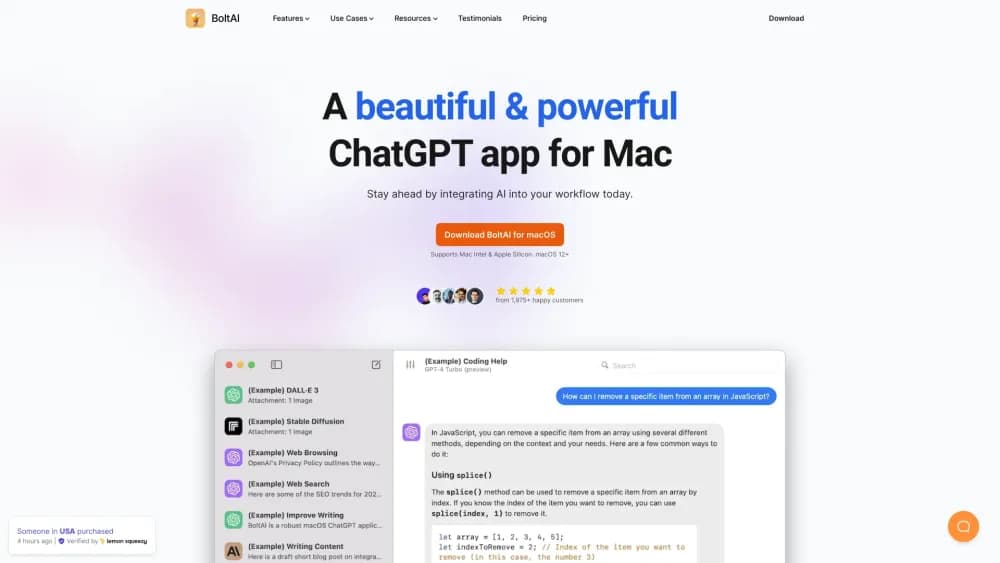
BoltAI is a native Mac AI app that runs OpenAI, Anthropic, Gemini, and local models in one window with your own API keys, adding projects, agents, MCP tools, and document analysis.
About BoltAI
What Is BoltAI
BoltAI is a desktop chat client for macOS that turns your own API keys into a single AI workspace. Instead of paying one subscription per model, you plug in keys from OpenAI, Anthropic, Google, Mistral, xAI, DeepSeek, or a local runner like Ollama and LM Studio, then switch models inside one native window.
That solves a specific annoyance. Most people already pay two or three AI vendors and still keep three browser tabs open to reach them. BoltAI puts those models behind one input box, with the generation settings and saved prompts you set once and reuse everywhere. The founder Daniel Nguyen has kept it an independent, self-funded product since 2023, and the changelog shows steady releases rather than occasional dust-offs.
The limits are worth knowing before you buy. It's Mac-first, with Windows marked as coming soon, so a mixed office gets an uneven rollout. Usage costs land on your own API bills, not in the app price. And because the app is a client and not the model provider, your experience depends on whichever vendor's rate limits and outages show up that day.
Getting Started
- Download BoltAI from the official site and start the 14-day trial, which includes every feature but no Cloud Sync.
- Add your AI services. Paste API keys for the vendors you already pay, or connect Ollama, LM Studio, or OpenRouter for models that run on another machine.
- Pick a model and send a first prompt. Use the shortcut to open Instant Chat over whatever app you're working in, so you never leave the window.
- Set up a project for recurring work, attach reference files, and give the project a default agent so new chats start with the right instructions.
- Buy a license when the trial ends, then sign in if you want chats and settings on more than one Mac.
Product Information
A quick look at BoltAI's pricing, supported platforms, and performance.
Best for
The users, tasks, and scenarios where this tool fits best.
Users
- People who already pay for two or more AI providers
- Developers and technical writers
- Privacy-conscious users
Tasks
- Reading long documents
- Explaining screenshots and UI bugs
- Drafting and rewriting inside other apps
- Building small reusable assistants
Scenarios
- A freelancer juggling several clients
- A researcher comparing models on the same question
- A developer testing local models
Key features
Multi-Model Chat with Your Own Keys
BoltAI's core promise is 300+ models in one app. OpenAI, Anthropic, Google Gemini, Mistral, xAI, DeepSeek, Qwen, Perplexity, Azure, and Amazon Bedrock all sit behind the same input box. You pay each vendor directly, so the model you pick doesn't depend on what a subscription plan allows. Switching a conversation to another model takes two clicks, which makes comparing answers on the same prompt genuinely practical.
Local Model Support and CLI Providers
Local options go through Ollama and LM Studio, so a model running on your own hardware appears next to the cloud ones. BoltAI also connects to coding agents through their command line tools, including Codex CLI, Claude Code, Gemini CLI, and GitHub Copilot. That combination is unusual in a chat app: hobbyists test small local models and developers reach their terminal agents from the same window.
Projects, Folders, and Agents
Projects work as containers for context. Each one can hold linked files and folders from your Mac, a default agent, its own prompt mode, and attachments that stay connected across a conversation. The app can read AGENTS.md, AGENT.md, and CLAUDE.md from a linked folder, so instructions already written for a coding tool carry over. Chats can also be forked to explore a different direction without losing the original thread.
Document Q&A and Multimodal Input
PDF, PowerPoint, Word, and Excel files can be attached and queried, and the answers come back as structured text rather than a wall of quoting. Vision models handle images and screenshots, image generation runs in the same chat, and ShotSolve is built for the drop-a-screenshot case where you want an error explained. Attachments stay linked as the conversation continues, which matters for long research sessions.
Agents, MCP Tools, and Code Execution
Agents in BoltAI carry their own instructions, model choice, and tool access, so a code review agent and a translation editor agent behave consistently. MCP support connects external servers, which means databases, file systems, or search services can be called from inside a chat. A code interpreter runs scripts and processes files without leaving the app, and Claude Skills can read and build Office documents.
Privacy, Local Storage, and Pricing Model
Chats are stored on your Mac, API keys live in Apple Keychain, and the vendor says it doesn't collect or analyze your data. The pricing model is the other differentiator: a one-time payment covers lifetime access to the version you bought, with one year of updates included, and renewals are optional at a discount. Essential runs $79 for one Mac, Pro $99 for two desktops plus one mobile device, and Pro+ $199 for three desktops and two mobile devices.
Pros and cons
Pros
- One interface covers cloud models, local models, and CLI agents, so you stop juggling browser tabs and separate apps.
- A one-time purchase with optional discounted renewals costs less over two years than most per-model subscriptions.
- Chats and keys stay on your machine, which is a real difference for client work and anything under NDA.
- Projects, linked folders, and per-project default agents make long-running work easier to pick back up.
Cons
- Windows is still listed as coming soon, so a mixed Mac and PC team can't standardize on it yet.
- Model usage bills land on your own accounts, and heavy users can spend more on API tokens than a flat subscription would cost.
- Cloud Sync requires a license and pauses when support and updates lapse, which surprises people who expect syncing to be free forever.
- Setup takes more effort than a consumer chatbot: without API keys, the app has nothing to run, and a vendor outage or rate limit hits you directly.
Frequently asked questions
BoltAI is a Mac app for running AI models from several providers in one place. It works as a native macOS AI client where you bring your own API key, then chat, analyze documents, run agents, and switch models without opening a browser or paying a separate subscription per vendor.
Related content
Explore related tools, skills, and articles for BoltAI.
BoltAI Alternatives

Base Code
Base44 (Wix) · Coding · ProductivityBase Code is a shared cloud development environment from Base44. Teammates describe changes to an existing GitHub codebase in chat, preview them live and send them back as pull requests.

Knocket
Knocket (Tencent RTC team) · Productivity · Business · ChatbotKnocket is a free live chat and contact page tool that lets visitors message you from your website, app, or a shareable link, with every reply handled from Telegram or one inbox.

FloorGen
Vinit Kumar (FloorGen) · Productivity · China AIFloorGen is a browser-based floor plan maker that turns a sentence or a sketch into an editable 2D plan and a 3D walkthrough. Export to PDF, DXF or video, and draw without an account.