

Bookaroozie
Bookaroozie · Productivity
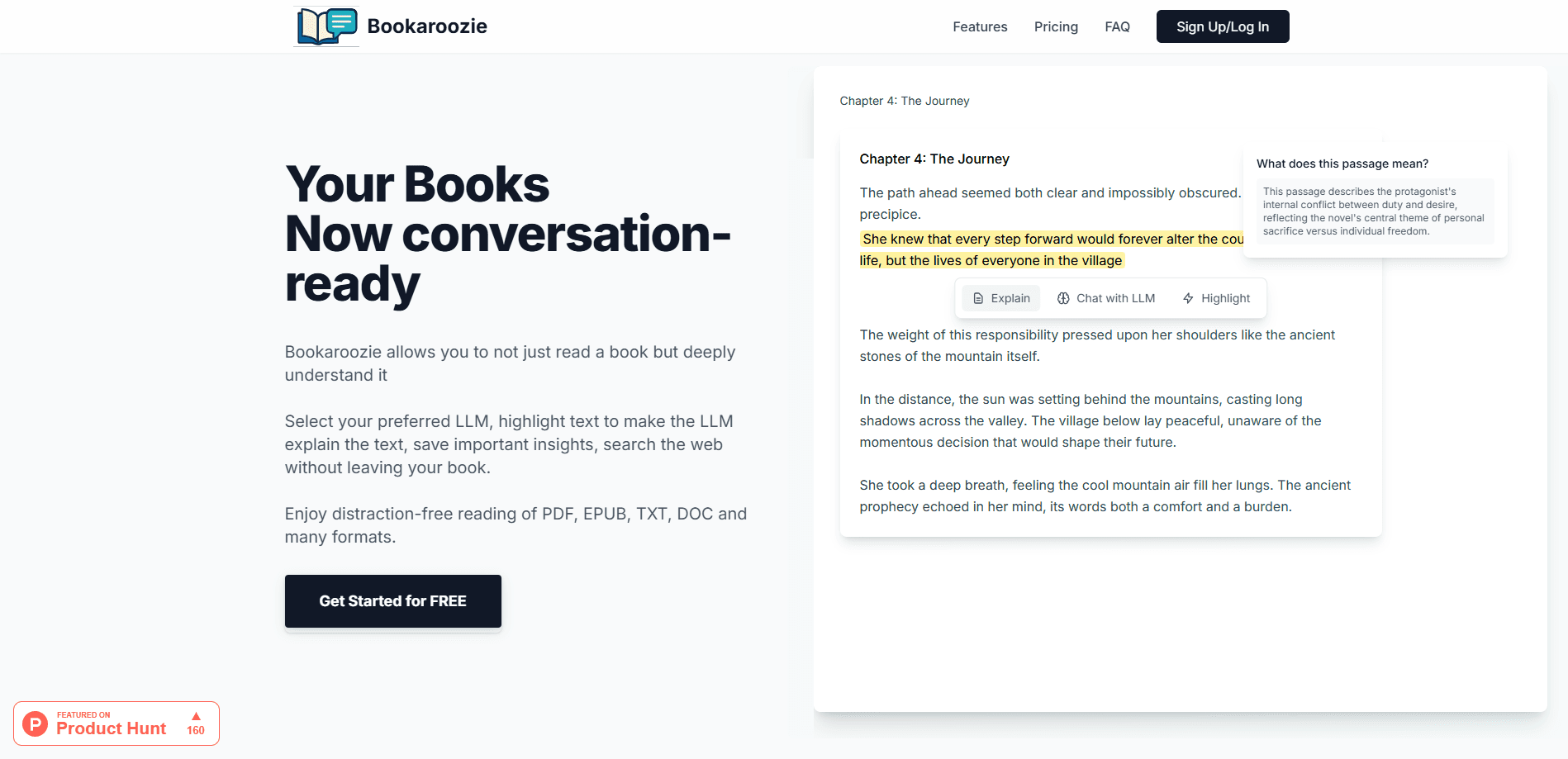
Bookaroozie is an AI book reader that turns PDF, EPUB, and MOBI files into an interactive reading session, letting you ask AI about a book by highlighting any line.
About Bookaroozie
What Is Bookaroozie
Bookaroozie is a web-based interactive reading companion for people who get stuck inside dense documents. Think of it as an LLM reading companion: instead of scrolling past a paragraph you don't follow, you highlight it and ask the AI what it means. The answer shows up next to the text, so you keep your place and your focus.
It handles the file types most readers actually have lying around: PDF, EPUB, MOBI, TXT, and DOC or DOCX. That matters because Kindle-style readers tend to choke on PDFs, while PDF tools rarely open a proper ebook. Bookaroozie sits in the middle, and if you need to explain a PDF passage, it reads both.
The trade-off is that it runs in a browser, so there's no dedicated mobile app and no offline mode. You also need internet for AI answers, since the explanations come from cloud language models rather than a local one. Selectable text is required too, which rules out scanned PDFs that are really just images.
Getting Started
- Open bookaroozie.com in your browser and create a free account.
- Pick the language model you want to use for explanations and questions.
- Upload a book or document in PDF, EPUB, MOBI, TXT, or DOC format.
- Highlight a passage, then ask the AI to explain it, summarize it, or connect it to another idea.
- Save any insights worth keeping, or search the web without closing your book.
Product Information
A quick look at Bookaroozie's pricing, supported platforms, and performance.
Best for
The users, tasks, and scenarios where this tool fits best.
Users
- Students working through textbooks and papers
- Non-native English readers
- Book club and hobby readers
Tasks
- Decoding a technical or academic passage
- Comparing ideas across a chapter
- Keeping a running set of takeaways
Scenarios
- Prepping for a seminar on a PDF you were handed at the last minute
- Reading a long ebook on a laptop during a commute by train
- Studying for an exam across several EPUBs
Key features
Ask AI About Any Highlight
This is the core of the product. Highlight a sentence or a paragraph, and Bookaroozie sends it to the language model you selected for an explanation, a rewrite, or a deeper answer. You can ask AI about a book passage and stay inside it the whole time, which is the point.
Choose Your Language Model
Bookaroozie lets you pick between major LLMs rather than locking you into one. Readers who trust Claude for long explanations and others who prefer ChatGPT for quick answers both get a choice. The catch is that answer style and speed shift with whichever model you use.
Broad File Format Support
PDF, EPUB, MOBI, TXT, and DOC or DOCX all open in the same reader. That mix covers scanned-style documents alongside standard ebooks, so you don't need a separate tool for each type. Scanned files without a text layer are the exception, since highlighting needs real text.
Save and Export Insights
When an explanation is worth keeping, you save insights with a click. Annotations stay attached to the passage they came from and can be exported later. It turns a reading session into a set of notes you can actually use again.
Search the Web Without Leaving the Page
If a question needs more than the book can answer, you can run a web search without opening another tab. Staying in one window keeps you from losing your place, which is the failure mode of most research spirals.
Distraction-Free Reading
The layout strips out feeds, notifications, and side panels so the text is the only thing on screen. Optional reading preferences let you tune how the page looks. As a distraction-free ebook reader, it's a small thing that makes a long chapter easier to finish.
Pros and cons
Pros
- Explains tricky passages in place, so you don't leave the page to look something up.
- Supports PDF and EPUB in one reader, covering the two formats people most often juggle.
- Lets you switch between LLMs instead of forcing one model on you.
- One-time payment options avoid a recurring subscription.
- Saved insights and export options turn reading into reusable notes.
Cons
- No mobile app and no offline reading, so it's tied to a browser with a connection.
- Scanned PDFs without selectable text can't be highlighted, which blocks the main feature.
- Answer quality depends entirely on the model you choose, so results vary.
Frequently asked questions
PDF, EPUB, MOBI, TXT, and DOC or DOCX. If a PDF is a scan with no text layer, you won't be able to highlight it for AI explanations.
Related content
Explore related tools, skills, and articles for Bookaroozie.
Bookaroozie Alternatives

Base Code
Base44 (Wix) · Coding · ProductivityBase Code is a shared cloud development environment from Base44. Teammates describe changes to an existing GitHub codebase in chat, preview them live and send them back as pull requests.

Knocket
Knocket (Tencent RTC team) · Productivity · Business · ChatbotKnocket is a free live chat and contact page tool that lets visitors message you from your website, app, or a shareable link, with every reply handled from Telegram or one inbox.

FloorGen
Vinit Kumar (FloorGen) · Productivity · China AIFloorGen is a browser-based floor plan maker that turns a sentence or a sketch into an editable 2D plan and a 3D walkthrough. Export to PDF, DXF or video, and draw without an account.