

Brainstream
Brainstream · Productivity · Leaning
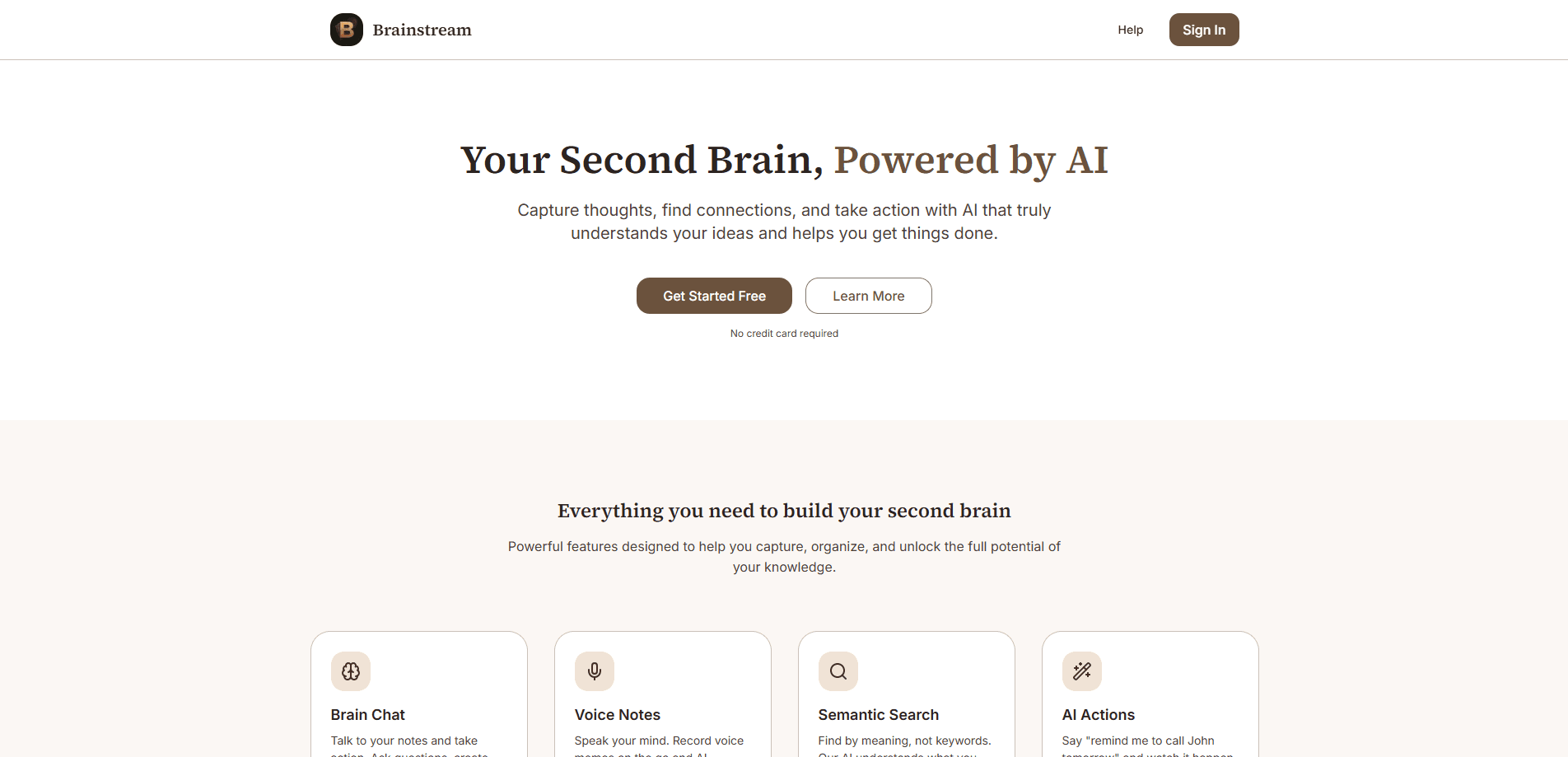
Brainstream is an AI note-taking app built around a simple promise: capture a thought, then let an assistant do something with it. You can type, talk, or drop in a file, and Brainstream transcribes, tags, and connects what you save. The assistant chats with your notes, runs natural-language commands like creating a task, and quietly surfaces patterns you'd otherwise miss. It positions itself as a second brain app, and the free tier means you can test that claim before paying.
About Brainstream
What Is Brainstream
Brainstream sits in the crowded lane of AI notes assistant tools, but its angle is action rather than storage. Most note apps stop once your note is saved, and that's exactly where the real problem starts, because a note you never revisit is just digital clutter taking up space on a server you're paying for. Brainstream treats the note as a starting point and uses an assistant to search it, summarize it, and act on it.
The app pulls rich text, voice recordings, images, and files into one place. That mix matters because a lot of people think out loud, and those people lose good ideas every day simply because typing on a phone while walking the dog or driving to work is awkward and slow. You record a voice memo on a walk, and by the time you're back at your desk it's searchable text. From there, semantic search notes by meaning instead of exact wording, so a half-remembered idea still turns up.
The catch is scope. Brainstream leans hard on AI features, and those depend on how good its models are with your material. Its own terms note that AI output "may not always be accurate or complete" and should be reviewed before you rely on it. That's a fair warning, and it applies to every AI note-taking app on the market right now, not just this one. So treat the assistant as a fast first pass, not a final word.
Getting Started
- Create an account at usebrainstream.app. No credit card is required to begin.
- Add your first note by typing, pasting text, or recording a voice memo.
- Ask the assistant a question about your notes, or give it a command such as "remind me to call John tomorrow."
- Organize with tags and tasks, and optionally connect Google Calendar to link meeting notes to events.
- Review the AI output, then undo any action you don't want with a single tap.
Product Information
A quick look at Brainstream's pricing, supported platforms, and performance.
Best for
The users, tasks, and scenarios where this tool fits best.
Users
- Students
- Writers and researchers
- Busy professionals
Tasks
- Voice notes transcription
- Natural-language task creation
- Finding a forgotten idea
- Daily review
- Research synthesis
Scenarios
- Capturing ideas during a commute
- Prepping for a meeting
- End-of-week cleanup
Key features
Brain Chat
Brain Chat is the center of the experience. You ask questions in plain language and the assistant answers using your own notes as the source, then takes action when you ask for it. That last part separates Brainstream from a plain search box, which can only show you what you already saved and never helps you do anything with it. Ask for a task. Mark something complete. Dig into a topic. All of it happens in one chat window, without switching apps.
Voice Notes
Speaking is faster than typing when an idea hits, and Brainstream transcribes voice memos automatically once they're recorded. The recording and the text stay linked, so you can search either way. If you think best on your feet, this is the feature you'll use most. Hands full? Just talk. A twenty-second memo on the train becomes a searchable paragraph before you reach your stop, which is a small thing that adds up over a year of scattered ideas.
Semantic Search
Semantic search finds notes by meaning, not keywords. Say you wrote "that pricing idea from the cafe" but search "cheap tier brainstorm." Brainstream still connects them. That's the difference between a search bar and a memory. It's a real upgrade over folder-and-keyword hunting, and it's why the app can feel like it remembers things for you, even when the phrase you typed shares no words with the note you're actually chasing. Once you get used to searching by meaning, going back to exact-match search feels like using a tool that refuses to understand plain English.
AI Actions
AI Actions turn natural commands into real changes. Tell Brainstream to create a task or complete an item and it does it, no menus involved. The appeal is speed. Every action is undoable with one tap, which matters because trusting an assistant to edit your notes takes a little nerve at first, especially if you've been burned by a tool that mangled your carefully organized folders before you could stop it.
Think Deeper
Think Deeper looks across your whole note collection for patterns and connections you'd never spot by scrolling. It's aimed at people who accumulate notes faster than they review them. Use it when a project feels scattered and you want the threads pulled together. What's the point of saving everything if you can't see how it fits? Think Deeper is Brainstream's answer to that question, and it's the feature most likely to surprise you the longer you use the app.
Daily Briefs
Daily Briefs are AI-generated summaries of what matters most in your notes right now. They're a light way to stay on top of a growing pile without reading everything. Think of it as a morning catch-up on your own thinking. If you've ever opened your notes app, felt overwhelmed by the backlog, and closed it again, this feature is aimed squarely at you, because it decides what deserves your attention so you don't have to scroll through everything to find it.
Always in Control
Every AI action in Brainstream can be reversed. That single design choice lowers the cost of experimenting with the assistant, because you can try a bold command without worrying that it will quietly rewrite weeks of notes before you notice something went wrong. If it does something wrong, one tap fixes it. Nothing is final until you say so, and that's what makes the rest of the AI tooling feel safe to use.
Pros and cons
Pros
- Voice capture with automatic transcription means you never lose a spoken idea.
- Semantic search works by meaning, so fuzzy memory still finds the right note.
- Natural-language AI Actions turn commands into tasks and edits without menus.
- Every AI action is undoable, which makes experimenting low-risk.
- A free tier lets you test the AI task management setup before committing to Pro.
Cons
- Your experience lives or dies by the AI quality - weak summaries make the whole app feel limited.
- Heavy reliance on AI output is a risk, since Brainstream's own terms warn it may be inaccurate.
- It's web-first, so there's no native mobile app for offline capture.
Frequently asked questions
Brainstream is an AI note-taking app for capturing and acting on ideas. You save notes by text, voice, or file, then use the assistant to search, summarize, and turn thoughts into tasks.
Related content
Explore related tools, skills, and articles for Brainstream.
Brainstream Alternatives

Base Code
Base44 (Wix) · Coding · ProductivityBase Code is a shared cloud development environment from Base44. Teammates describe changes to an existing GitHub codebase in chat, preview them live and send them back as pull requests.

Knocket
Knocket (Tencent RTC team) · Productivity · Business · ChatbotKnocket is a free live chat and contact page tool that lets visitors message you from your website, app, or a shareable link, with every reply handled from Telegram or one inbox.

FloorGen
Vinit Kumar (FloorGen) · Productivity · China AIFloorGen is a browser-based floor plan maker that turns a sentence or a sketch into an editable 2D plan and a 3D walkthrough. Export to PDF, DXF or video, and draw without an account.