
Brayden's File Q&A
Jenni AI · Productivity
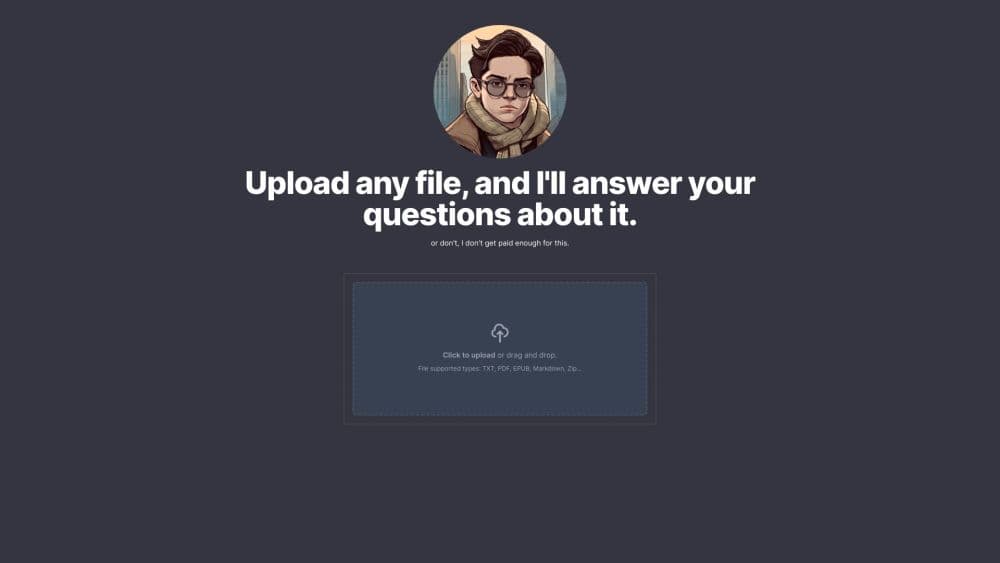
Brayden's File Q&A is a free browser tool that reads your PDF or document and answers questions about it in the voice of a bored 15 year old intern.
About Brayden's File Q&A
What Is Brayden's File Q&A
Brayden's File Q&A, live at brayden.ai, is a document Q&A tool with a joke built into the middle of it. You upload a file, ask a question, and the answer arrives in lowercase text messages from Brayden, a fictional 15 year old intern who says he works for Jenni AI and complains about his job between answers.
The machinery underneath is ordinary. The file gets parsed, split into chunks, and searched for passages that match your question, then a language model writes a reply from those passages. What changes is the delivery. Brayden types in short fragments, uses slang, and falls back to "idk bro" when a question drifts away from your document.
That persona is also the main limit. You get a quick read on a contract or a textbook chapter, not a careful line by line analysis. Jenni AI built the site as a side project, and the page points anyone with serious document work toward the main Jenni product or ChatPDF.
Getting Started
- Open brayden.ai in any browser. There's no signup form and no card field.
- Click the upload area and choose a file. PDF, EPUB, DOCX, TXT, Markdown, CSV, JSON, and ZIP archives all work.
- Wait for the indexing message, then type your question into the chat box. A single message can run up to 12,000 characters.
- Read the reply and ask a follow-up. The file stays in context for the rest of the session.
- Refresh the page when you want to start clean with another document.
Product Information
A quick look at Brayden's File Q&A's pricing, supported platforms, and performance.
Best for
The users, tasks, and scenarios where this tool fits best.
Users
- Students who need a fast read on an assignment
- Readers testing AI tools
- Writers and editors checking a long draft
- Anyone who avoids signups
Tasks
- Summarizing a contract clause
- Finding a detail in a long PDF
- Explaining jargon in a paper
- Checking a table in a report
Scenarios
- Reading late at night before a deadline
- Comparing two versions of a document
- Testing whether AI document chat fits your workflow
- Explaining a dense document to a friend
Key features
Chat With a PDF in Plain Language
The core loop is simple: one file in, questions out. You don't write prompts with instructions or set a role. You ask "what does this clause say" and get a short answer in the same chat window, which makes it the least intimidating way to chat with PDF files for the first time.
File Support Beyond PDFs
The uploader takes PDF, EPUB, DOCX, TXT, Markdown, CSV, JSON, and ZIP archives. That covers most of what students and office workers actually open in a week, including ebooks and exported spreadsheets. Unsupported files get a rejection message with a suggestion to use ChatPDF instead.
A Character Instead of a Corporate Assistant
Brayden answers in lowercase, avoids punctuation, and ends most replies with a complaint about his job. Off topic questions get "idk bro" the first time, then a reluctant general answer if you push. The system prompt also tells him to admit when the document doesn't contain an answer, which keeps some honesty in the joke.
No Account and No Payment
There's no login screen, no email capture, and no credit counter. You open the page, upload, and start typing. Refreshing the tab clears the conversation, which is also how you switch documents.
Answers Tied to Your File
Replies are generated from the passages pulled out of your upload, not from a general web search. Brayden refers to what the file says and declines when the answer isn't there. For a free tool with a comedy wrapper, that grounding is the part that makes it usable.
Short Replies Built for a Phone Screen
Answers arrive as a few fragments rather than paragraphs. That's easy to scan on a phone and easy to paste into a group chat. It's also why the tool struggles with anything that needs structured output, such as a comparison table or a cited summary.
Pros and cons
Pros
- Free to use with no account, no card, and no usage counter, so trying it costs nothing but a minute.
- Handles PDF, EPUB, DOCX, TXT, Markdown, CSV, JSON, and ZIP, which is wider format support than most free PDF chat tools.
- Answers stay anchored to the uploaded file and the bot admits when the document doesn't cover the question.
- Zero setup: no prompt writing, no model picker, no settings screen to learn.
Cons
- The persona caps how useful the output can be. Replies are short, slangy, and lowercase, so you can't paste them into a report or a citation.
- Nothing is saved. A refresh wipes the chat and the file, so every session starts with a fresh upload. That gets annoying if you return to the same document all week.
- No API, no browser extension, and no integrations, so the tool can't sit inside another app or a research pipeline.
- A confident wrong answer looks the same as a correct one. The joke tone hides uncertainty, so verify numbers and names against the source page.
Frequently asked questions
Yes. The site has no paid tier, no credit system, and no card field. You can ask questions about a PDF or any other supported file at no cost.
Related content
Explore related tools, skills, and articles for Brayden's File Q&A.
Brayden's File Q&A Alternatives

Udon
Udon · Coding · ProductivityUdon turns an Apple Silicon Mac into a home server you run from a browser, with container controls, file shares, and an optional AI sysadmin.

offstage
offstage cloud · Coding · Productivityoffstage gives AI coding agents and CI jobs a real Mac: a fresh macOS account on Apple silicon, driven over an API and billed by the second.

BotBus
Chengdu Tuyang Tusen Technology Co., Ltd. · Coding · ProductivityBotBus lets you control AI coding agents from your phone and watch: approve commands, start tasks and read results while the code stays on your desktop.