

Brick.Photos
Brick.Photos · Image
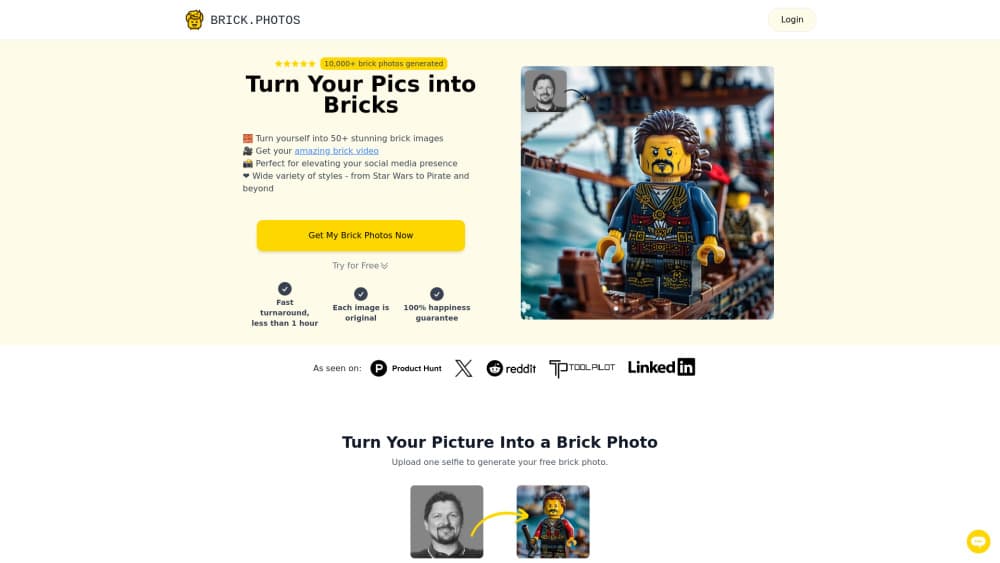
Brick.Photos is a web tool that turns an ordinary photo into a LEGO style brick mosaic, plus a short animated brick video, through a single $7.99 one time package.
About Brick.Photos
What Is Brick.Photos
Brick.Photos is a small browser based service that rebuilds a photo out of toy bricks. You upload an image, the site's AI redraws it as a wall of colored bricks, and you get a file back to share or print. The site says more than 10,000 brick photos have been made so far, mostly for social profiles, wall art, and gifts.
The appeal is narrow and clear. A normal filter makes a photo look different. An AI brick photo makes it look like a physical object, which is why people use it for birthday cards, profile pictures, and prints of pets or family shots. The same source image can also come back as a short looping brick video, which is the part most photo apps don't offer.
The limits matter just as much. There's no free tier and no trial on the site, so you pay before you see your own result. The service also runs in batches rather than as an open editor: the current package allows 20 transformations, each with two variations, and two of your images can be turned into animated clips. At the time of writing the homepage shows a "Back Soon" notice and the package is marked temporarily unavailable, so check that ordering works before you plan a gift around it.
Getting Started
- Open brick.photos in a desktop or mobile browser. No account is needed to look around.
- Pick the photo you want to convert. A sharp, well lit shot with one main subject holds up best, since brick grids lose fine detail.
- Buy the $7.99 package, then upload the image and let the AI build the first pass.
- Review the two variations, download the high resolution file without a watermark, and repeat for the rest of your 20 transformations.
Product Information
A quick look at Brick.Photos's pricing, supported platforms, and performance.
Best for
The users, tasks, and scenarios where this tool fits best.
Users
- Social media creators
- Gift shoppers
- Parents and teachers
Tasks
- Making a profile picture
- Building wall art
- Turning a still into a short clip
Scenarios
- A last minute birthday card
- A small business promo
- A classroom activity
Key features
Photo to Brick Conversion
The core job is simple. You hand over a JPG or PNG and the brick art generator maps the image onto a grid of colored bricks, keeping the shapes that make the subject recognizable. Results come in pairs, so you can compare two takes before you commit to one for printing.
Animated Brick Video
Two images from your package can be turned into a short brick video, where the mosaic assembles itself or shifts in place. This is the feature that separates the site from a plain photo filter, and it's the one most people use for social posts rather than prints.
Selfie Focused Workflow
The package includes up to 20 brick photos made from selfies, which suggests the tool is tuned for faces rather than landscapes. Close up portraits with even lighting tend to survive the brick grid better than wide shots with lots of small objects.
High Resolution, Watermark Free Output
Finished files arrive at high resolution with no watermark, so a download can go straight to a print shop. That matters for anyone making custom brick art as a gift, since a watermarked or low resolution file is useless once it's on paper.
Two Variations Per Transformation
Each of the 20 transformations returns two versions of the same photo. The difference is usually in color balance and how much detail the bricks keep, and picking between them is faster than re running the whole job.
Priority Processing and Instant Delivery
The package lists priority processing and instant download, which means you aren't waiting in a queue behind free users. Files land as soon as the render finishes, so the whole loop from upload to shareable image fits into a coffee break.
Pros and cons
Pros
- One payment of $7.99 covers 20 transformations, with no subscription to cancel later.
- Every transformation gives you two variations, which softens the risk of a result you don't like.
- Output is high resolution and watermark free, so prints and profile pictures both work.
- The brick video option adds motion that most photo to brick tools skip.
- No account setup or design skill is needed, and the whole flow is three steps.
Cons
- There's no free plan or sample render of your own photo, so you can't judge quality before paying.
- The site currently shows a "Back Soon" notice and the package is marked temporarily unavailable, which means orders may not go through today.
- You get a fixed batch rather than an editor, so there's no way to repaint single bricks or fine tune the grid.
- Nothing on the site describes an API or bulk workflow, so teams that need volume have to upload one image at a time.
Frequently asked questions
It converts a normal photo into a picture made of colored toy bricks and can also turn selected images into short animated brick videos. You upload, pay for the package, and download the finished files.
Related content
Explore related tools, skills, and articles for Brick.Photos.
Brick.Photos Alternatives

Google EmbeddingGemma 2
Google DeepMind · Writing · Image · CodingGoogle EmbeddingGemma 2 is a 740M-parameter open model that turns text, code, images, audio, and video frames into vectors in one 768-dimension space, running on phones and laptops.

Tractionwave
TractionWave · Image · MarketingTractionWave is an AI attention heatmap tool for static ads. Upload a PNG or JPG and it returns predicted attention, ranked hotspots, and fixes before you spend budget.

Imejis.io
Imejis.io · Image · MarketingImejis.io is an AI design studio for agents and marketing teams. Describe an image in plain words, and it writes the copy, builds the layout, reflows it to every size, then exports a finished file.