

Brief My Meeting
Brief My Meeting · Productivity
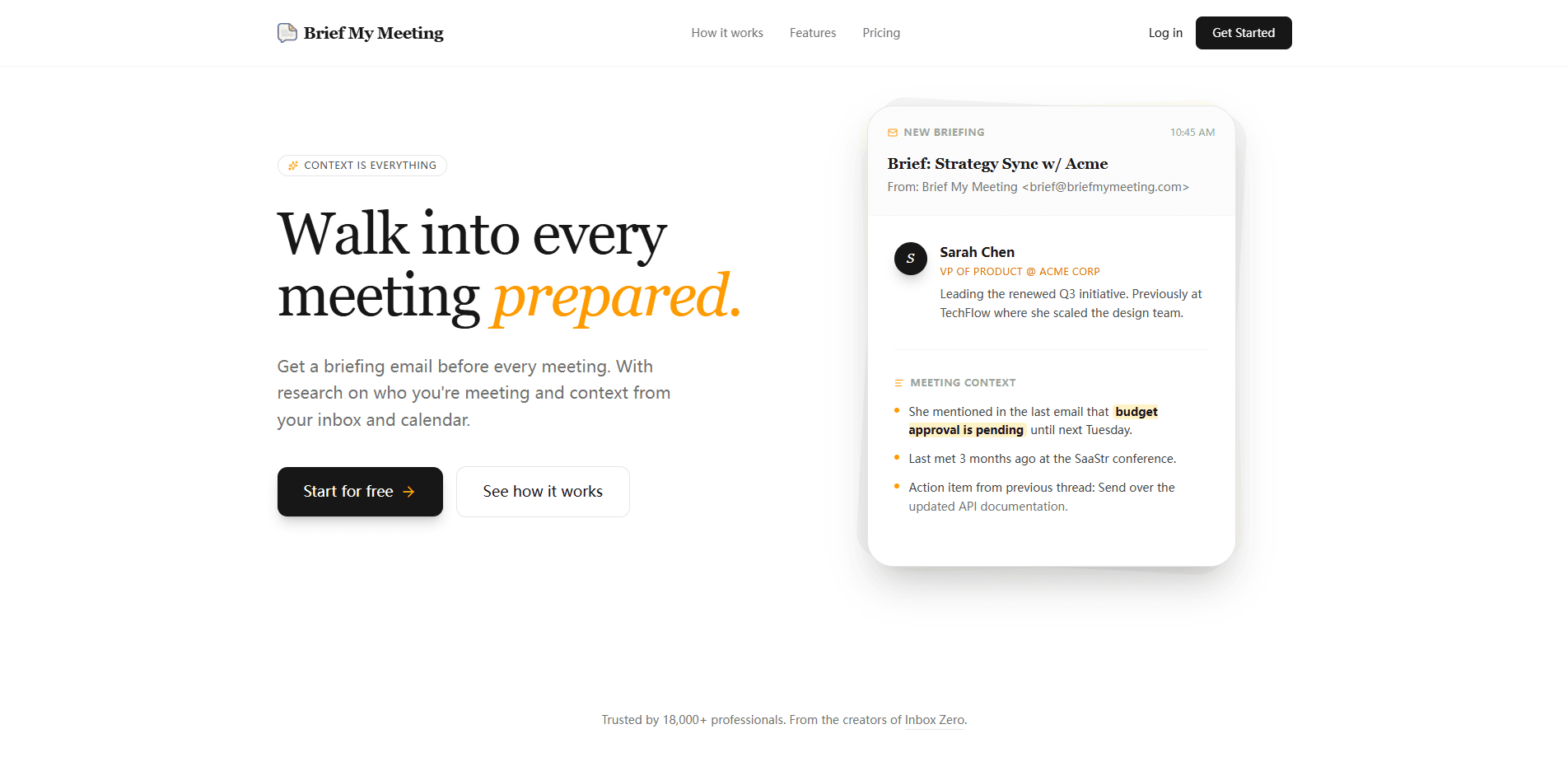
Brief My Meeting is an AI meeting preparation tool that pulls your emails, calendar events, and attachments into a single briefing before each call. Call it a meeting briefing app for people who hate the pre-call scramble. It sends that brief to your inbox a few hours ahead of an external meeting, along with research on the people you're meeting. The goal is simple. You walk into the call already knowing what was discussed last time, and for anyone juggling a dozen relationships at once, that single advantage is what makes a meeting briefing app worth paying for at all.
About Brief My Meeting
What Is Brief My Meeting
Brief My Meeting is a web-based AI assistant built for people who spend their week in back-to-back calls. Instead of opening six tabs before a meeting, you get one email that summarizes your history with each attendee, the documents you shared, and the open threads you promised to follow up on, which is exactly the kind of detail most people only remember halfway through the conversation. It connects to your inbox and calendar, then does the digging for you.
The product targets sales reps, founders, account managers, and anyone whose reputation depends on remembering details. According to the company, most of the value comes from the sheer time saved. If you currently lose 20 minutes before every external call, that's hours back each week.
Most competing meeting prep software assumes you'll do the work yourself. Brief My Meeting flips that. It does the research and hands you the summary. That difference matters if you've ever stared at a calendar full of calls and realized you have no idea what half of them are about.
The main limitation is scope. Brief My Meeting focuses on external meetings, and it works best when your relevant history actually lives in the connected email and calendar accounts. If a deal happened entirely over Slack or a phone call, there's nothing for the tool to pull from, which means the brief can end up looking thinner than you'd expect for a relationship you know is real.
Getting Started
- Create an account on the Brief My Meeting website with your work email.
- Connect your inbox and calendar so the tool can read past emails, events, and attachments.
- Set which meeting types should trigger a brief, usually external calls with people outside your company.
- Let it run. A briefing email lands in your inbox a few hours before each qualifying meeting.
- Open the brief before the call and skim the attendee research, meeting context, and action items.
Product Information
A quick look at Brief My Meeting's pricing, supported platforms, and performance.
Best for
The users, tasks, and scenarios where this tool fits best.
Users
- Sales reps and account managers
- Founders and executives
- Consultants and freelancers
Tasks
- Prepping for a first call with a new lead
- Recovering a stalled thread
- Catching up after time off
Scenarios
- A packed Monday of back-to-back client calls where you can't prep each one manually.
- A quarterly review meeting where the other side expects you to remember a deal from three months ago.
- A discovery call with someone you've emailed twice but never spoken to live.
Key features
Automated Briefing Emails
The core of the product is a briefing email that arrives a few hours before each external meeting. It collects what you need to know in one readable message. No dashboard. No query. The brief comes to you.
Attendee Research
For everyone in the room, Brief My Meeting pulls LinkedIn profiles, company information, and role context. So who exactly is in the meeting? The brief answers that before you ask. That means you know who the VP of Product actually is and what she worked on before this role, so you're not caught flat-footed when the conversation turns to projects she ran at her last company. It's the difference between guessing at someone's priorities and walking in prepared.
Email and Calendar History
The tool aggregates past emails, meetings, and attachments tied to your attendees. If you sent a budget draft two weeks ago, it shows up. This is the part that saves the most time, because searching your inbox manually is exactly the task the product replaces, and it's the one most people put off until five minutes before the call starts.
Meeting Context Extraction
Beyond raw history, the brief highlights what matters: what was discussed last time, action items you owe, and details like budget approval still pending. It reads more like a colleague's handoff note than a data dump. And honestly, a good handoff note is exactly what most people are trying to reconstruct from memory while the call connects.
Inbox and Calendar Integration
Setup is a one-time connection to your email and calendar accounts. After that, Brief My Meeting runs in the background and only prompts you when a brief is ready. No upkeep. It just works. For busy teams, that hands-off design is the difference between a tool people actually use and one that quietly gets abandoned after the first week.
SOC 2 Type 2 Compliance
The company states that Brief My Meeting is SOC 2 Type 2 compliant, which matters because the tool reads your email and calendar. For teams handling sensitive client data, that's a real checkbox before adoption. Skip this if you're just trialing it for personal use.
Pros and cons
Pros
- Sends briefs automatically a few hours before meetings, so prep fits into existing habits rather than adding a new app to check.
- Combines attendee research with email and calendar history in one message, cutting the manual pre-call scramble.
- One-time setup means little ongoing work once your inbox and calendar are connected, so it fits into a routine instead of demanding a new habit you have to maintain every morning.
- SOC 2 Type 2 compliance addresses the obvious concern about handing a third party access to your email.
Cons
- No free plan, so you pay before you know whether the briefs match how you actually work.
- Focused on external meetings, which leaves internal standups and team check-ins out of the picture.
- Depends on your relevant history living in email and calendar. Deals and decisions that happened elsewhere won't show up, so the brief can feel incomplete.
- Pricing isn't published on the site. You have to sign up to see the exact cost.
Frequently asked questions
It reads your email and calendar, then sends you a briefing before each external meeting. The brief covers attendee research, past conversations, shared documents, and open action items. Think of it as a pre-call summary written for you.
Related content
Explore related tools, skills, and articles for Brief My Meeting.
Brief My Meeting Alternatives

Base Code
Base44 (Wix) · Coding · ProductivityBase Code is a shared cloud development environment from Base44. Teammates describe changes to an existing GitHub codebase in chat, preview them live and send them back as pull requests.

Knocket
Knocket (Tencent RTC team) · Productivity · Business · ChatbotKnocket is a free live chat and contact page tool that lets visitors message you from your website, app, or a shareable link, with every reply handled from Telegram or one inbox.

FloorGen
Vinit Kumar (FloorGen) · Productivity · China AIFloorGen is a browser-based floor plan maker that turns a sentence or a sketch into an editable 2D plan and a 3D walkthrough. Export to PDF, DXF or video, and draw without an account.