

Busabase
Busabase · Productivity · Business
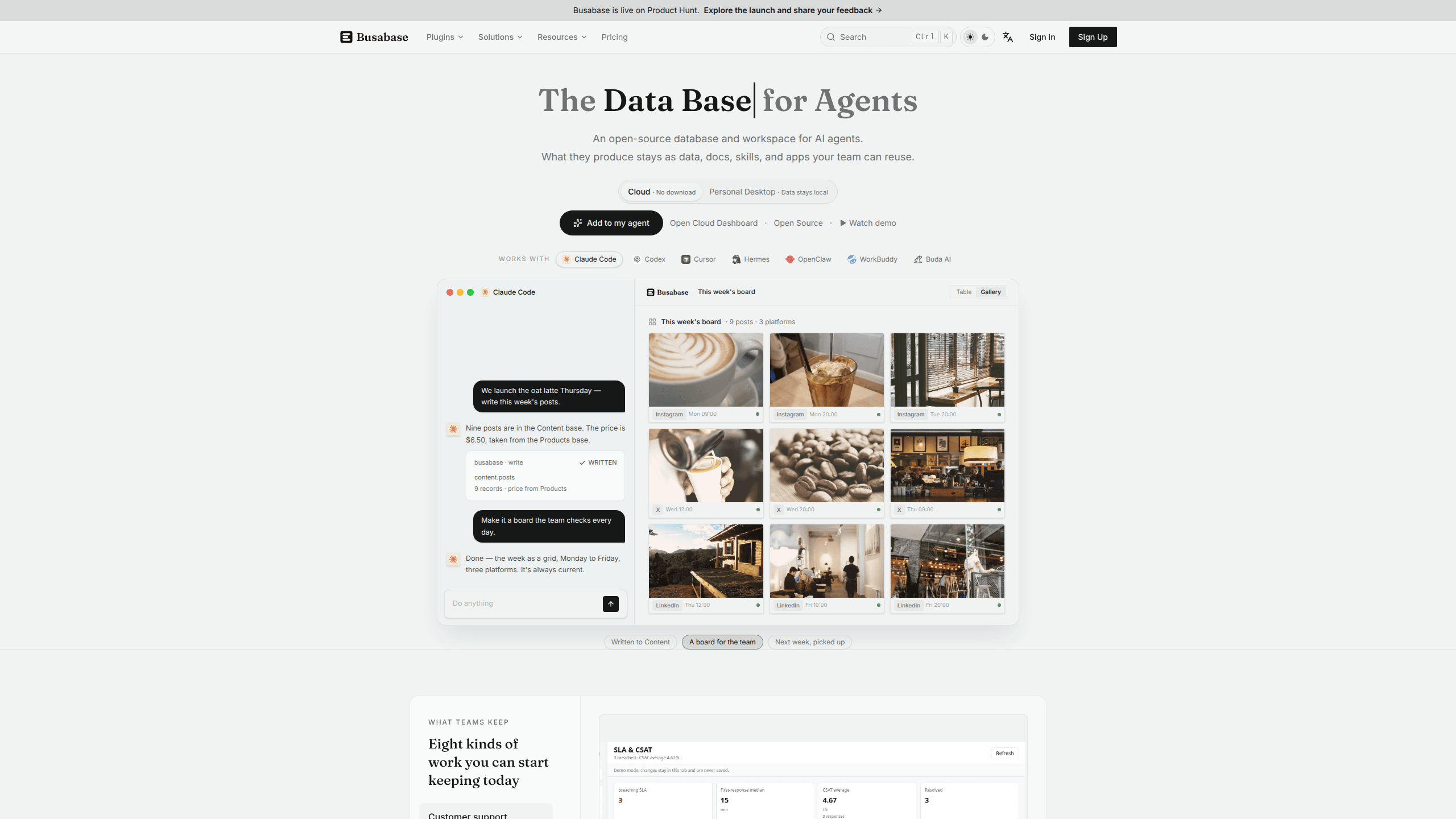
Busabase is an open-source database and workspace where AI agents and teams share bases, docs, skills, and apps. Every agent write arrives as a change request with a diff and an author.
About Busabase
What Is Busabase
Busabase calls itself a system of record for AI agents. In practice, that means one shared place where an agent reads existing data, does a piece of work, and leaves the result behind for the next agent or a teammate. The workspace holds five kinds of material: bases with typed fields and records, docs and files, skills, workflows, and small internal apps called AirApps.
The software is open source under the MIT license. You can run Busabase Desktop on your own machine, self-host the server with Docker or Kubernetes, or use Busabase Cloud. The desktop and self-hosted editions keep data in a local folder by default and work offline. There is no usage telemetry in the open-source build.
The problem it targets is easy to recognize. Agent output usually ends up in chat logs, one-off spreadsheets, and folders that only one person can find. When the session closes, the next agent starts from zero. Busabase turns that output into durable records, and it records who wrote each change, what the diff was, and when it merged.
The limits matter too. Busabase is not a model, a chat client, or a general document editor. It needs an agent connected over MCP, the API, or the CLI before it does much. Self-hosting shifts backups, upgrades, and access control to your team. And a review queue only helps if someone actually reviews.
Getting Started
- Create a Busabase Cloud account, or install Busabase Desktop and open a local workspace. The desktop route needs no account.
- Create a Base and define fields for the records you want an agent to maintain, such as a product catalog, a support queue, or a research log.
- Connect your agent. The setup document walks through MCP, the OpenAPI contract, or the CLI, and the plugins cover Claude Code, Codex, Cursor, and other clients.
- Give the agent a credential. A write key applies changes straight away; a proposal-only key sends every change to the review inbox first.
- Open the Inbox, read the diff, and approve or reject the change. Approved records keep their author, message, and history.
Product Information
A quick look at Busabase's pricing, supported platforms, and performance.
Best for
The users, tasks, and scenarios where this tool fits best.
Users
- Teams running several coding agents
- Operations and content leads
- Small consultancies delivering AI work to clients
Tasks
- Keeping a research log or dataset current
- Reviewing agent-written data before it becomes fact
- Reusing a procedure across agents
- Giving an agent an interface people can inspect
Scenarios
- A session ends and the next agent starts from zero
- Two agents write to the same customer list
- A client requires data to stay on its own network
Key features
Typed Bases and Records
A Base works like a table with field types, views, and relations. Agents can add records, update a status, or link a row to another base, and people can sort the same data in a table or gallery view. This is the part that makes Busabase an AI agent database rather than a folder of documents: the schema gives an agent a predictable place to write.
Change Requests and the Inbox
Agents do not overwrite rows in place. Each write opens a change request with a message, a diff, and an author. A credential with write access can merge immediately, while a proposal-only credential sends the change to the Inbox for review. The history stays attached, so a wrong merge can be traced and rolled back.
Docs, Files, and Drive Nodes
Alongside structured records, a workspace can hold Doc, File, and Drive nodes. That gives an agent a place to keep notes, source files, and reference material that does not fit a table. Search runs across the workspace, so the next agent can find the earlier decision without reading a chat transcript.
Skills and Workflows
Skills are saved instructions that live in the workspace, and workflows chain steps into an automation. A skill can describe how your team handles a support reply, a content brief, or a data cleanup. Any connected agent can load the same skill, which keeps behavior consistent when the model or the client changes.
AirApps for Agent Work
An AirApp is an internal app that opens inside the workspace. It can read the same records the agent writes, show a queue or a dashboard, and give a person the controls they need to review the output. AirApps can also be published as a website that reads and writes the workspace through the API.
Agent Connections
Busabase exposes an MCP server, a REST API with an OpenAPI contract, a CLI, and a Python SDK. Official plugins cover Claude Code, Codex, and DeepSeek Harness, with more clients available through MCP. The agent brings its own model, and Busabase supplies the shared data and the audit trail.
Pros and cons
Pros
- The MIT license removes the seat limit on self-hosted installs, and the Cloud free tier includes MCP, webhooks, and OpenAPI access, so a single agent can connect without paying.
- Every write carries a message, a diff, an author, and a history you can roll back. That is a stronger guarantee than a shared folder or a chat transcript.
- The workspace keeps data, docs, skills, and apps in one place, which cuts the number of tools a team has to connect before an agent can do useful work.
- Agent choice stays open. Claude Code today and Codex tomorrow can use the same records, because the connection runs through MCP and the API rather than a single vendor.
- Cloud pricing is flat per seat with no metered usage. Hitting a limit pauses the action instead of producing a surprise bill.
Cons
- Busabase does nothing useful without an agent. A team that wants a chat interface or a model has to bring one, and the setup step is real work.
- Self-hosting means you own backups, upgrades, and access control. The free open-source edition has no sign-in or role management, so a shared server needs a plan for both.
- The document side is thinner than Notion. Teams that mainly write long pages will find the data-first structure and the smaller editor feature set a poor fit.
- The review queue adds a step. If nobody checks the Inbox, proposal-only agents pile up changes and the workspace stops reflecting reality.
- The Cloud free plan caps a space at 5,000 records and three seats, which is enough to test an agent but not to run a busy team.
Frequently asked questions
Busabase stores what AI agents produce so a team can find, review, and reuse it. The work lands as records in a base, docs and files, skills, workflows, or an AirApp, and each change keeps its author and history.
Related content
Explore related tools, skills, and articles for Busabase.
Busabase Alternatives

Base Code
Base44 (Wix) · Coding · ProductivityBase Code is a shared cloud development environment from Base44. Teammates describe changes to an existing GitHub codebase in chat, preview them live and send them back as pull requests.

Knocket
Knocket (Tencent RTC team) · Productivity · Business · ChatbotKnocket is a free live chat and contact page tool that lets visitors message you from your website, app, or a shareable link, with every reply handled from Telegram or one inbox.

FloorGen
Vinit Kumar (FloorGen) · Productivity · China AIFloorGen is a browser-based floor plan maker that turns a sentence or a sketch into an editable 2D plan and a 3D walkthrough. Export to PDF, DXF or video, and draw without an account.