

CalendarPipe
CalendarPipe · Productivity
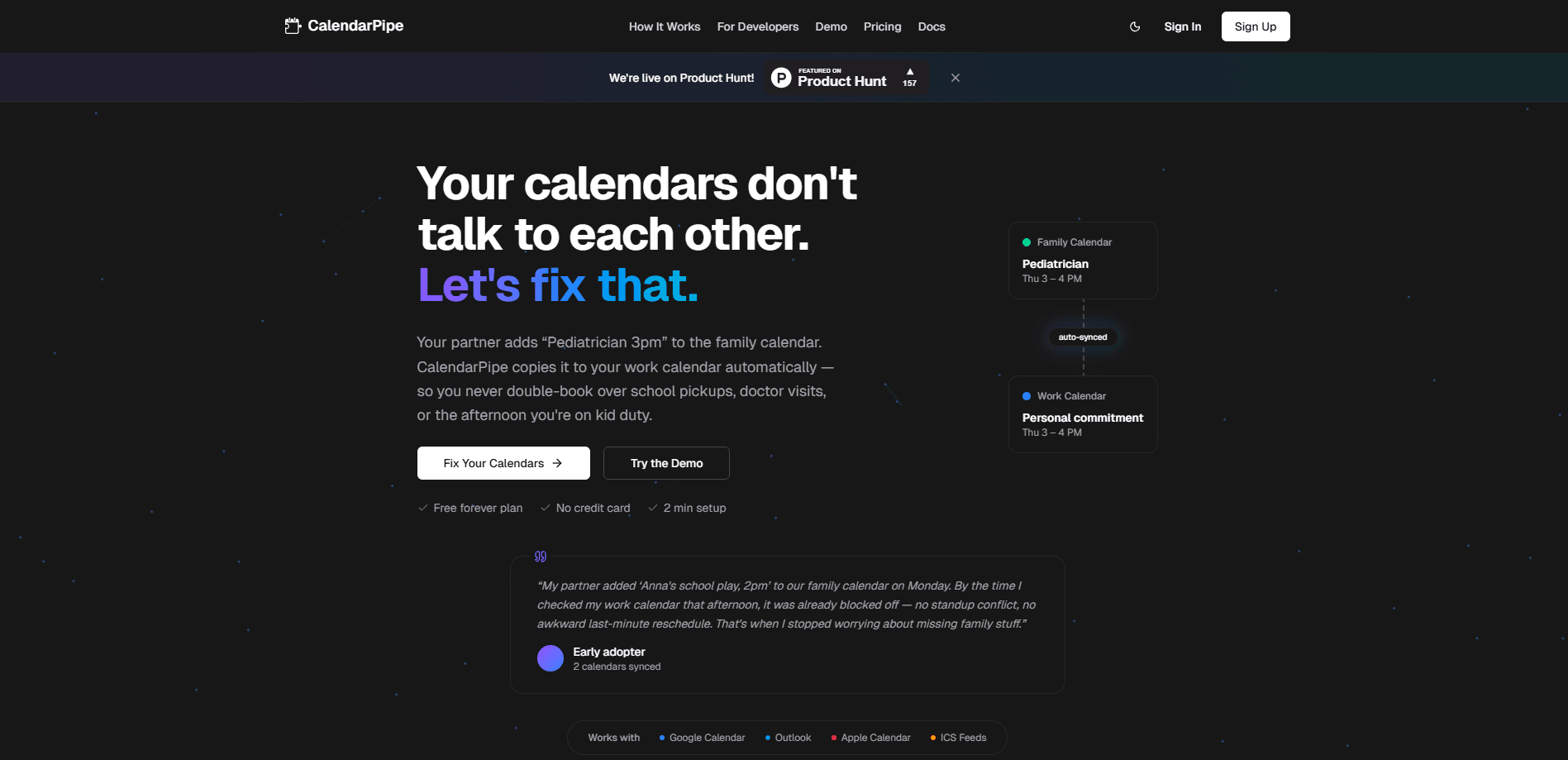
CalendarPipe is a programmable calendar sync tool that connects Google Calendar, Outlook, and Apple Calendar through rules it calls pipes. If you have ever wanted to sync Google Calendar with Outlook without copying events by hand, this is the kind of job it handles. Instead of copying events by hand, you write one rule that filters, renames, and routes events between two calendars, and CalendarPipe keeps them in step on a timer. It has a free forever plan for two calendar connections and one sync rule, while Pro costs $4/month for unlimited connections, unlimited rules, a 5-minute sync interval, AI rule generation, and REST API access.
About CalendarPipe
What Is CalendarPipe
CalendarPipe solves a problem most people just live with: your work calendar and your personal calendar don't talk to each other. You end up checking two apps, or worse, double-booking yourself because a dentist appointment never made it to your work schedule. CalendarPipe links them with rules you control, so a family event can appear on your work calendar as a vague "Personal commitment" without exposing the details.
The tool leans on three ways to build those rules. What a calendar sync service should feel like, in other words: flexible enough for anyone. Non-technical users get a visual builder and ready-made templates. Anyone can describe what they want in plain English and let AI generate the rule. Developers can write TypeScript "gate functions" that run in a sandbox with no network access, which keeps custom logic contained. That range is why it appeals to both a parent juggling school pickups and an engineer wiring an internal tool.
The big question is whether you'd pay for it, and that depends on how many calendars you actually run. The biggest limitation is scope. CalendarPipe syncs calendars, and it does that well, but it isn't a full project manager or a task app. It also leans on CalendarPipe's own servers to run the sync loop, so your rules only fire while the service is active. And invitation-based delivery, which is one of its smarter tricks, caps the delivery window at 30 days on every plan, so it won't email invitations months into the future.
Getting Started
- Sign up for the free plan at calendarpipe.com. No credit card is needed, and setup takes about two minutes.
- Connect the calendars you want to use. CalendarPipe supports Google Calendar, Outlook/Microsoft 365, Apple Calendar over CalDAV, and ICS feeds.
- Build your first pipe. Pick a source calendar and a destination, then add a rule, either visually, by describing it in plain English, or in the code editor.
- Test the rule against real events using a dry run before you turn it on, so you can see exactly which events match.
- Enable the pipe. Free accounts sync every 15 minutes across a 14-day window; Pro syncs every 5 minutes across 90 days.
Product Information
A quick look at CalendarPipe's pricing, supported platforms, and performance.
Best for
The users, tasks, and scenarios where this tool fits best.
Users
- People juggling a work and a personal calendar
- Parents coordinating family logistics
- Developers and automation builders
Tasks
- Mirroring one calendar onto another
- Redacting event details
- Filtering by rule
- Sharing availability through a booking page
Scenarios
- Syncing to someone who doesn't use the app
- Getting past a corporate firewall
- Booking clients or patients without showing your schedule
Key features
Programmable Sync Rules
A pipe is a rule that moves events between two calendars, and you decide what it does along the way. It can filter events, rewrite titles, or flip everything to Busy. Rules can be built visually, generated from a plain-English description, or written as TypeScript gate functions that run in a sandbox with no network access. That last option matters if you need custom logic but don't want your rule reaching out to anything else.
Invitation-Based Delivery
This is CalendarPipe's standout trick. It helps to know the usual catch first. Normally you can only sync a calendar you have OAuth access to, which is a wall for a colleague's or client's calendar. CalendarPipe sidesteps it by emailing a standard iCalendar invitation instead. The recipient accepts from whatever mail app they already use, so nothing needs to be installed and nothing needs permissions on their end.
Hosted Calendars for AI Agents
CalendarPipe can hand an AI agent its own real calendar, complete with an address, an .ics feed, and CalDAV access. Anything the agent books shows up in the user's normal calendar app. You create one through the REST API, and the agent can also accept or decline incoming invitations by polling or through a webhook.
Booking Pages
Share a link and let people book your free time. The rule you write decides which events take a slot off the table, and it can differ from what drives your sync. The page publishes openings rather than your whole schedule, so bookers see free times without ever reading your calendar. Their view stays simple. The person booking needs no account; they pick a time, confirm their email, and a real invitation arrives.
Full Rule API and Dry Runs
The Pro plan opens the REST API, which covers the whole rule lifecycle. An agent or script can create a rule, test its gate function against real events with a dry run, enable it, and force a re-sync without touching the dashboard. That dry run is worth using even if you build rules by hand, since it shows which events actually match before anything changes.
Visual Builder, Templates, and Code Editor
CalendarPipe gives non-developers a visual builder and a set of templates to start from, so you don't need to write a line of code to get a working pipe. The code editor is there if you want it and isn't required if you don't. Free accounts get the same set. Not bad for a plan that costs nothing.
Pros and cons
Pros
- Free forever plan covers two calendar connections and one sync rule with no credit card, which is enough to test whether it fits your setup.
- Pro is $4/month or $40/year with no per-calendar or per-seat pricing, so costs don't climb as you add calendars.
- Invitation-based delivery syncs to calendars you can't access directly and works behind corporate firewalls that block third-party OAuth.
- Rules can be built visually, in plain English, or as code, covering both non-technical and developer users.
- Booking pages publish only open slots, so visitors never see your actual schedule and need no account.
Cons
- Sync only runs through CalendarPipe's servers, so your rules fire on its schedule, every 15 minutes on free and every 5 on Pro, not instantly.
- Invitation-based delivery caps at a 30-day window on every plan, meaning it can't email invitations further out than that.
- Multi-directional sync is billed as separate rules, so keeping two calendars mirrored both ways consumes two of them, which eats into the free plan's single rule.
Frequently asked questions
It syncs events between calendars you already own, like Google Calendar, Outlook, and Apple Calendar. You write rules that decide which events move, how they're renamed or hidden, and in which direction, and CalendarPipe keeps them in step automatically.
Related content
Explore related tools, skills, and articles for CalendarPipe.
CalendarPipe Alternatives

Base Code
Base44 (Wix) · Coding · ProductivityBase Code is a shared cloud development environment from Base44. Teammates describe changes to an existing GitHub codebase in chat, preview them live and send them back as pull requests.

Knocket
Knocket (Tencent RTC team) · Productivity · Business · ChatbotKnocket is a free live chat and contact page tool that lets visitors message you from your website, app, or a shareable link, with every reply handled from Telegram or one inbox.

FloorGen
Vinit Kumar (FloorGen) · Productivity · China AIFloorGen is a browser-based floor plan maker that turns a sentence or a sketch into an editable 2D plan and a 3D walkthrough. Export to PDF, DXF or video, and draw without an account.