

AI Food Calorie Tracker-CalZen
42apps LLC · Image · AI Assistant
CalZen is an AI calorie tracker for iOS and Android that turns a photo of your plate into calories, protein, carbs, and fat in about three seconds, so logging food stops being a chore.
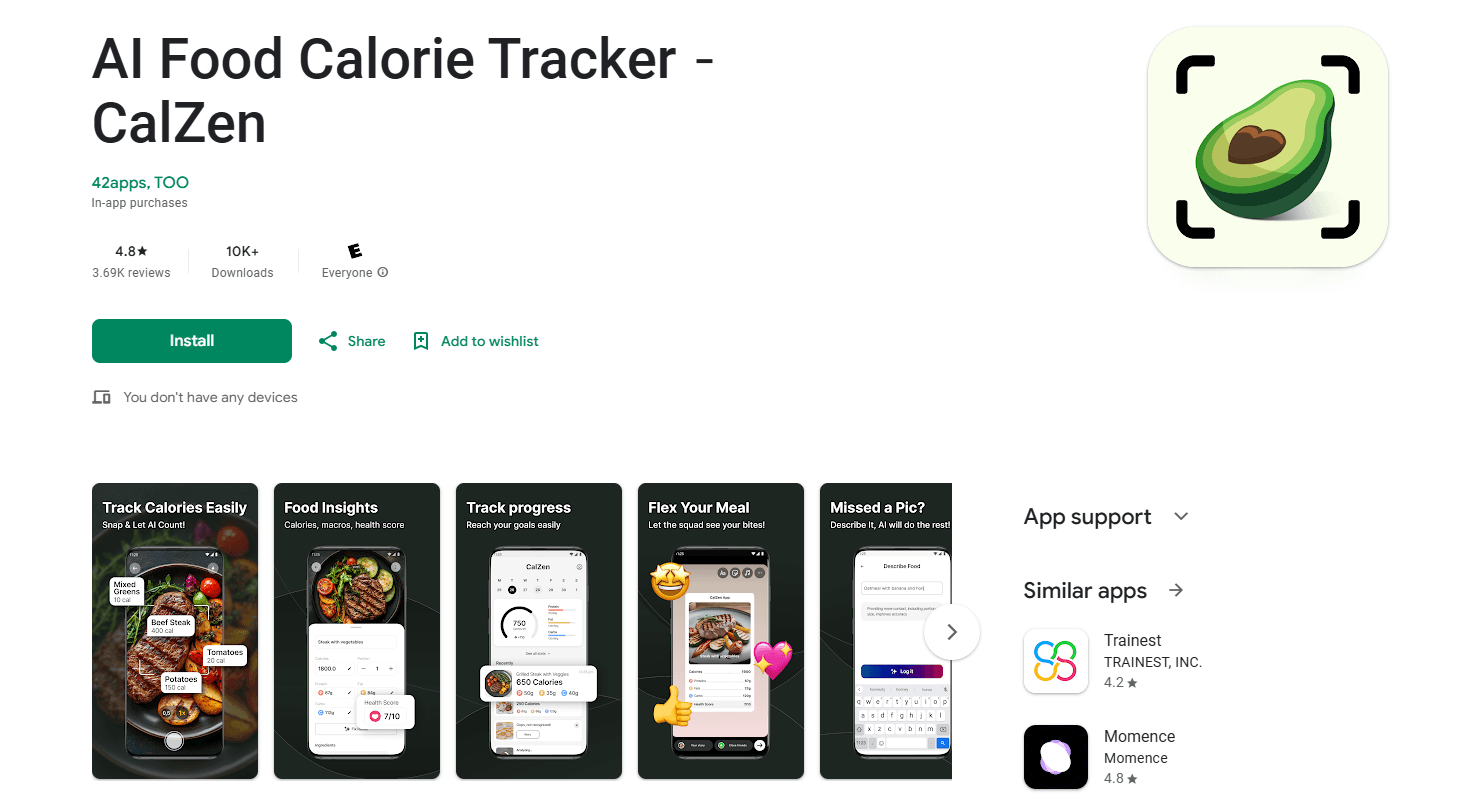
About AI Food Calorie Tracker-CalZen
What Is CalZen
CalZen is a calorie counter app built around one idea: if logging a meal takes a photo and three seconds, people actually keep doing it. You point your camera at a plate, and the app identifies each item, estimates the portion, and fills in calories, protein, carbs, and fat. No food scale, no scrolling a database for "chicken breast 150g."
The product comes from 42apps LLC, the team behind the app, and it's aimed at everyday people rather than athletes or dietitians. As a calorie tracking app, most users open it to lose weight. Setting a goal, snapping meals, and watching the daily number update turns out to be enough for a lot of them, which is why the app leans on speed over precision chasing.
Its main limits are worth knowing up front. As a photo calorie counter, portion estimates come from a picture, so they're estimates and not lab measurements, and anything unusual is easier to fix with the Describe option than to trust on the first pass. CalZen also leans on OpenAI's API to read your photos, so an internet connection is part of how it works. And it's a wellness tool, not a medical one: the app itself states it doesn't provide medical advice.
Getting Started
- Download CalZen from the App Store or Google Play, then set your goal, current weight, and target during onboarding.
- Open the camera and photograph a meal. Home-cooked plates, restaurant dishes, and takeout all work the same way.
- Review what the AI found and adjust portions if something looks off. You can also type a description when a photo is unclear.
- Add water, steps, and weight as the day goes on. Apple Health or Health Connect feeds activity in automatically.
- Check the daily dashboard to see calories left, your macro split, and the health score before planning the next meal.
Product Information
A quick look at AI Food Calorie Tracker-CalZen's pricing, supported platforms, and performance.
Best for
The users, tasks, and scenarios where this tool fits best.
Users
- People trying to lose weight
- Busy parents and professionals
- Gym-goers chasing a protein target
Tasks
- Logging a home-cooked meal
- Tracking restaurant and takeout food
- Watching carb intake
Scenarios
- Eating out during a work week
- Sticking with tracking past the first week
- Keeping weight steady after a diet
Key features
Photo-based food logging
The core of CalZen is the AI food scanner. Point it at a plate and the AI identifies the items, estimates portions, and returns calories, protein, carbs, and fat. It's the difference between logging that takes three seconds and logging that takes five minutes, which is usually the difference between tracking for a year and quitting after a week.
AI nutrition analysis through OpenAI
When you scan a meal, the image and any text you add go to OpenAI's API, which returns the nutrition breakdown. CalZen states that OpenAI processes the data only to return results and doesn't use it to train models, and that no name or email is sent along with the photo.
Activity and health integrations
Steps, burned calories, and water flow in from Apple Health and Health Connect once you grant permission. Feeding real activity data into the calorie budget makes the daily target more accurate than a formula that ignores how much you moved.
Daily dashboard with health score
The home screen pulls calories remaining, water, steps, weight trend, and a macro balance into one view, plus a health score out of 10. Seeing the whole day at a glance is what turns a pile of logs into a decision about the next meal.
Weight tracking and macro balance
Acting as a macro tracker, a weight log charts progress over time, and the macro view breaks down protein, carbs, and fat against your targets. For anyone bulking or cutting, that split matters more than the raw calorie number.
Describe option and barcode scanning
Photos don't cover everything. For a mixed dish the AI can't read cleanly, you can type what you ate, and packaged foods can be scanned instead. Having a fallback keeps an odd meal from breaking the streak.
Pros and cons
Pros
- Fast logging: one photo replaces searching, weighing, and typing, which is what keeps people tracking long enough to see results.
- Works on any meal: home cooking, restaurant plates, and takeout all go through the same camera flow.
- Activity sync: Apple Health and Health Connect fill in steps and burned calories so the daily goal reflects real movement.
- Regular updates: the team ships new features and AI accuracy improvements on a weekly cadence.
- Large user base: 3 million-plus users and a 4.8 rating on the App Store give a sense of how the app performs for real people.
Cons
- Portion estimates aren't exact: a photo can't tell how much rice is on a plate, so totals are close, not weighed.
- Needs a connection: photos are analyzed through OpenAI, so offline logging isn't the point.
- Free tier is limited: after the trial, unlimited scans and the detailed breakdowns sit behind a subscription.
- Not a medical tool: the app says plainly it doesn't offer medical advice, so anyone managing a condition should treat it as a general tracker.
Frequently asked questions
CalZen is used to track calories and macros by photographing your food. It identifies each item on the plate and returns calories, protein, carbs, and fat, so you can keep a daily record without a scale or a database search.
Related content
Explore related tools, skills, and articles for AI Food Calorie Tracker-CalZen.
AI Food Calorie Tracker-CalZen Alternatives

Google EmbeddingGemma 2
Google DeepMind · Writing · Image · CodingGoogle EmbeddingGemma 2 is a 740M-parameter open model that turns text, code, images, audio, and video frames into vectors in one 768-dimension space, running on phones and laptops.

Tractionwave
TractionWave · Image · MarketingTractionWave is an AI attention heatmap tool for static ads. Upload a PNG or JPG and it returns predicted attention, ranked hotspots, and fixes before you spend budget.

Imejis.io
Imejis.io · Image · MarketingImejis.io is an AI design studio for agents and marketing teams. Describe an image in plain words, and it writes the copy, builds the layout, reflows it to every size, then exports a finished file.