

Camouflage for iOS
Frederik Jacques · Image
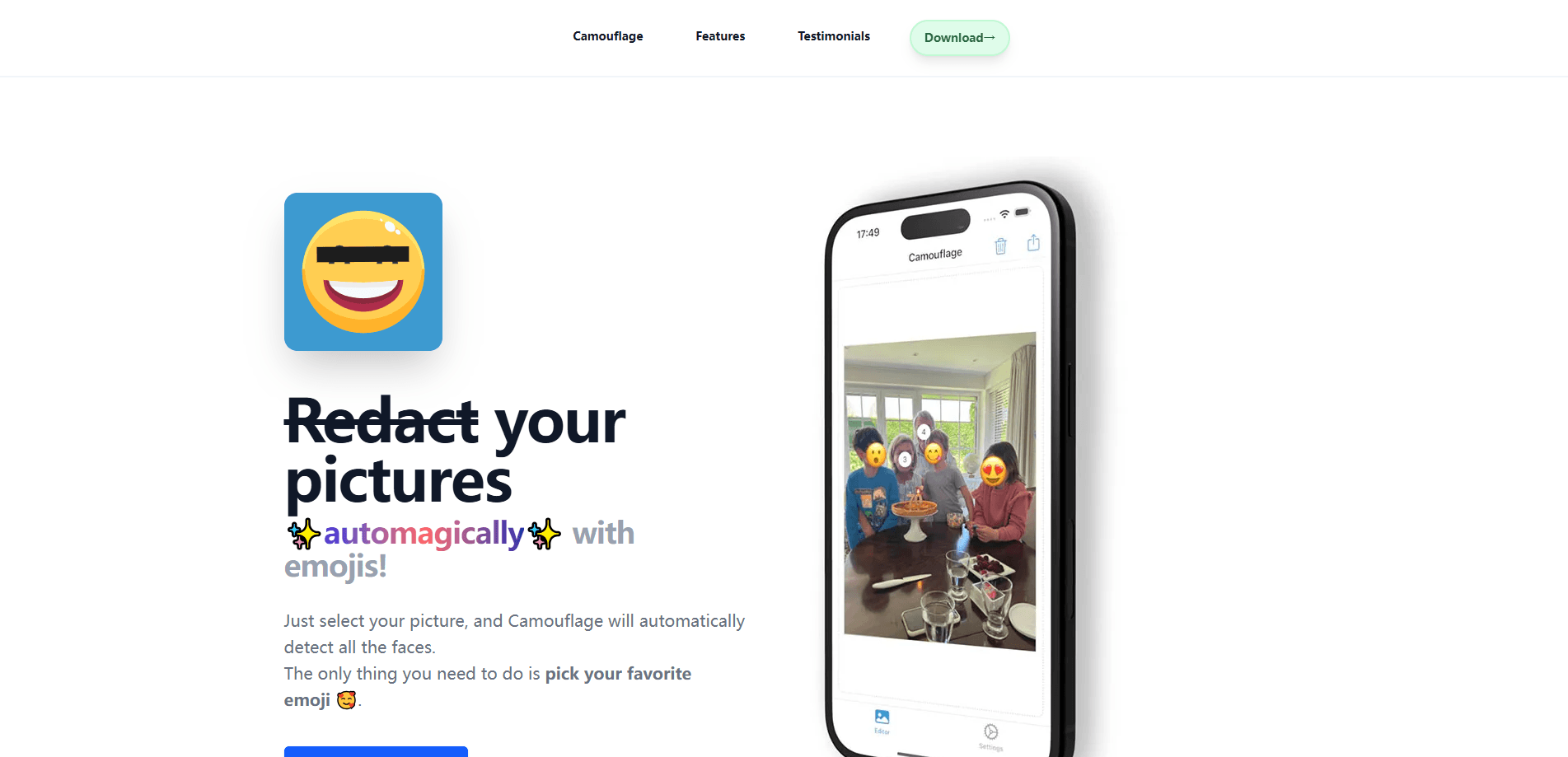
Camouflage for iOS is a photo redaction app that detects faces on your iPhone and covers them with emojis you pick, all on-device and free to use.
About Camouflage for iOS
What Is Camouflage for iOS
Camouflage for iOS is a photo redaction app built by independent developer Frederik Jacques. It uses on-device face detection to scan a picture, find every face in it, and drop an emoji on top so you can hide faces before you post the shot.
The whole point is speed. The usual way to hide a face is to open a markup editor and drag a shape over it by hand, which can take a minute or more per photo. Camouflage does the detection for you, so covering a group shot becomes a few taps.
Two things set it apart from a plain blur tool. First, it uses a playful emoji instead of a black box, so a redacted photo still looks like something you'd want to share. Second, everything runs locally on the device, so your pictures never leave the phone.
Getting Started
- Install Camouflage from the App Store on an iPhone or iPad running iOS 18.2 or later.
- Pick a photo from your library. The app scans it and marks the faces it finds.
- Choose an emoji to cover them, or set up to six favorites for quick access.
- Adjust placement if the app missed a spot, then confirm the edit.
- Save the redacted copy back to your photos and share it wherever you like.
Product Information
A quick look at Camouflage for iOS's pricing, supported platforms, and performance.
Best for
The users, tasks, and scenarios where this tool fits best.
Users
- Parents sharing family photos
- Teachers and school staff
- Privacy-conscious social media posters
Tasks
- Redacting a group photo before posting
- Masking faces in screenshots and casual shots
- Adding a fun cover instead of a harsh blur
Scenarios
- Posting a class or team photo within minutes
- Cleaning up an old photo for a public profile
Key features
On-Device Face Detection
Camouflage uses an AI model that finds faces directly on your iPhone, so there's no server round trip and no upload. That keeps processing fast and means the app works even without a connection. It's the feature that removes the manual part of redaction, since you no longer hunt for each face yourself.
Emoji Face Covers
Instead of a blur or a black bar, the app places an emoji over each detected face. You choose which one, so a redacted photo can still feel warm and personal. The result reads as intentional styling rather than a clumsy censor, which suits casual sharing more than it suits official documents. If you mainly want to cover faces with emojis before posting, this is the core of the app.
Six Favorite Emojis
You can save up to six emojis as favorites for one-tap access. If you redact photos often and tend to reuse the same two or three covers, this cuts the picker out of your routine. It's a small touch that speeds up repeat use.
Local Privacy By Design
Your photos stay on the device throughout the editing process; the app doesn't store, transfer, or access your files after you finish. The only outside service is TelemetryDeck, which gathers anonymized usage stats and can be switched off in settings. For anyone uneasy about image data leaving the phone, that's the reassuring part.
Quick Photo Library Import
Camouflage pulls straight from your photo library, so you don't bounce between apps to bring a picture in. You select, redact, and save back to the library in one flow. It's built for the fast, repeatable edit rather than a deep editing session.
Simple Save and Share
Once a photo is redacted, you save the copy back to your library and share it from there. There's no export wizard or format maze to work through, which keeps the app approachable for people who just want the job done.
Pros and cons
Pros
- Free to download with no subscription or in-app purchase mentioned on the App Store listing.
- Face detection runs entirely on-device, so photos aren't uploaded anywhere.
- Emoji covers keep redacted photos shareable instead of making them look censored.
- Fast for repeat jobs like school or family group photos.
- Native iPhone and iPad app, so it fits an existing mobile workflow.
Cons
- It covers faces only, so it won't hide license plates, text, or other private details in a photo.
- Emoji placement isn't a secure redaction method, since the pixels underneath stay in the file; it's for casual privacy, not legal or journalistic use.
- macOS support exists but the app is aimed at the iPhone and iPad experience first.
Frequently asked questions
Camouflage for iOS detects faces in your photos and covers them with emojis you choose, so you can share an image without showing anyone's face. Everything happens on your device.
Related content
Explore related tools, skills, and articles for Camouflage for iOS.
Camouflage for iOS Alternatives

Google EmbeddingGemma 2
Google DeepMind · Writing · Image · CodingGoogle EmbeddingGemma 2 is a 740M-parameter open model that turns text, code, images, audio, and video frames into vectors in one 768-dimension space, running on phones and laptops.

Tractionwave
TractionWave · Image · MarketingTractionWave is an AI attention heatmap tool for static ads. Upload a PNG or JPG and it returns predicted attention, ranked hotspots, and fixes before you spend budget.

Imejis.io
Imejis.io · Image · MarketingImejis.io is an AI design studio for agents and marketing teams. Describe an image in plain words, and it writes the copy, builds the layout, reflows it to every size, then exports a finished file.