

Careerfinder – AI Career Roadmap
Foreign Admits · AI Assistant
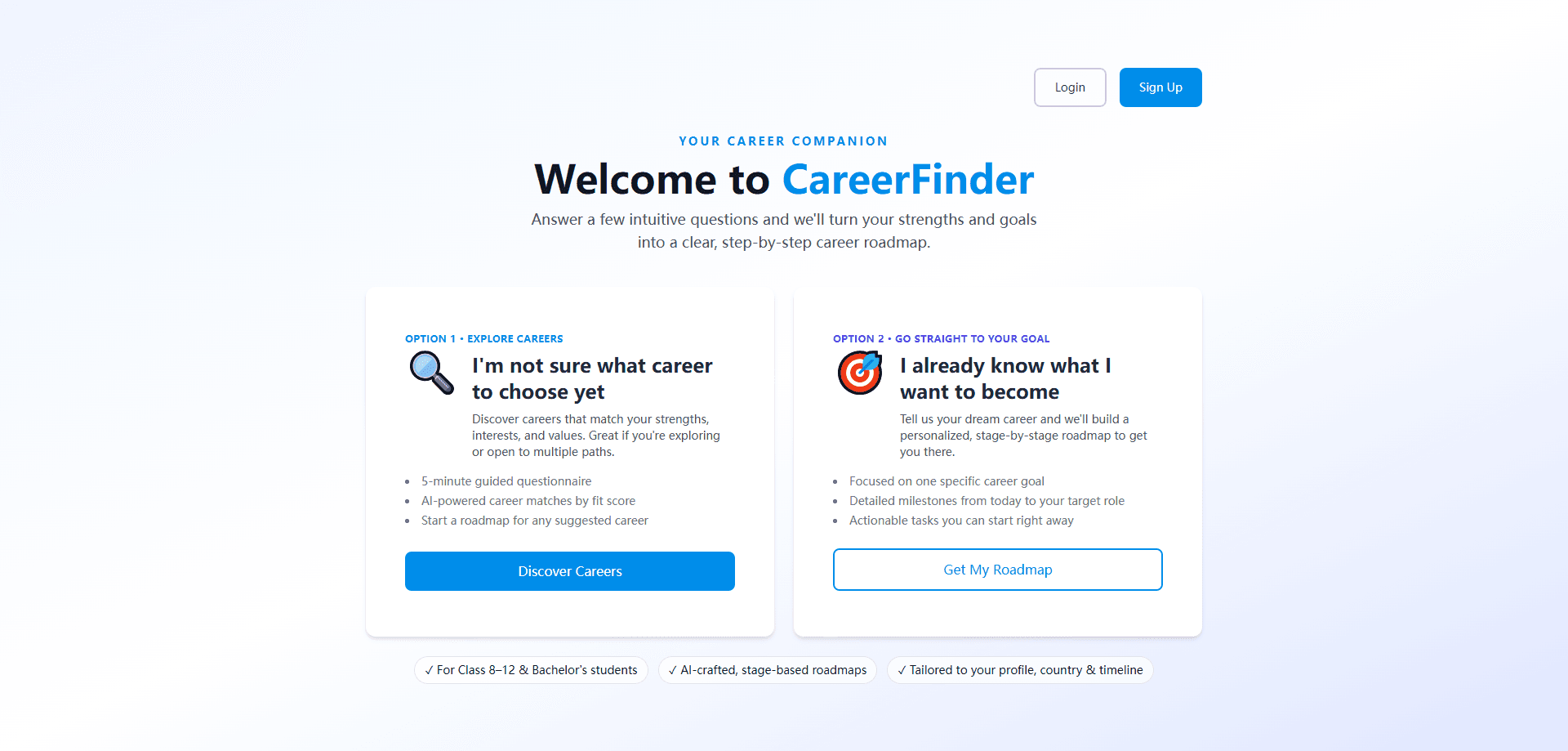
Careerfinder – AI Career Roadmap is an AI career guidance tool for students who need help choosing a direction or mapping out a path they've already picked. It asks a short set of questions about your strengths, interests, and goals, then builds a personalized roadmap with stages and tasks. It's aimed at Class 8–12 and bachelor's students. The whole thing runs in a browser, so there's nothing to install.
About Careerfinder – AI Career Roadmap
What Is Careerfinder – AI Career Roadmap
Careerfinder – AI Career Roadmap is a web-based career planning tool that runs on foreignadmits.app. It targets students who are trying to figure out what to do next, whether that's a teen in Class 8–12 or someone working through a bachelor's degree. The core promise is straightforward: answer a few questions, get a career roadmap that breaks a big decision into smaller steps.
The tool handles two very different situations. If you've got no idea what you want to become, it runs a guided questionnaire and suggests career matches ranked by fit score. If you already know your target role, it skips the exploring and goes straight to building milestones from your current spot to that role. Simple enough. Both paths end in the same place: a roadmap you can actually start working through. Which one fits you today?
Getting Started
- Open Careerfinder – AI Career Roadmap in your browser and create an account with the Sign Up button.
- Choose your path: pick Discover Careers if you're undecided, or Get My Roadmap if you already have a target role in mind.
- Answer the guided questionnaire, covering your strengths, interests, values, country, and timeline.
- Review the career matches or milestone list the AI generates for your profile.
- Pick a suggested career and start the roadmap, working through the stages and tasks one at a time.
Product Information
A quick look at Careerfinder – AI Career Roadmap's pricing, supported platforms, and performance.
Best for
The users, tasks, and scenarios where this tool fits best.
Users
- Class 8–12 students
- Bachelor's students
- Career changers
Tasks
- Choosing a career direction
- Career path planning
- Sanity-checking a target role
Scenarios
- Sitting down after exam results and not knowing which stream to pick
- Planning a semester's worth of prep for a specific role
- Comparing two career options side by side
Key features
Two Entry Paths for Different Starting Points
Most career tools assume you've already shortlisted something. Careerfinder doesn't. The first option, Discover Careers, is for the student who's open to anything and wants suggestions. The second, Get My Roadmap, is for the student with a fixed goal who just needs the how. Splitting the two means you're never filling out questions that don't apply to you. That matters. Nobody wants to slog through fifty fields to get one useful answer.
AI Career Matches Ranked by Fit Score
When you pick the exploring path, the tool produces a list of careers sorted by how well they match your profile. The fit score is the ranking signal, so you can see why one suggestion sits above another instead of getting an unordered dump of options. It's a useful starting point for a conversation with a parent or counselor. The score reflects your answers, not some objective verdict on your identity.
Stage-Based Roadmaps
The roadmap is the centerpiece. Instead of a single answer like "become a data analyst," it lays out stages that carry you from your current position to the target role. Each stage holds tasks you can act on, which is the difference between inspiration and a to-do list. You can start a roadmap for any career the tool suggests, so exploring and planning aren't separate steps. Worth knowing.
Profile, Country, and Timeline Awareness
Careerfinder factors in where you're based and when you need to get there. Country matters because education systems and hiring norms differ, and timeline matters because a Class 12 student and a final-year bachelor's student face very different clocks. Feeding those into the roadmap keeps the suggestions from reading like generic internet advice.
Browser-Based, No Install
There's no app to download. You log in, answer questions, and get your roadmap in the same session. For a student who just wants to check something quickly on a school laptop, that's a lower barrier than installing yet another app. Quick and simple. No setup headaches either.
Pros and cons
Pros
- Two clear starting points mean you don't have to know your career before using a career tool.
- Fit-score ranking gives the suggestions a visible order you can question and compare.
- Roadmaps are stage-based with tasks, so there's a concrete next action instead of abstract advice.
- Country and timeline inputs make the output less copy-paste generic.
- Free to use and browser-only, so trying it costs you nothing but the questionnaire.
Cons
- The free plan shows a single $0 tier, so there's no paid upgrade for people who want deeper support like human counseling.
- No public API, which means you can't pull the roadmap data into your own tools or spreadsheets.
- The focus on Class 8–12 and bachelor's students makes it a weaker fit for experienced professionals planning a late-career move.
- Suggestions depend heavily on your questionnaire answers, so a rushed or dishonest set of responses produces a roadmap that misses the mark.
Frequently asked questions
Careerfinder – AI Career Roadmap is an AI career guidance tool that turns a short questionnaire about your strengths, goals, country, and timeline into a personalized career roadmap. It's built for students who are either still exploring options or already set on a target role.
Related content
Explore related tools, skills, and articles for Careerfinder – AI Career Roadmap.
Careerfinder – AI Career Roadmap Alternatives

Iplan AI
Iplan AI · Productivity · AI AssistantIplan AI is an AI travel planner that turns a few trip details into a full day-by-day itinerary in seconds. You answer questions about your destination, interests, budget, and travel companions, and the tool builds a plan you can edit, share, and carry with you on any device. It targets travelers who want a solid draft without spending hours in spreadsheets and browser tabs. Think of it as an itinerary generator that does the tedious part for you.

Screenhelp
Screenhelp · Productivity · AI AssistantScreenhelp is an AI screen assistant that turns a single keyboard shortcut into real-time help. You press Ctrl+Shift+Space, it captures what's on your screen, and it streams an answer into a private panel in about two seconds. Think of it as an AI screenshot helper you trigger on demand. It runs on Mac, Windows, and the web, starts free with 30 answers a month, and stays invisible during screen sharing on Zoom, Teams, and Google Meet.

Rainbow
Rainbow · AI AssistantRainbow is an AI weather forecast app built around short-term precipitation nowcasting. Its engine pushes min-by-min rain and snow predictions up to four hours ahead, blending live satellite and radar feeds into hyperlocal forecasts. The app adds live rain radar, a seven-day outlook, precipitation alerts, home-screen widgets, and a hurricane tracker, and it runs on both Android and iOS with a free tier plus paid upgrades.