

Careerfornia
Careerfornia · AI Assistant
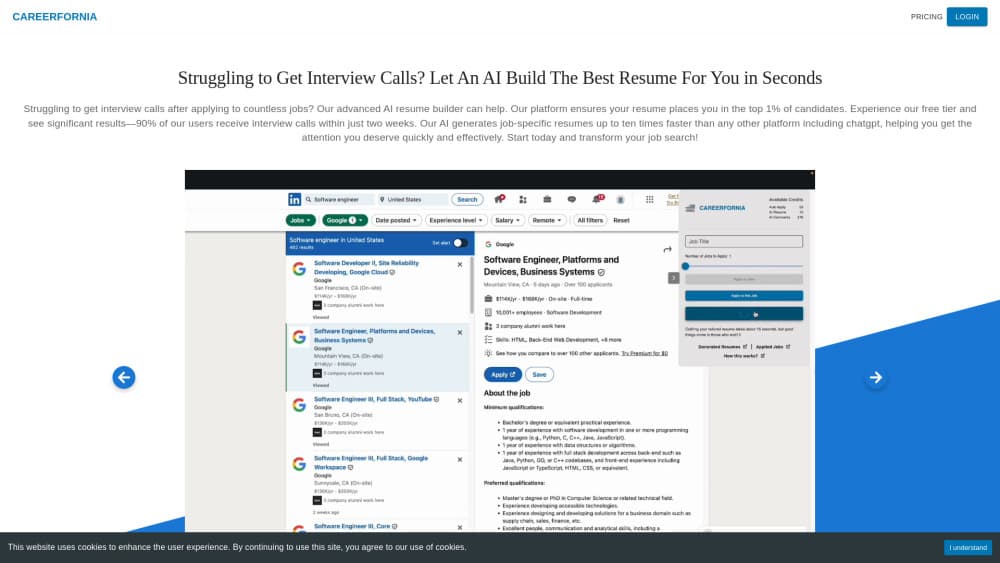
Careerfornia is an AI resume builder that rewrites your whole resume for every job in about 10 seconds, scores how well it matches the posting, and can fill out applications from LinkedIn.
About Careerfornia
What Is Careerfornia
Careerfornia is a web app for people who apply to a lot of jobs at once. You save one profile, then paste a job description and get a separate resume written for that posting. The rewrite covers the summary, the skills block, and every bullet point.
Most resume tools hand you suggestions and leave the editing to you. This one writes the draft, lays it out in a single column that applicant tracking systems can parse, and shows a keyword match score beside the posting. You can change any line before you download.
The catch is accuracy. The company says the AI sometimes adds a skill or a result that isn't in your profile, so read each draft before you send it. There's no free plan either, just a 3-day trial that turns into $30 a month.
Getting Started
- Create an account at careerfornia.com and start the 3-day trial.
- Fill in your profile once with your work history, education, skills, and projects.
- Paste a job description, or open a LinkedIn posting and click the extension.
- Read the rewritten resume, fix anything that isn't true, then export a PDF or DOCX.
Product Information
A quick look at Careerfornia's pricing, supported platforms, and performance.
Best for
The users, tasks, and scenarios where this tool fits best.
Users
- Active job seekers sending 10 or more applications a month
- Career switchers
- Recent graduates
- Freelancers and contractors
Tasks
- Tailoring a resume to one posting
- Checking keyword coverage before you apply
- Applying through LinkedIn
- Filling out company career sites
Scenarios
- A week of daily applications
- Coming back to the job market after a few years
- Applying in a second country
Key features
Full Rewrite for Each Job
Careerfornia rewrites the summary, the skills section, and every bullet for the job you paste. That's the main difference from tools that suggest one line at a time and wait for you to accept it. Each posting gets its own saved document, so a week of applications leaves you with a week of tailored resumes.
Keyword Match Score
Every draft comes with a score that compares your resume against the job description. The number shows how much of the posting's vocabulary made it into your document, and it updates as you edit. Use it as a checklist rather than a target, since a high score with invented experience is worse than a lower one with true detail.
ATS-Friendly Resume Output
Exports use one column, real text, and standard section headings, with no tables, text boxes, or icons in the body. That's the layout applicant tracking systems read most reliably, and it also prints cleanly if a recruiter wants paper. You can download a PDF for portals and a DOCX when a form asks for an editable file.
LinkedIn Chrome Extension
The extension adds a button to LinkedIn job pages. Click it and Careerfornia imports the description, builds the draft, and keeps you on the same tab. For any other job board you paste the text yourself, which takes a few seconds and works the same way.
Auto-Apply on Company Career Sites
Auto-apply fills in applications on company career pages using your saved answers. By default it stops before Submit so you can check the form, and an Auto-submit option sends it after a 5-second countdown. It never posts or messages on LinkedIn on your behalf.
Editable Drafts and Multiple Profiles
Nothing gets locked after generation. You can rewrite a bullet, drop a skill the AI added, or reorder roles, then export again. Several profiles let you run different versions of your history side by side without rebuilding the whole document each time.
Pros and cons
Pros
- The rewrite covers the entire resume, so you review a finished draft instead of assembling one from suggestions.
- Ten seconds per posting makes a 20-application week realistic without cutting quality.
- The keyword match score gives you a concrete number to check before you send.
- ATS-friendly output and DOCX export cover both strict portals and forms that want an editable file.
- Auto-apply saves the repetitive form filling on company career sites while still stopping for your review.
Cons
- No free plan. You get 3 days of access and then pay $30 a month or $300 a year, which is steep for a search that lasts a few weeks.
- The AI can add skills or results that aren't in your profile, so every draft needs a read before it goes out. Skipping that step can cost you an interview.
- Auto-apply works on company career sites through the extension, and other boards still need a pasted description, so it isn't a single queue for every application.
- There's no public API, which rules it out if you wanted to plug resume generation into your own tooling.
Frequently asked questions
It rewrites your full resume for a specific job description in about 10 seconds, scores the keyword match, and can fill out applications. You keep one profile and get a separate document for each posting.
Related content
Explore related tools, skills, and articles for Careerfornia.
Careerfornia Alternatives
Agibot
Agibot · Productivity · AI Assistant · ChatbotAgibot is a personal AI agent for Mac that keeps running after you close the window, runs routines on a schedule, and works from Telegram or Slack with your own API keys.

Foley
Hanamori Labs, LLC · Voice & Language · Productivity · AI AssistantFoley is a voice to-do list that turns a spoken sentence into a filed task, complete with project, date and time, then helps you plan the day around what is already there.

Ghost Core
Ghost · Productivity · AI AssistantGhost Core is a $3,499 screenless personal AI computer that runs local AI models on its own hardware, builds context from your apps and devices, and acts without waiting for a prompt.