

Colorcinch – AI Photo Editor
Progresso Technology LLC · Image
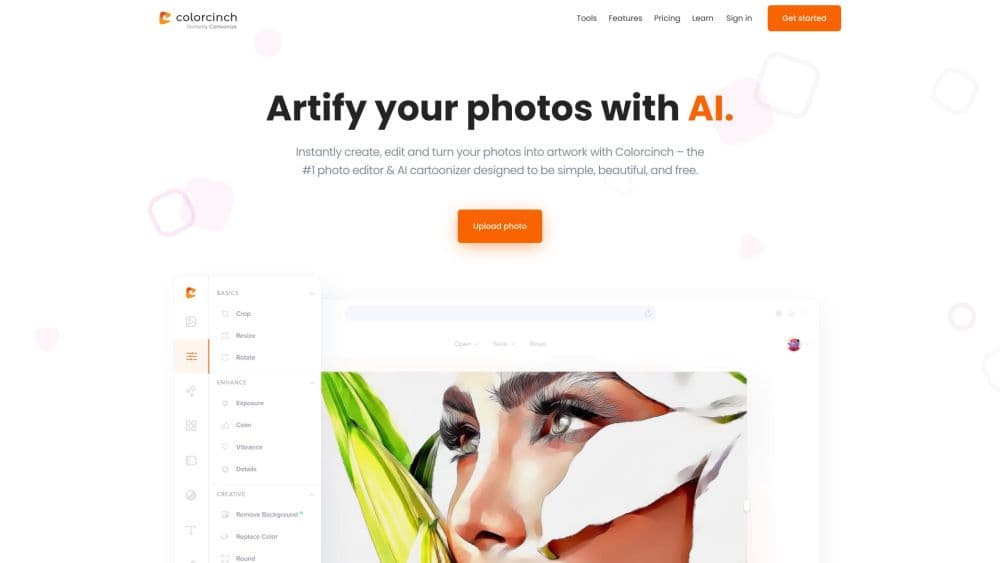
Colorcinch (formerly Cartoonize) is an online AI photo editor that turns photos into cartoons, removes backgrounds, upscales images, and restores faces, with a free basic mode and Pro plans.
About Colorcinch – AI Photo Editor
What Is Colorcinch
Colorcinch is a browser-based photo editing platform that also ships as an iOS and Android app. The tool grew out of Cartoonize, the site people used to cartoon themselves in one click, and it still centers on that idea: upload a photo, get a stylized result, without learning layers or masks. Around the cartoonizer sit a full editor, a stock library, and a set of AI tools for the slower parts of image work.
The pitch is breadth with a low learning curve. In one workspace you remove or replace backgrounds, upscale low-resolution images, restore old or blurry faces, erase objects and photobombers, and convert a photo into anime, sketch, or painting styles. Text masking, color replacement, overlays like rain and bokeh, and collage making cover the creative side, and export runs up to 400 DPI for print.
Two limits shape when Colorcinch fits. The free Basic mode needs no account but gates the premium effects, graphics, and higher-resolution exports behind Pro, so the full toolkit sits behind a subscription. And because editing happens in the browser or a light mobile app, it trades some of the precision of desktop software for speed and simplicity.
Getting Started
- Open cartoonize.net in a browser or install the Colorcinch app on iOS or Android. You can start editing without an account, and signing up is only needed to keep a Pro plan.
- Upload a photo from your device, drag one in, or open a stock image from the built-in library.
- Pick a tool. Run the Cartoonizer or a photo-to-art effect, remove the background with AI, upscale a low-resolution shot, or restore an old portrait.
- Refine the result. Adjust exposure, color, and sharpness, add text with masking, or layer on overlays, frames, and graphics.
- Export or share. Save the file as JPG, PNG, or PDF at up to 400 DPI, or post it straight to social media.
Product Information
A quick look at Colorcinch – AI Photo Editor's pricing, supported platforms, and performance.
Best for
The users, tasks, and scenarios where this tool fits best.
Users
- Casual users who want a cartoon or avatar
- Content creators and social media users
- Marketers and small sellers
- People fixing old or low-quality photos
Tasks
- Turning a photo into a cartoon or art piece
- Removing or replacing a background
- Upscaling and restoring images
- Building profile pictures, avatars, and memes
Scenarios
- Making a new profile picture for social or work accounts
- Preparing store or listing photos
- Bringing family photos back to life
Key features
AI Background Removal
Colorcinch removes a background in one click and lets you replace it with a color, image, or scene. The AI detects the subject and cuts a clean edge, which is what most people need for profile pictures, product shots, and cut-out collages. It replaces the fussy manual masking that makes background work slow in ordinary editors.
Cartoonizer and Photo to Art Effects
The Cartoonizer turns a photo into a cartoon, and it sits alongside sketcher, painting, drawing, and anime styles. The effect strength is adjustable, so you can go for a light stylized look or a full transformation. This is the feature the product was named for, and it still runs in a single click rather than through manual tracing.
Image Upscaling and Face Restoration
The upscaler raises the resolution of a small or low-quality image, and face restoration recovers detail in old, blurry, or damaged portraits. Both target the same problem: a photo that's too soft or too small to use at full size. They're aimed at people reviving scanned prints, old phone photos, or images that won't hold up on a large screen.
AI Object Removal and Inpainting
The removal and inpainting tools erase unwanted objects, text, and photobombers, then fill the gap so it blends with the scene. Instead of cropping a subject out of a shot, you clean up the image itself. It's a common fix for travel photos, product images, and edits where the background keeps distracting from the subject.
Full Photo Editor with Layers
Beyond the AI tools, Colorcinch packs a broad editor: exposure and color adjustment, sharpen and blur, crop and resize, rotate and flip, color replacement, and freehand drawing. A layers panel adds and organizes image and text elements, which lets you build multi-part compositions rather than single-pass edits.
Text Masking, Overlays, and Frames
Text masking fills any text with the image of your choice, and the text editor controls color, size, spacing, outline, and shadow. Overlays add rain, snow, fog, bokeh, and light leaks, and frames range from premade to handcrafted borders. These are the extras that turn a simple edit into a finished design piece.
Stock Library and Social Templates
The built-in library holds over four million stock photos, graphics, and icons, so you can build a design without sourcing assets elsewhere. Profile picture makers, avatar makers, meme generators, and preset social aspect ratios mean a large share of common social formats are covered out of the box.
Pros and cons
Pros
- The one-click Cartoonizer and art effects are the core draw, and they work without any editing experience.
- The free Basic mode needs no account, so you can test the results before subscribing.
- AI tools for background removal, upscaling, face restoration, and object removal cover the tasks people search for most.
- A full editor with layers, text masking, overlays, and frames means you don't leave the site to finish a design.
- Export reaches 400 DPI across JPG, PNG, and PDF, which is enough for print work rather than screen only.
Cons
- Premium effects, the full graphics library, and higher-resolution exports sit behind the Pro plan, so the free tier is limited.
- Annual Pro billing isn't refundable, and refunds are only considered within the first 30 days when switching plans.
- Browser-based and light on mobile, it won't match dedicated desktop software for heavy or precise retouching.
- Some tasks run on credits or premium access, so frequent use of certain AI tools has a cost implication.
Frequently asked questions
Colorcinch edits photos and turns them into artwork in a browser or mobile app. You can cartoonize a picture, remove or replace a background, upscale a low-resolution image, restore an old face, erase objects, and build profile pictures, avatars, and memes, all in one place.
Related content
Explore related tools, skills, and articles for Colorcinch – AI Photo Editor.
Colorcinch – AI Photo Editor Alternatives

Google EmbeddingGemma 2
Google DeepMind · Writing · Image · CodingGoogle EmbeddingGemma 2 is a 740M-parameter open model that turns text, code, images, audio, and video frames into vectors in one 768-dimension space, running on phones and laptops.

Tractionwave
TractionWave · Image · MarketingTractionWave is an AI attention heatmap tool for static ads. Upload a PNG or JPG and it returns predicted attention, ranked hotspots, and fixes before you spend budget.

Imejis.io
Imejis.io · Image · MarketingImejis.io is an AI design studio for agents and marketing teams. Describe an image in plain words, and it writes the copy, builds the layout, reflows it to every size, then exports a finished file.