
Change Clothes AI
Change Clothes AI · Image
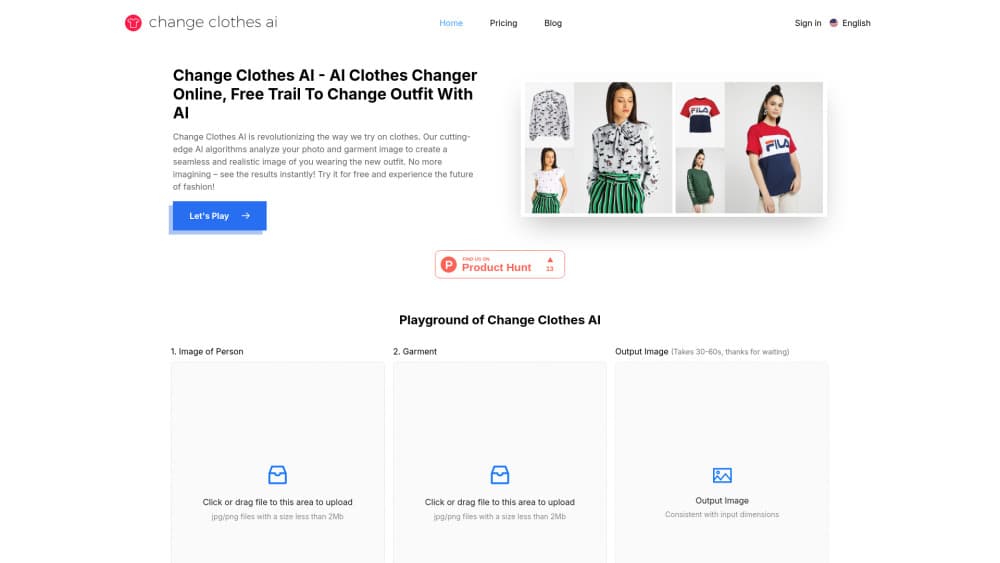
Change Clothes AI is an online tool that swaps the outfit in your photo for any garment you upload, so you can see how new clothes look on you without a fitting room.
About Change Clothes AI
What Is Change Clothes AI
Change Clothes AI is a web-based AI outfit changer, also billed as a clothes swap AI tool. You upload a portrait of yourself and a photo of a garment, and the tool blends them into a single realistic image of you wearing that outfit. There's no app to install and no Photoshop skills needed. It runs in your browser. Nothing to download, nothing to configure.
The tool is built for people who want to preview clothing before buying or posting. Online shoppers use it to cut down on returns, while creators use it to mock up looks for social media. Want to know whether a color actually suits you before you commit? That's the itch this tool scratches.
The main limits are practical. Uploads are capped at 5MB, the tool works best with a clear, front-facing portrait and good lighting, and paid plans are credit-based, so every image costs credits. The free entry point is tight. You get a small credit allowance to test the workflow, then you buy a package to keep going. Results on tricky fabrics or dramatic poses can look off, so expect a few tries per image, especially if your source photo has uneven lighting or the garment uses a busy print that the engine has trouble mapping cleanly onto your pose.
Getting Started
- Open the site and upload a clear, front-facing photo of yourself (JPG, PNG, or WEBP, under 5MB).
- Upload a front-facing image of the garment you want to try on.
- Pick a model strategy, generation mode, and cloth category, then add a short garment description.
- Generate the image and download the result, or tweak the inputs and run it again.
- Buy a credit pack if you've used up the free allowance.
Product Information
A quick look at Change Clothes AI's pricing, supported platforms, and performance.
Best for
The users, tasks, and scenarios where this tool fits best.
Users
- Online shoppers
- Content creators
- Fashion enthusiasts
Tasks
- Virtual try-on
- Outfit planning
- Product previews
Scenarios
- Deciding on an online purchase
- Building a social media post
- Wardrobe brainstorming
Key features
AI Outfit Swapping
Upload a portrait and a garment image, and the tool replaces your current clothing with the new piece while keeping your face, pose, and body shape. It reads how fabric drapes and fits on your form so the result holds up to a closer look. The whole swap runs in seconds, not hours of editing.
Realistic Image Synthesis
The engine studies lighting, shadows, and fabric folds before it merges the two images, which is what keeps results from looking pasted on. This attention to detail is the difference between a usable preview and an obvious fake. Blurry or badly lit inputs still hurt quality, and so does a garment shot taken from an odd angle, so the two source photos you feed it end up mattering just as much as the model running behind the scenes.
Garment Detail Capture
The tool analyzes the garment's shape, size, color, pattern, and texture so the final image reflects how the piece actually looks. That means prints and patterns land where they should, not warped or smeared. It works best on front-facing garment shots.
Generation Modes and Strategies
You can pick a model strategy, a generation mode, and a cloth category before you run the tool, which steers how the swap is handled. A short text description of the garment adds another layer of control. This setup lets you dial in results instead of taking whatever the default gives you.
No-Install Web Workflow
Everything happens in the browser. There's no app to download, no account required to start, and no desktop software. You upload, generate, and download from the same page, which keeps the barrier to trying it very low.
Credit-Based Pricing
Usage runs on credits. The Standard pack gives 20 credits for a one-time $8, while Pro ($20/month) and Premium ($50/month) offer larger pools at lower per-image rates. Per-image cost drops from $0.40 to $0.10 as you move up, and higher tiers add faster generation and advanced models.
Pros and cons
Pros
- Works in the browser with no install and no signup to start.
- Handles the full loop from upload to download in one page.
- Per-image cost falls sharply on higher tiers, down to $0.10.
- Captures garment color, pattern, and texture rather than just pasting a flat layer.
- Free allowance lets you test the workflow before paying.
Cons
- Uploads are capped at 5MB, which rules out many high-resolution camera files.
- Every image consumes credits, so heavy users burn through packs fast.
- Results depend on your source photos. Angled shots, poor lighting, or busy patterns often need several attempts.
- No public API, so it can't be wired into your own app or pipeline.
Frequently asked questions
It swaps the outfit in your photo for a garment you upload, giving you a realistic preview of yourself in new clothes. People use it for online shopping, outfit planning, and content creation.
Related content
Explore related tools, skills, and articles for Change Clothes AI.
Change Clothes AI Alternatives

Google EmbeddingGemma 2
Google DeepMind · Writing · Image · CodingGoogle EmbeddingGemma 2 is a 740M-parameter open model that turns text, code, images, audio, and video frames into vectors in one 768-dimension space, running on phones and laptops.

Tractionwave
TractionWave · Image · MarketingTractionWave is an AI attention heatmap tool for static ads. Upload a PNG or JPG and it returns predicted attention, ranked hotspots, and fixes before you spend budget.

Imejis.io
Imejis.io · Image · MarketingImejis.io is an AI design studio for agents and marketing teams. Describe an image in plain words, and it writes the copy, builds the layout, reflows it to every size, then exports a finished file.