

change.photos
change.photos · Image
change.photos is an image transformation API that resizes, compresses, sharpens, blurs, and converts photos at scale. It uses one POST endpoint, offers a free tier, and paid plans from $10 monthly.
About change.photos
What Is change.photos
change.photos is a web-based image transformation API for resizing, processing, and shrinking images. You send it a photo URL plus a set of parameters, and it returns a link to the finished image. There's no photo editor to learn and no desktop software to install. The whole product is a REST endpoint called /api/change.
The main problem it solves is repeatable image work at scale. If your app needs every uploaded photo resized to the same width, converted to WebP, and compressed before it hits storage, you'd otherwise wire up a whole image library yourself and keep it patched. change.photos handles that as a photo API for developers, and you can call it from any language, which is where bulk image processing usually starts to hurt.
The biggest limit is scope. This is a transformation API, not a generation tool. It won't remove backgrounds, swap faces, or invent new pixels. If you need generative editing, you'll need a different platform. And every image has to be reachable by URL, so local files need to live somewhere public first.
Getting Started
- Create a free account at change.photos and grab an API key from your dashboard.
- Send a POST request to
https://change.photos/api/changewith your key in the Authorization header andContent-Type: application/json. - Pass the
urlof the image you want to transform, plus any parameters such aswidth,height,format, orquality. - Read the
urlfield in the JSON response, which points to your transformed image. - Track usage against your monthly image quota, then upgrade the plan when you outgrow it.
Product Information
A quick look at change.photos's pricing, supported platforms, and performance.
Best for
The users, tasks, and scenarios where this tool fits best.
Users
- Backend and full-stack developers
- Indie app builders
- Web and ecommerce teams
Tasks
- Bulk image processing
- Format conversion
- Compression and blur
Scenarios
- Uploading user avatars at a fixed size
- Preparing social media and marketplace images
- Running a media-heavy side project
Key features
One Endpoint for Every Operation
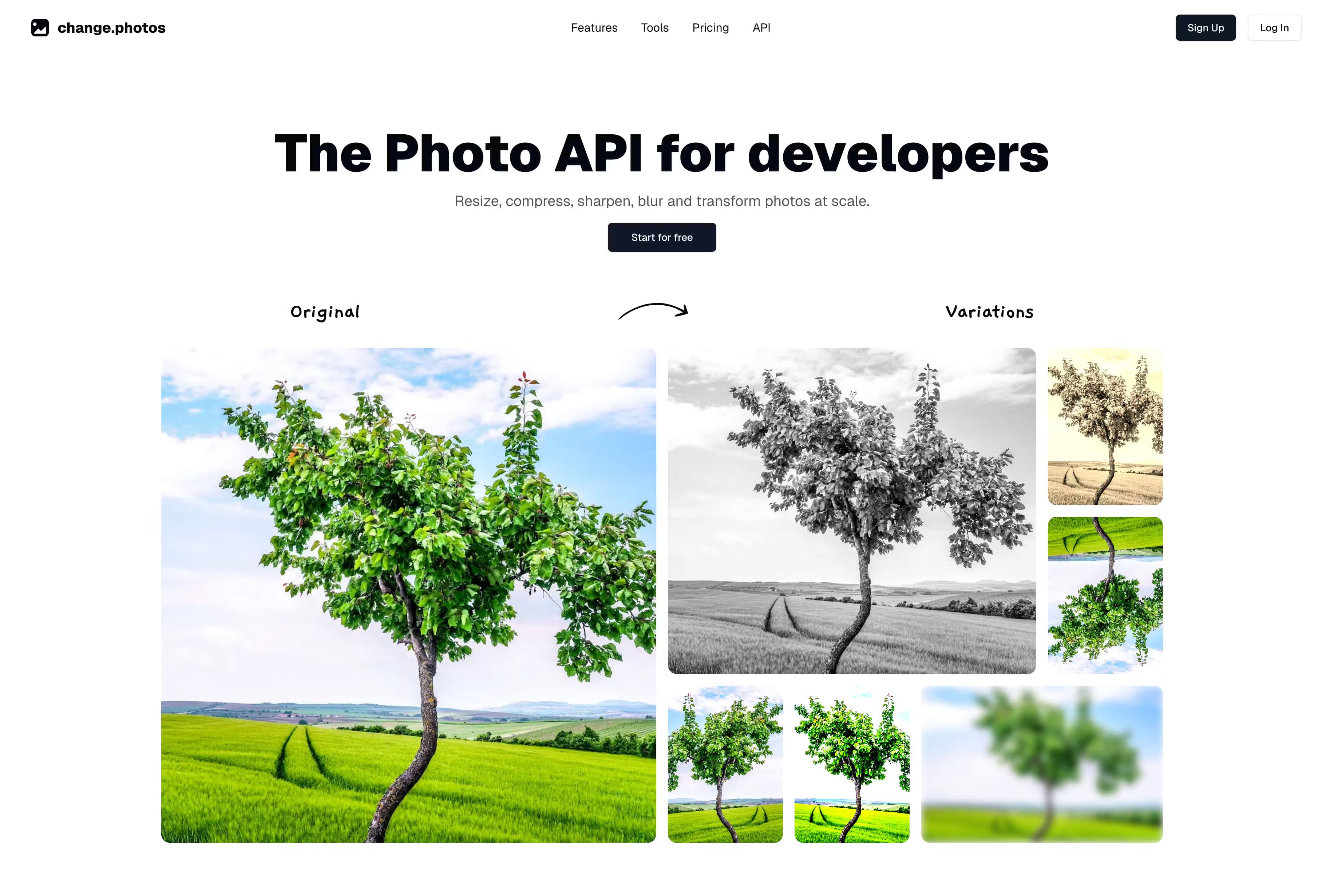
All nine operations run through the same POST /api/change call. This image resizing API is really one image manipulation API for resize, rotate, flip, compress, blur, sharpen, grayscale, tint, and convert, all sharing one request shape. You learn the pattern once, and it keeps your integration short and readable.
Precise Resizing with Fit Modes
The width and height parameters accept pixel values, and the fit option controls how the image maps onto them. You can pick contain, cover, fill, inside, or outside to avoid the stretched look that naive resizers produce. One parameter line usually covers an entire thumbnail setup.
Format Conversion and Quality Control
This image compression API lets you output JPEG, PNG, or WebP and set quality anywhere from 1 to 100. It's the part that matters for page speed, because converting a PNG screenshot to WebP at a lower quality can cut file size a lot. The API defaults to JPEG at quality 80 if you don't specify.
Rotation and Flipping
The rotate parameter takes any angle from -360 to 360 degrees, and flip and flop mirror the image vertically and horizontally. It's handy when user uploads arrive sideways and you want to correct them without a manual pass.
Blur, Sharpen, Grayscale, and Tint
Blur accepts a sigma value between 0.3 and 1000, so you can go from a subtle softening to a heavy mosaic effect. Sharpen and grayscale are simple booleans, while tint takes an RGB object for color grading. Together they cover the light edits most apps need.
Usage-Based Pricing with a Free Tier
The free plan gives you 50 images a month with unlimited storage and unlimited API calls. Basic runs $10 a month for 1,000 images, and Pro runs $25 a month for 5,000. Only the number of image transformations changes between tiers, so nothing gets feature-locked.
Pros and cons
Pros
- Setup takes minutes because everything goes through one POST endpoint with a consistent parameter set.
- The free tier includes unlimited API calls and storage, so you're only capped on processed images.
- WebP output plus quality controls make it easy to cut image weight for faster pages.
- All paid tiers unlock every operation, so you never hit a feature wall after upgrading.
- Blur, tint, and fit modes cover common editing needs without adding another service.
Cons
- There's no visual editor or mobile app, so it's built for code rather than hands-on tweaking.
- Transformation only, no background removal, generation, or AI object editing, which means creatives still need a separate tool.
- Images must be available at a public URL, so private local files need to be hosted first.
- The free plan's 50-image monthly cap runs out fast if you're processing real traffic.
Frequently asked questions
It transforms images through an API. You send a photo URL and parameters like width, format, or blur, and it returns a URL to the processed image. It handles resizing, compression, conversion, and light effects, not AI generation.
Related content
Explore related tools, skills, and articles for change.photos.
change.photos Alternatives

Google EmbeddingGemma 2
Google DeepMind · Writing · Image · CodingGoogle EmbeddingGemma 2 is a 740M-parameter open model that turns text, code, images, audio, and video frames into vectors in one 768-dimension space, running on phones and laptops.

Tractionwave
TractionWave · Image · MarketingTractionWave is an AI attention heatmap tool for static ads. Upload a PNG or JPG and it returns predicted attention, ranked hotspots, and fixes before you spend budget.

Imejis.io
Imejis.io · Image · MarketingImejis.io is an AI design studio for agents and marketing teams. Describe an image in plain words, and it writes the copy, builds the layout, reflows it to every size, then exports a finished file.