

Chini.Fit - Find Hidden Sugar in Meals
Chini.Fit · AI Assistant
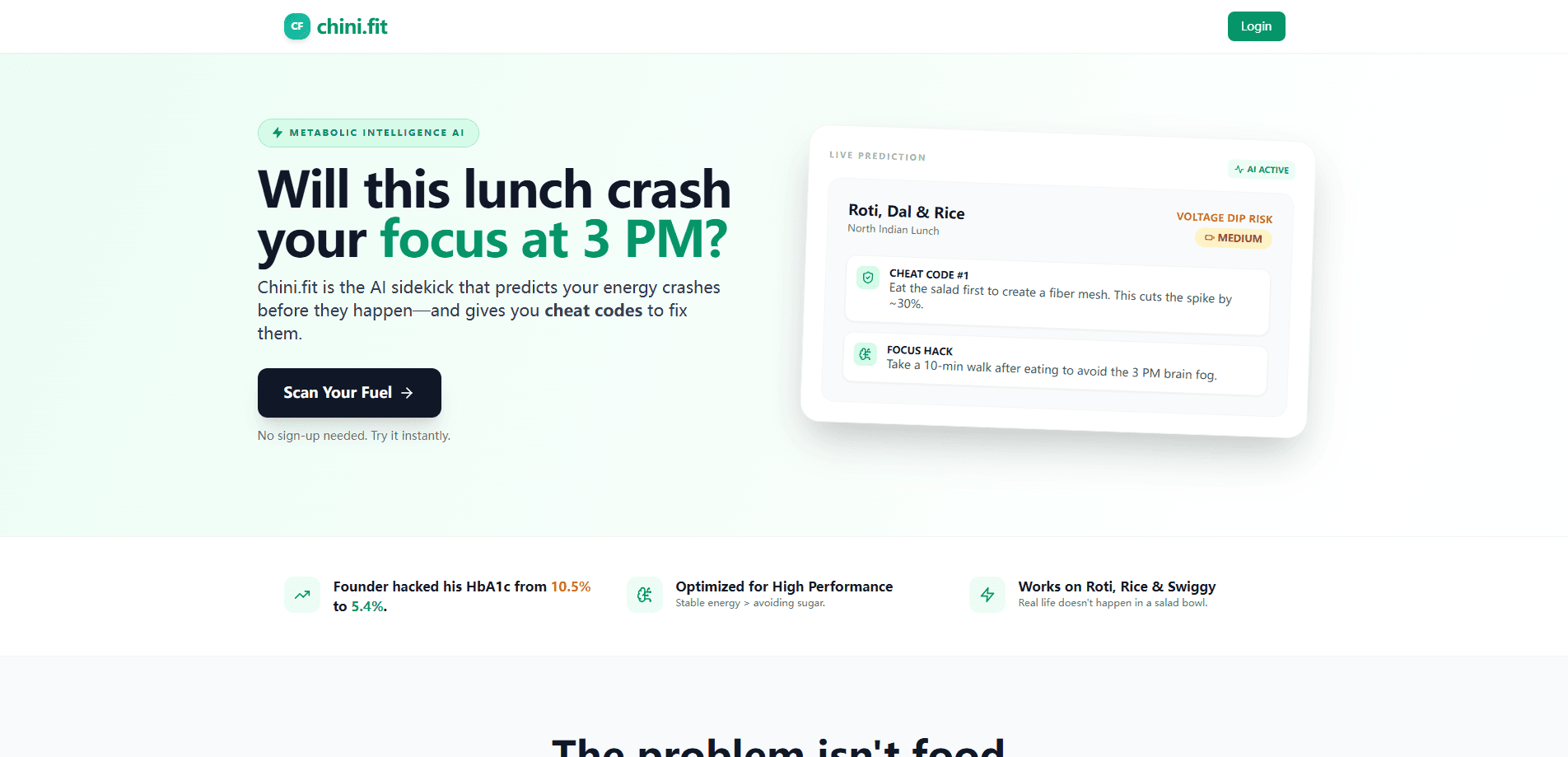
Chini.Fit is a blood sugar meal analysis tool that reads a photo or text description of what you're about to eat and estimates how much it will spike your glucose. Instead of counting calories, it runs an AI nutrition analysis, predicts your metabolic load, flags crash risk in plain language, and hands you practical fixes like eating vegetables first or taking a short walk. It works as a lightweight metabolic health app that runs in the browser, needs no sign-up to try, and is built for anyone chasing steadier energy through the afternoon, whether or not they have a diabetes diagnosis.
About Chini.Fit - Find Hidden Sugar in Meals
What Is Chini.Fit
Chini.Fit is a browser-based AI meal scanner that turns a single meal photo into a blood sugar forecast. You snap a picture of your plate or type out what you ate, and the app identifies the ingredients and portions, then estimates the glucose impact of that meal. Think of it as a glucose spike predictor that reads your glycemic response. It frames the result as a metabolic load score plus a crash risk, so you get an answer in plain English rather than a wall of nutrition numbers.
The idea is blunt. The problem usually isn't the food itself. It's the crash that follows. A "healthy" lunch that spikes your glucose can leave you foggy and reaching for coffee by mid-afternoon. Chini.Fit was built by a founder who brought his own HbA1c down from 10.53% to 5.4% by tracking meals, and the tool packages that approach for everyone else.
The biggest limitation is that it's an educational guide, not a medical device. Its estimates are AI predictions, not lab measurements, for a different purpose than a clinical blood sugar tracker. If you manage diabetes with insulin, this doesn't replace the numbers your doctor uses. Don't treat it as one. The tool is also web-only for now, with no native app, and it's aimed at casual daily use rather than clinical-grade accuracy.
Getting Started
- Open chini.fit in your browser. No account or sign-up is required to run a first analysis.
- Choose "Use Photo" and upload a picture of your meal, or pick "Type It" and describe the meal in plain text if you don't have a photo.
- Let the AI identify the ingredients and portions, then wait for the energy forecast.
- Read your metabolic load and crash risk, along with the suggested cheat codes to soften the impact.
- Rerun the analysis on a modified meal to see how adding protein, fiber, or a walk changes the forecast.
Product Information
A quick look at Chini.Fit - Find Hidden Sugar in Meals's pricing, supported platforms, and performance.
Best for
The users, tasks, and scenarios where this tool fits best.
Users
- People who feel an energy dip after lunch
- Prediabetic or health-curious adults
- Anyone who eats rice, roti, or takeout
Tasks
- Predicting the glucose impact of a meal
- Comparing two versions of the same dish
- Finding small fixes for a high-carb meal
Scenarios
- Deciding what to order at lunch
- Breaking an afternoon slump habit
- Turning a fitness or weight goal into something concrete
Key features
Photo Meal Analysis
Point your camera at a plate and the AI identifies the ingredients and estimates the portions without you weighing anything. It handles the messy reality of a home-cooked curry or a delivery order, not just clean, single-item foods. No scale. No lookup. The result feeds straight into the glucose forecast, which is the whole point: less logging, faster answers.
Glucose Spike Forecasting
The core output is a predicted metabolic load and a crash risk, written in plain English. You see whether a meal is likely to send you into a spike-then-slump cycle before you eat it. Will this lunch crash you at 3 PM? Now you can check. This is the piece that separates it from a calorie counter, since two meals with the same calories can deliver that energy very differently.
Cheat Codes for High-Carb Meals
When a meal scores poorly, the tool suggests specific, low-effort fixes: add vinegar, eat the vegetables first, or take a walk after eating. These are practical nudges, not rigid rules, and they show up attached to the meal that triggered them. Small changes. Real effects. It's the difference between knowing a meal will spike you and knowing what to do about it.
Text-Based Meal Entry
No photo? Type a description instead. The app parses a written meal, like "two rotis with dal and a scoop of rice," and estimates the same way it does from an image. That matters on days when you're logging from memory, planning a meal in advance, or eating something that photographs badly. It happens more often than you'd think.
No-Sign-Up Instant Try
You can run an analysis without creating an account or handing over an email. The app opens straight into the scan flow, which keeps the barrier low for a first look. If you decide to keep using it, the friction of starting was already zero. That's rare. Most tools make you sign up first.
Pros and cons
Pros
- No sign-up wall before your first analysis, so you can test it on your actual lunch in under a minute.
- Focuses on glucose impact and crash risk instead of calories, which is the metric that matches how you actually feel after eating.
- Tuned for real meals like rice, roti, and takeout rather than idealized health-food examples.
- Photo and text input cover both "I have a plate" and "I'm planning ahead" moments.
- Practical cheat codes turn a warning into a clear next step.
Cons
- Estimates are AI predictions, not measured glucose response, so accuracy varies across dishes and the numbers shouldn't be treated as clinical.
- Web-only for now, with no native iOS or Android app for tracking on the go.
- Pricing and account tiers aren't published on the site, so it's unclear what paid features or limits exist beyond the free analysis.
- No API is documented, so developers can't build the analysis into their own tools.
Frequently asked questions
No. It's an educational tool that estimates how a meal may affect your blood sugar, and it doesn't diagnose, treat, or replace your care team. If you manage diabetes with medication or insulin, keep using the guidance and monitoring your doctor provides.
Related content
Explore related tools, skills, and articles for Chini.Fit - Find Hidden Sugar in Meals.
Chini.Fit - Find Hidden Sugar in Meals Alternatives

Iplan AI
Iplan AI · Productivity · AI AssistantIplan AI is an AI travel planner that turns a few trip details into a full day-by-day itinerary in seconds. You answer questions about your destination, interests, budget, and travel companions, and the tool builds a plan you can edit, share, and carry with you on any device. It targets travelers who want a solid draft without spending hours in spreadsheets and browser tabs. Think of it as an itinerary generator that does the tedious part for you.

Screenhelp
Screenhelp · Productivity · AI AssistantScreenhelp is an AI screen assistant that turns a single keyboard shortcut into real-time help. You press Ctrl+Shift+Space, it captures what's on your screen, and it streams an answer into a private panel in about two seconds. Think of it as an AI screenshot helper you trigger on demand. It runs on Mac, Windows, and the web, starts free with 30 answers a month, and stays invisible during screen sharing on Zoom, Teams, and Google Meet.

Rainbow
Rainbow · AI AssistantRainbow is an AI weather forecast app built around short-term precipitation nowcasting. Its engine pushes min-by-min rain and snow predictions up to four hours ahead, blending live satellite and radar feeds into hyperlocal forecasts. The app adds live rain radar, a seven-day outlook, precipitation alerts, home-screen widgets, and a hurricane tracker, and it runs on both Android and iOS with a free tier plus paid upgrades.