

Chunk
Dudley Spence · Productivity · AI Assistant
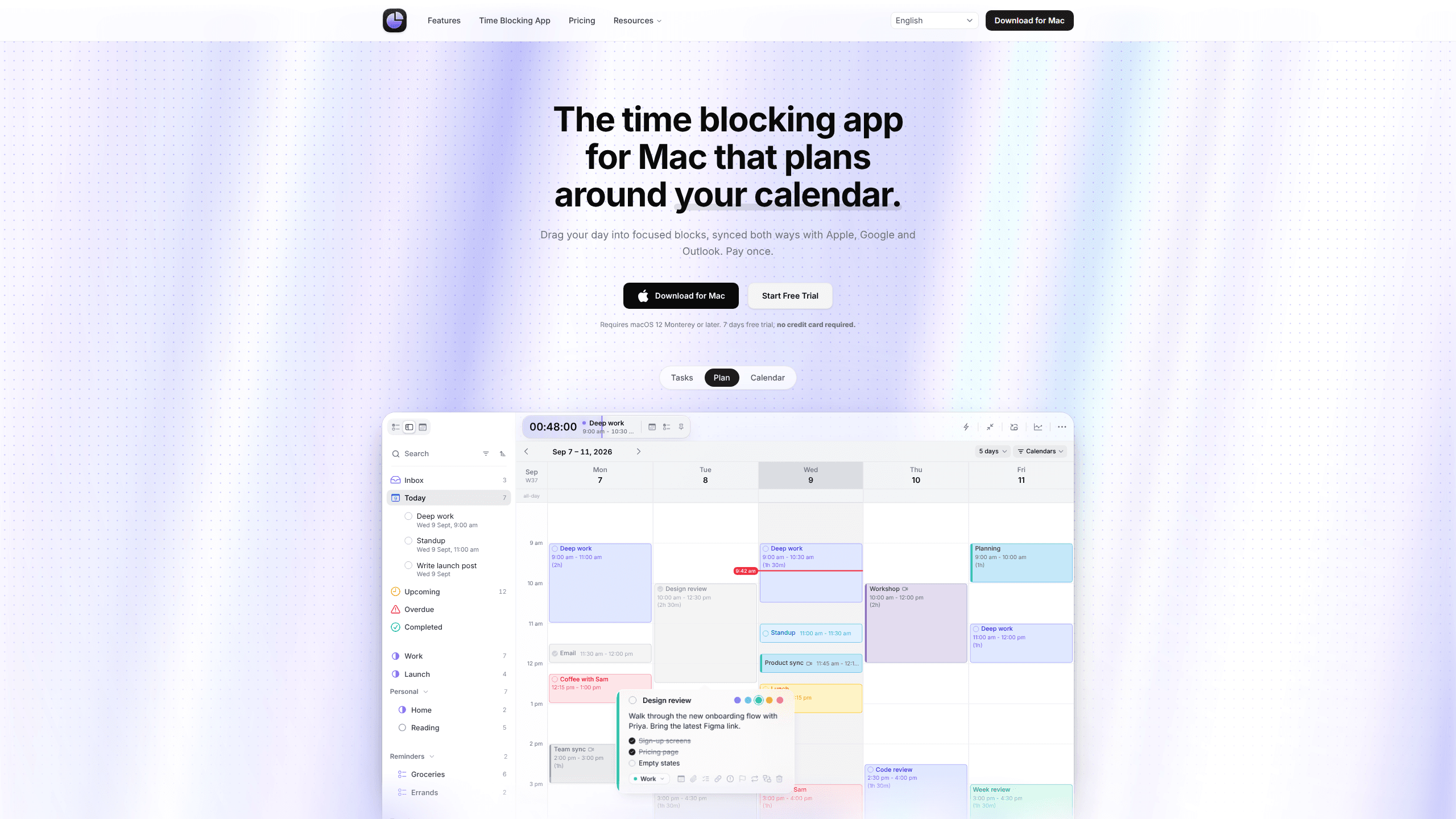
Chunk is a time blocking app for Mac that turns tasks, projects, and calendar events into focused blocks you drag into place. It syncs with Apple, Google, and Outlook and costs $39.99 once.
About Chunk
What Is Chunk
Chunk is a time block planner for macOS that keeps your task list and your calendar in one window. You slide from a list of tasks into a calendar grid, then drag work onto the hours where you want it to happen. As a task scheduling app, it replaces the usual pair of windows with one plan.
The Chunk app reads and writes to Apple Calendar, Google Calendar, and Outlook. A meeting added on your phone shows up in Chunk, and a block you move on your Mac lands in the calendar you already share with other people. Tasks can come from smart lists, projects, or Apple Reminders.
Dudley Spence, an independent developer, builds the app. It needs macOS 12 Monterey or later. There is no free tier. New users get a 7-day trial, then buy a lifetime license. An iPhone version is listed as coming soon.
Getting Started
- Download Chunk from chunkapp.net and install it on a Mac running macOS 12 or later. The trial starts without a credit card.
- Connect the calendars you already use. Chunk asks for access to Apple Calendar, Google Calendar, or Outlook, and syncs both ways.
- Add tasks to a smart list or project, or pull in Apple Reminders. Drag a task onto the timeline to reserve time for it.
- Set repeat rules for routines and adjust block lengths as the day changes.
- Buy the license before the trial ends if you want to keep your plan and future updates.
Product Information
A quick look at Chunk's pricing, supported platforms, and performance.
Best for
The users, tasks, and scenarios where this tool fits best.
Users
- Freelancers who juggle several clients
- Students with irregular weeks
- Managers who live in meetings
Tasks
- Planning a week of deep work
- Turning a large project into daily work
- Keeping a work calendar and a personal calendar in one plan
- Running recurring routines
Scenarios
- A day packed with back-to-back calls
- A launch week with a fixed deadline
- Planning away from your desk
Key features
Tasks and calendar on one surface
Chunk puts smart lists, projects, Apple Reminders, and recurring templates in a single column next to the calendar. You schedule a task by dragging it onto a time slot, and the same plan appears as a timeline, a week grid, or a month. The point is speed: fewer windows and fewer copy-paste steps between deciding and scheduling.
Two-way sync with Apple, Google, and Outlook
Calendar time blocking only works if your existing calendars stay current. Chunk reads events from the three major calendar services and writes your blocks back to them, so colleagues see the time you reserved and you see their meetings. Sync runs through the accounts you already own.
Projects that break into sessions
Lists now work as projects, each with an overview, a deadline, and a finish line. You can split a large task into several sessions or drag the whole project onto the calendar to reserve time for it. That structure suits work that takes days rather than a single afternoon.
A local MCP server for Claude
Chunk ships a local MCP server that connects to Claude Desktop in one click. You can ask Claude to plan your day in plain language and have it read or change your schedule. The server runs on your Mac and your data stays there, which matters if you keep client names and meeting details in the same plan.
Flexible views and timeline controls
The View menu switches between one day, three days, five days, a week, and a month over the same plan. You can zoom the timeline and compress early or late hours that you never use. Schedule export saves a copy as PDF or CSV when you need to share it.
Menu bar panel, timer, and full-screen alerts
A global shortcut opens a compact menu bar panel over full-screen apps, and the active timer shows the task name, progress, and time remaining. When a block ends, a full-screen alert lets you mark the task complete or reschedule it on the spot. Small touches like instant block and custom shortcuts keep the daily routine quick.
Pros and cons
Pros
- A one-time purchase with no subscription, which keeps the cost predictable after year one.
- Two-way calendar sync means the app fits an existing workflow instead of replacing it.
- Tasks, projects, and Apple Reminders sit beside the schedule, so planning and doing share one screen.
- The local MCP server gives Claude a private way to read and edit the plan without sending data to a third party.
- Useful details are included: instant block, menu bar access, timer, and PDF or CSV export.
Cons
- It runs only on macOS, so Windows and Android users are out, and the iPhone app is still listed as coming soon.
- There is no free tier. After 7 days you pay $39.99 for one license, or $79.99 for a family pack.
- There is no public API. Automation outside Claude Desktop depends on the local MCP server.
- Time reports are missing, so you can't compare estimated block length with actual time spent.
Frequently asked questions
Chunk is a daily planner for macOS built around time blocking. You turn tasks and projects into calendar blocks, then work through the day in the order you planned.
Related content
Explore related tools, skills, and articles for Chunk.
Chunk Alternatives

Base Code
Base44 (Wix) · Coding · ProductivityBase Code is a shared cloud development environment from Base44. Teammates describe changes to an existing GitHub codebase in chat, preview them live and send them back as pull requests.

Knocket
Knocket (Tencent RTC team) · Productivity · Business · ChatbotKnocket is a free live chat and contact page tool that lets visitors message you from your website, app, or a shareable link, with every reply handled from Telegram or one inbox.

FloorGen
Vinit Kumar (FloorGen) · Productivity · China AIFloorGen is a browser-based floor plan maker that turns a sentence or a sketch into an editable 2D plan and a 3D walkthrough. Export to PDF, DXF or video, and draw without an account.