

Clarity AI
Philip (philz1337x) · Image
Clarity AI is an AI image and video upscaler with four models, from faithful Crystal precision to creative Clarity modes, available on the web and through a pay-as-you-go API.
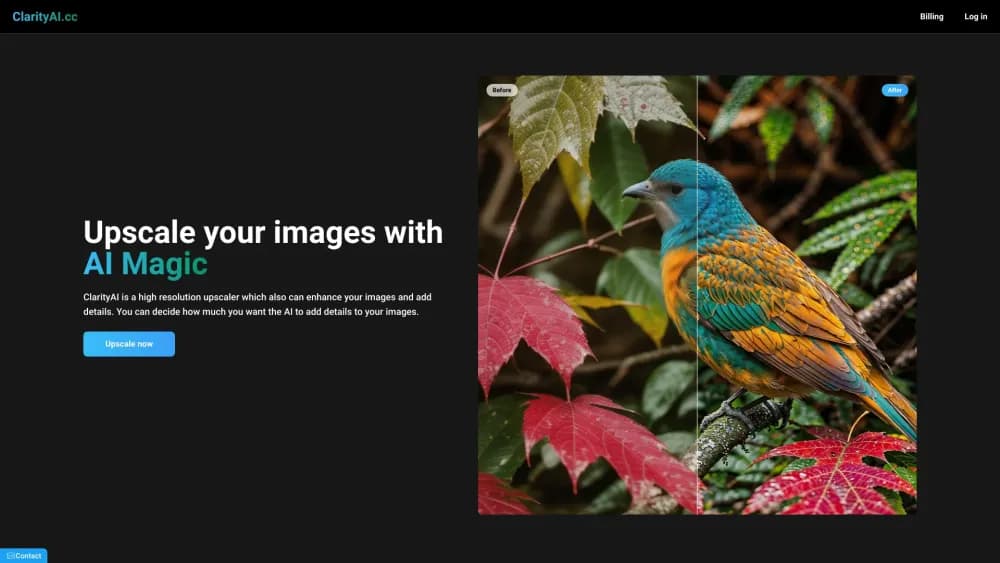
About Clarity AI
What Is Clarity AI
Clarity AI is a web tool that rebuilds small or soft images at higher resolution. You upload a photo, pick a model, and it returns a sharper file with real detail instead of noise. The same engine handles video frames, so you can sharpen a clip without the smeared look that simple scaling leaves behind. People who just want to upscale images online get a browser tool, not a desktop install.
The product splits into two families. Crystal goes for precision: it keeps faces, skin, product labels, and fine text close to the original and barely invents anything. Clarity and Clarity Pro go for creative detail, letting you dial how much extra texture the AI adds. That choice matters, because a faithful mode suits a product shot you need to sell, while a creative mode suits artwork where you want more punch. The company positions all of this as a Magnific alternative with the same goal: bigger files that still look real.
The catch is scope. Clarity AI does one job well: making resolution go up. It won't edit, retouch, or generate an image from scratch, and the free path is a one-off trial rather than an ongoing plan. The paid tiers run on monthly credits, so heavy users watch the meter.
Getting Started
- Open clarityai.co and sign up, then land on the upscale screen.
- Drag in an image or a short video clip.
- Pick a model: Crystal for faithful precision, Clarity or Clarity Pro for creative detail.
- Adjust the Creativity and Resemblance sliders, or leave them on the defaults.
- Run the upscale, compare against the original, and download the result.
Product Information
A quick look at Clarity AI's pricing, supported platforms, and performance.
Best for
The users, tasks, and scenarios where this tool fits best.
Users
- E-commerce and product teams
- AI artists refining generated images
- Designers and agencies prepping visuals for print
Tasks
- Restoring low-resolution photos
- Sharpening product and portrait shots
- Prepping images for large-format print
- Upscaling video frames
Scenarios
- A small online store polishing listings
- A print job that needs bigger files
- A creator salvaging old footage
Key features
Four Upscaling Models in One Place
Clarity AI runs four engines: Crystal for precision, Crystal Video for footage, Clarity for creative control, and Clarity Pro for next-generation creative work up to 8K. Each targets a different job, so you match the model to the image instead of forcing one setting on everything. Having all four behind one account is what separates it from single-mode upscalers.
Crystal Precision Mode
Crystal is the faithful option. It keeps every real detail and invents nothing, which makes it the pick for faces, skin, portraits, and products where an altered detail would be a problem. The company says it can reach up to 1.5 gigapixel output, well beyond the 2K files most tools stop at.
Creative Control with Clarity and Pro
Clarity is the open-source classic, and it gives fine-grained control over detail, style, and creativity. Clarity Pro pushes the same idea further for portraits and skin, adding detail while staying close to the original. If you want to shape how much texture the AI adds, these two modes are the reason to pick Clarity AI.
Image and Video Upscaling Together
The same platform covers stills and footage. Crystal Video upscales clips frame by frame, up to 4K per frame, so you don't juggle a separate video tool. For anyone who works with both photos and short clips, that saves an extra subscription.
Developer API with Pay-As-You-Go Pricing
Clarity AI offers a REST API billed per megapixel, with no subscription. Crystal runs at $0.016 per megapixel, Clarity at $0.005, and the Clarity Pro upscaler at $0.03. You can call the models directly or run them through GPU platforms like Replicate, Fal, and WaveSpeed. For teams that want an image enhancement API inside their own product, that setup fits without a contract.
ComfyUI and Workflow Integrations
Beyond the API, Clarity AI plugs into ComfyUI and other pipelines for people who already work in node-based tools. Style Transfer, repeating pattern support, and small image handling round out the higher tiers. These are the features that separate a casual upscale from a production workflow.
Built for Production Load
The API is designed to scale to millions of images and go live in minutes, according to the company. Pay-as-you-go pricing means you commit to nothing upfront. For developers comparing services, that combination of simple billing and no commitment is the main draw.
Pros and cons
Pros
- Four models cover both faithful precision and creative detail, so one tool handles portraits, products, and art.
- Crystal reaches up to 1.5 gigapixel, far past the 2K output many upscalers cap at.
- The API bills per megapixel and carries no subscription, with the Clarity model as low as $0.005/MP.
- Crystal Video upscales footage frame by frame, so stills and video share one platform.
Cons
- Paid plans start at $13/mo with credit limits, and the free path is only a trial rather than a lasting tier.
- Creative modes can add artifacts at high settings, so you have to dial back Creativity and Resemblance to stay safe.
- It only upscales and enhances; there's no editing or image generation, so it won't replace a full editor.
- High-volume work on the generous tiers gets expensive, which pushes serious users toward the API or Business plan.
Frequently asked questions
Clarity AI upscales and enhances images and video, turning small or soft files into sharper, higher-resolution ones. It's built for people who need real detail preserved, like product photos, portraits, and print-ready visuals.
Related content
Explore related tools, skills, and articles for Clarity AI.
Clarity AI Alternatives

Google EmbeddingGemma 2
Google DeepMind · Writing · Image · CodingGoogle EmbeddingGemma 2 is a 740M-parameter open model that turns text, code, images, audio, and video frames into vectors in one 768-dimension space, running on phones and laptops.

Tractionwave
TractionWave · Image · MarketingTractionWave is an AI attention heatmap tool for static ads. Upload a PNG or JPG and it returns predicted attention, ranked hotspots, and fixes before you spend budget.

Imejis.io
Imejis.io · Image · MarketingImejis.io is an AI design studio for agents and marketing teams. Describe an image in plain words, and it writes the copy, builds the layout, reflows it to every size, then exports a finished file.