

Claude Folder Upload
Independent developer · Productivity
Claude Folder Upload is a free Chrome extension that lets you upload folders to Claude in one shot instead of adding files one at a time.
About Claude Folder Upload
What Is Claude Folder Upload
Claude Folder Upload is a browser extension for Chrome that fixes one of the most annoying parts of working with Claude: getting a lot of files into the chat. Claude's own interface expects you to attach documents one by one. That's fine for a single PDF. It's painful for a project folder with fifty of them.
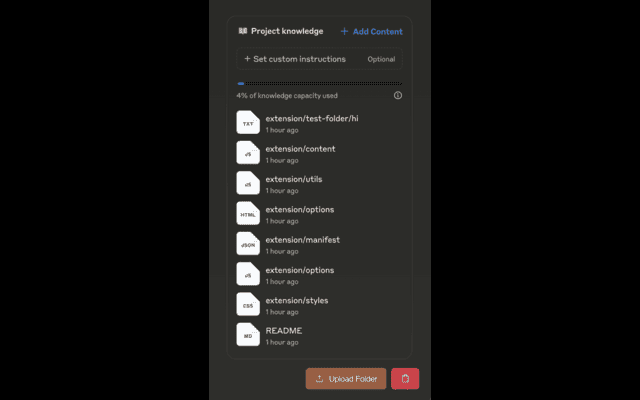
The extension changes that. You point it at a folder on your computer, and it uploads the contents while keeping the directory structure in place. Subfolders stay subfolders. The relationships between files survive the trip. That matters when a prompt only makes sense with the surrounding context, like a code repository where one file imports another. It's a file upload tool built for people who think in folders, not single attachments.
It also filters as it goes. Not every file in a folder is worth uploading, so the extension skips the obvious noise and lets you work with a cleaner set. It's a small utility with a narrow job, and it does that job well. If you've ever pasted a folder path into a chat box and hoped for the best, this is the tool that ends that guesswork for good.
Getting Started
- Open the Chrome Web Store and install Claude Folder Upload, then pin the icon to your toolbar.
- Sign in to Claude in the same browser so the extension can work with your session.
- Click the extension icon while you're on Claude, then pick the folder you want to send.
- Review the filtered file list, adjust anything you don't want included, and start the upload.
- Continue your prompt in Claude once the files land in the chat.
Product Information
A quick look at Claude Folder Upload's pricing, supported platforms, and performance.
Best for
The users, tasks, and scenarios where this tool fits best.
Users
- Developers and engineers
- Researchers and students
- Writers and analysts
Tasks
- Batch file upload to Claude
- Code review
- Bulk document analysis
- Dataset prep
- Research assembly
Scenarios
- Preparing for a long Claude session where you'd otherwise spend ten minutes clicking "attach file" over and over.
- Switching projects and needing to swap the entire working folder rather than cherry-picking files.
- Keeping folder structure intact when Claude needs to understand how files relate to one another.
- Filtering out clutter like build artifacts or cache files before they ever reach the chat.
Key features
Whole-folder upload
The point of the extension is that you select a folder, not a file. It reads the contents and sends them to Claude as a group, so a project with dozens of documents becomes a single action. For anyone who's attached files one at a time, this is the feature that changes the workflow. You can upload folders to Claude the same way you'd copy them to a USB drive.
Directory structure preserved
Subfolders keep their names and nesting when the files arrive in Claude. That matters for code, where a misplaced file breaks the mental model, and for anything organized by topic or date. You get the same shape you had on disk.
Smart file filtering
The extension skips files that usually add noise rather than value, such as hidden files and common clutter. You can review what it plans to send and trim the list before uploading, which keeps the context window focused on what you actually need Claude to read.
Works inside Claude
It runs as part of your Claude session in Chrome, so there's no separate dashboard or account to manage. You install it, sign in to Claude as usual, and the extension adds itself to the flow. Less setup, fewer moving parts.
Batch handling for large sets
When a folder holds many files, the extension manages the upload as a batch instead of firing them off blindly. That helps you avoid the stop-and-start of manual attaching and keeps a big job from turning into an all-afternoon chore.
Lightweight and free
It's a small Chrome extension with no cost attached. There's no subscription, no credit system, and nothing to configure beyond picking a folder. For a free file upload tool, the install is quick and the uninstall is cleaner. If it doesn't fit your workflow, you remove it and you've lost nothing.
Pros and cons
Pros
- Saves real time on any task that starts with a folder of files rather than a single document. Setup takes seconds.
- Keeps directory structure intact, which matters a lot for code and organized document sets.
- Filtering cuts clutter before it reaches Claude, protecting your context window.
- Free with no account, no paywall, and minimal setup.
- Fits directly into Claude in Chrome, so there's no new tool to learn.
Cons
- Chrome only, so Firefox, Safari, and Edge users are out of luck.
- Very large folders can still hit Claude's own upload and context limits, and the extension can't get around those.
- It's an independent extension, not an official Anthropic product, so support and updates depend on the developer.
- Documentation is thin, so a few behaviors (like exactly which files get filtered) are learned by trying rather than reading.
Frequently asked questions
It's a Chrome extension that uploads an entire folder of files to Claude in one go while preserving the folder structure. Instead of attaching files one by one, you select the folder and let the extension handle the rest.
Related content
Explore related tools, skills, and articles for Claude Folder Upload.
Claude Folder Upload Alternatives

Base Code
Base44 (Wix) · Coding · ProductivityBase Code is a shared cloud development environment from Base44. Teammates describe changes to an existing GitHub codebase in chat, preview them live and send them back as pull requests.

Knocket
Knocket (Tencent RTC team) · Productivity · Business · ChatbotKnocket is a free live chat and contact page tool that lets visitors message you from your website, app, or a shareable link, with every reply handled from Telegram or one inbox.

FloorGen
Vinit Kumar (FloorGen) · Productivity · China AIFloorGen is a browser-based floor plan maker that turns a sentence or a sketch into an editable 2D plan and a 3D walkthrough. Export to PDF, DXF or video, and draw without an account.