

Cliptics
Cliptics · Image · Voice & Language
Cliptics is a browser based collection of 100+ free AI tools for image editing, text to speech, and short video, with no account needed and daily limits that reset each day.
About Cliptics
What Is Cliptics
Cliptics is a web platform that gathers small AI utilities in one place. The catalog runs past 100 tools: background removers, an AI image generator, a photo editor with generative fill, text to speech in 50+ languages, an AI video generator, and a long tail of smaller helpers like hashtag and title generators. The company launched in December 2023.
The draw is that it costs nothing to start. You open a tool and use it. No signup, no credit card, no software install. The trade is a daily cap of 300 to 600 generations shared across all tools, plus ads and short wait timers between runs.
The limits define who this suits. Cliptics works well for one-off jobs and testing ideas. Anyone processing hundreds of assets a week will hit the cap and need a dedicated tool for that single task.
Getting Started
- Open cliptics.com and pick a category: image, audio, video, or the full tool list.
- Choose a tool, such as the background remover or the text to speech page.
- Upload a file or paste your text, then set the options that tool offers, like language or art style.
- Run the job and check the preview.
- Download the result in the offered format, then move to the next task. Sign in only if you want ad-free access.
Product Information
A quick look at Cliptics's pricing, supported platforms, and performance.
Best for
The users, tasks, and scenarios where this tool fits best.
Users
- Casual creators
- Small online sellers
- Students and teachers
- Social media managers
Tasks
- Removing backgrounds from photos
- Making a voiceover
- Touching up a photo with text prompts
- Drafting quick visuals
Scenarios
- Preparing a marketplace listing
- Publishing a short clip with narration
- Testing a campaign idea before committing
- Working on a laptop with no design software installed
Key features
100+ Tools in One Place
The catalog spans image, audio, video, and text utilities, from background removal to QR codes. One site replaces a scattered bookmarks folder, and you stay in the same interface as you switch tasks. The downside is depth: each individual tool does less than a specialist product built for the same job.
AI Background Remover
This online background remover separates a subject from a photo and keeps fine edges like hair and fur. It accepts JPG, PNG, and WEBP files up to 30MB and returns a transparent PNG. Product shots and profile pictures are the obvious uses, and the tool page notes a daily cap of roughly ten edits.
AI Text to Speech in 50+ Languages
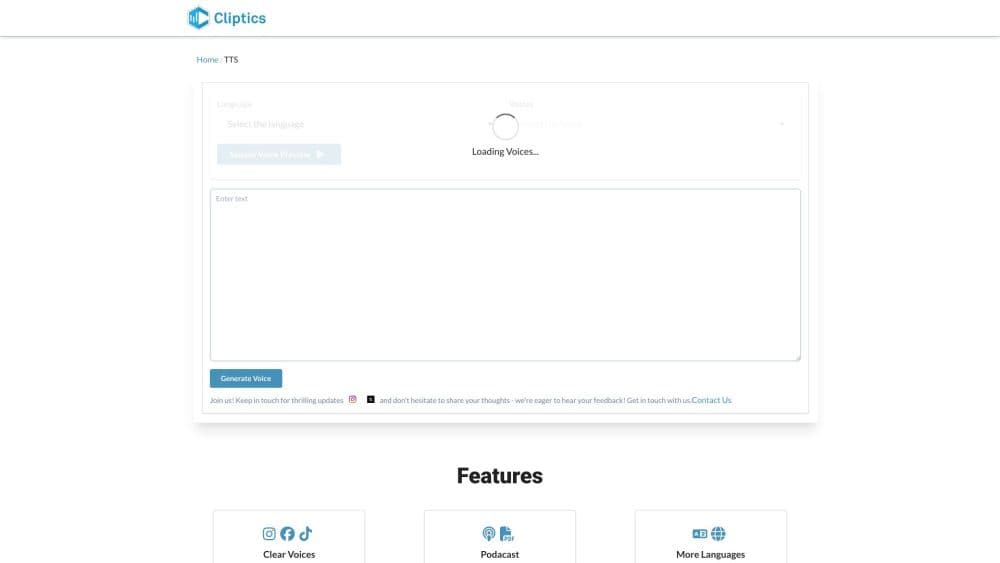
You paste up to 5,000 characters, choose from 16 dedicated language pages ranging from Arabic to Vietnamese, and adjust speed between 0.5x and 2x. Output downloads as MP3, WAV, or OGG, and the site states the MP3 files can be used commercially.
AI Image Generator and Photo Editor
The generator produces images up to 1024x1024 from a text prompt, with 8+ art styles and up to four variations per run. The editor adds generative fill on top of that: you describe a change and it adds objects, replaces backgrounds, or extends the frame while keeping the original composition.
AI Video and Voice Tools
The video side covers text to video, while the audio side adds voice cloning, dubbing, voice isolation, and a multi speaker text to speech tool. Voice cloning is the one to read the terms on, since the rights to a cloned voice belong to the person it came from.
No Signup and Daily Reset
Most tools run without an account, and limits reset at midnight. That removes the usual trial funnel: you test the real output before deciding whether the paid pass is worth it.
Pros and cons
Pros
- Zero cost to test: no account, no card, and the actual output is what you evaluate.
- Wide coverage: image, audio, and video jobs sit under one roof, so a small project rarely needs a second site.
- Browser only: nothing to install, and it works on a phone as well as a desktop.
- Commercial rights stated: the site says generated images and speech can be used commercially, which covers most freelance work.
Cons
- Shared daily cap: 300 to 600 generations spread across every tool means heavy image work eats the quota fast.
- Ads and wait timers on the free tier: the paid pass removes them but adds nothing else.
- Shallow per tool: no batching, no presets saved between sessions, and export options stay simple, so volume work needs a specialist instead.
- No public API or documented integration path, which rules it out for automated pipelines.
Frequently asked questions
Cliptics bundles free AI utilities for images, audio, video, and text on one site. Common uses include removing photo backgrounds, generating speech from text, making images from prompts, and drafting hashtags or titles.
Related content
Explore related tools, skills, and articles for Cliptics.
Cliptics Alternatives

Google EmbeddingGemma 2
Google DeepMind · Writing · Image · CodingGoogle EmbeddingGemma 2 is a 740M-parameter open model that turns text, code, images, audio, and video frames into vectors in one 768-dimension space, running on phones and laptops.

Tractionwave
TractionWave · Image · MarketingTractionWave is an AI attention heatmap tool for static ads. Upload a PNG or JPG and it returns predicted attention, ranked hotspots, and fixes before you spend budget.

Imejis.io
Imejis.io · Image · MarketingImejis.io is an AI design studio for agents and marketing teams. Describe an image in plain words, and it writes the copy, builds the layout, reflows it to every size, then exports a finished file.