

CloverAI
Clover AI · Productivity
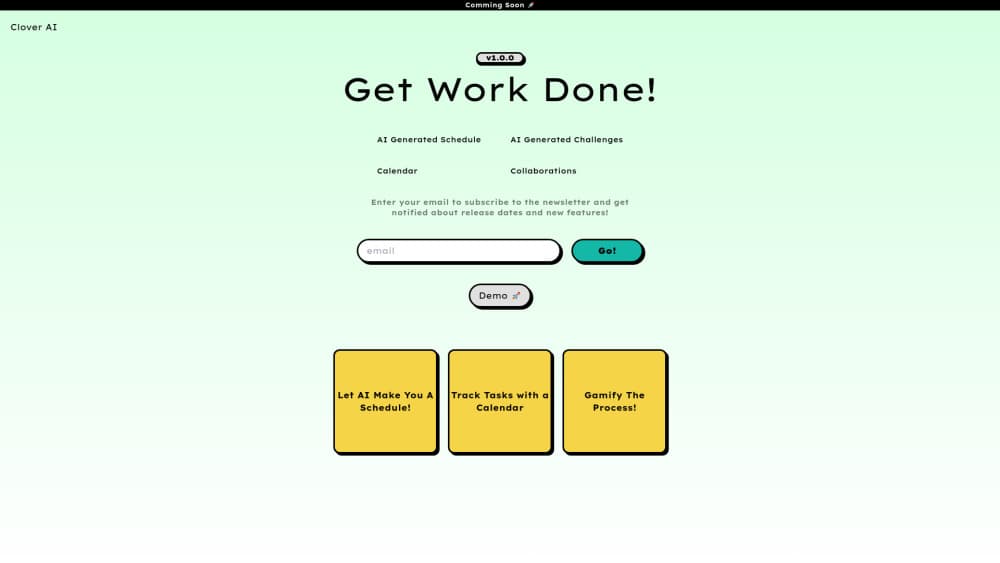
CloverAI is an AI productivity tool that drafts personalized schedules, turns task tracking into challenges and shares calendars with a team. It's still pre-launch, so there's nothing to try yet.
About CloverAI
What Is CloverAI
CloverAI is a productivity tool built on one idea: you list what needs doing, and the software arranges your day for you. Published feature lists describe an AI schedule generator, a task tracking app with a game layer, challenge creation and calendar collaboration for small teams. The audience it aims at is students, freelancers and small groups sharing a workload, not enterprise project offices.
Status matters more than features here. The site collects emails from people who want release news, no pricing has been published, and there's no mobile app in either store. As of October 2026 the cloverai.in domain runs an editorial publication about AI in India, covering models, chips, tools and startups, and the team describes the original scheduling project as the starting point for that coverage. So the fair read is an early-stage concept with a clear scope, not something you can log into today.
That gap sets the limits. Nobody outside the team has tested whether the schedules hold up against a real week, the shared calendar lists no connection to Google or Outlook, and there's no API. Treat it as one to watch rather than one to depend on. If you need an AI planner working this month, pick a product that already ships.
Getting Started
The intended flow, based on the published feature list, runs like this. None of it is live yet.
- Go to cloverai.in and subscribe to the release list so you get an email when access opens.
- Once you're in, add the tasks on your plate with rough durations and deadlines.
- Let the AI schedule generator lay out the week, then move blocks you disagree with.
- Start a challenge for the habit you keep skipping and invite whoever shares it.
- Share the calendar with teammates so everyone sees the same commitments.
Product Information
A quick look at CloverAI's pricing, supported platforms, and performance.
Best for
The users, tasks, and scenarios where this tool fits best.
Users
- Students
- Freelancers
- Small teams
Tasks
- Building a weekly plan
- Keeping a habit going
- Coordinating a shared week
- Following a launch
Scenarios
- A student juggling coursework, a part-time job and exam prep in the same seven days.
- A two-person freelance studio that plans by message thread and keeps losing track of who agreed to what.
- A side project where the schedule and the motivation problem are the same problem.
Key features
AI-Generated Schedules
The core promise is a schedule you don't have to assemble. You hand over your tasks and the tool arranges them into a plan, which is the tedious half of most planners. Whether the placement respects your energy levels, fixed meetings and deadlines is exactly what nobody outside the team has been able to check.
Gamified Task Tracking
Tracking a task is usually a checkbox and a small dose of guilt. CloverAI wraps that in a game layer, so progress shows up as something you can see and keep going. Gamified productivity works when the reward is tied to real work getting done, and fails when the points become the point. Which way this one lands is still open.
Challenge Creation
You set up a challenge, define what counts as progress and invite other people to join it. That's a different mechanism from a shared to-do list, because the challenge itself carries the accountability. It suits habits and sprints better than long projects with unclear finish lines.
Calendar Collaboration
Calendars can be shared so a group sees the same commitments in the same view. For a small team this removes the usual copy of the plan living in three different chat threads. There's no documented sync with Google Calendar or Outlook, which matters if your real schedule already lives there.
Release Updates
The one thing you can use today is the update list. Signing up gets you release news and feature announcements, and it's the only channel the team currently offers for early access. It also costs nothing beyond an email address, so the risk of following along is low.
Pros and cons
Pros
- Scheduling, tracking and team coordination sit in one place instead of three subscriptions.
- The gamified layer targets the real failure point of a task tracking app, which is week three rather than day one.
- Challenge creation gives habits and short sprints a format that a plain to-do list doesn't have.
- Joining the update list is free, so keeping an eye on it costs an email and nothing else.
Cons
- The product isn't available, and no release date has been published, so it can't solve a planning problem for you now.
- No mobile apps and no documented calendar sync mean the schedule would live in one browser tab, away from the tools you already use.
- With no pricing listed, you can't budget for it or compare it on cost against working AI planners.
- The domain now publishes AI news, which makes the product roadmap hard to read and raises the chance the scheduling app never ships in the form described.
Frequently asked questions
It's meant to plan and track work: generate a schedule from your task list, turn tracking into challenges, and share calendars with a small team. The features are described on the site, but the app itself hasn't been released to the public.
Related content
Explore related tools, skills, and articles for CloverAI.
CloverAI Alternatives

Udon
Udon · Coding · ProductivityUdon turns an Apple Silicon Mac into a home server you run from a browser, with container controls, file shares, and an optional AI sysadmin.

offstage
offstage cloud · Coding · Productivityoffstage gives AI coding agents and CI jobs a real Mac: a fresh macOS account on Apple silicon, driven over an API and billed by the second.

BotBus
Chengdu Tuyang Tusen Technology Co., Ltd. · Coding · ProductivityBotBus lets you control AI coding agents from your phone and watch: approve commands, start tasks and read results while the code stays on your desktop.