

Superhuman Docs
Superhuman (formerly Coda) · Productivity
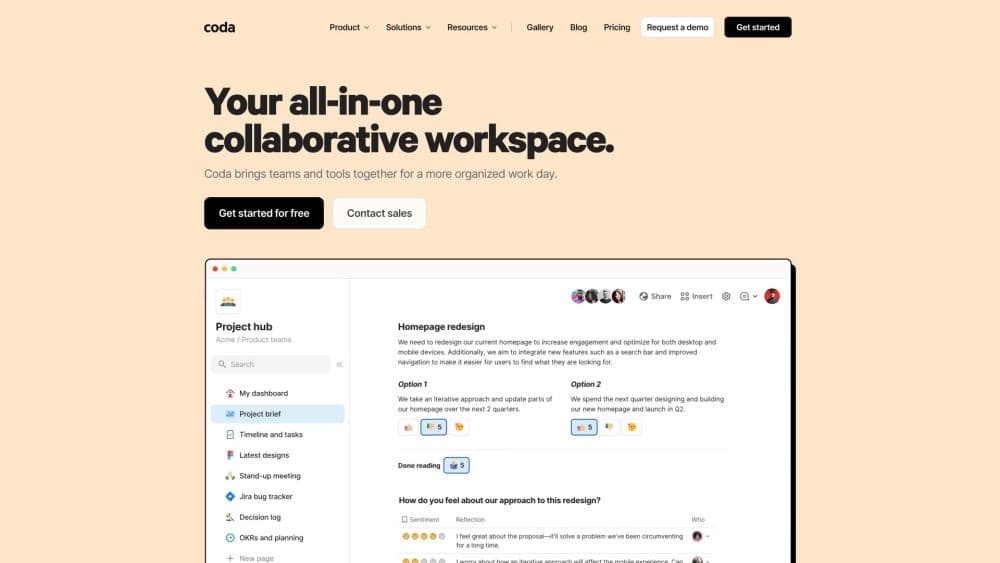
Superhuman Docs (formerly Coda) is a collaborative workspace that merges documents, spreadsheets, and AI into one canvas. Teams build tables, automations, and apps inside a doc, and only Doc Makers pay.
About Superhuman Docs
What Is Superhuman Docs
Superhuman Docs is the product formerly known as Coda. In October 2025, Grammarly rebranded as Superhuman and folded Coda into its suite, and on July 8, 2026 the doc editor took the name Superhuman Docs and moved to docs.superhuman.com. Existing Coda docs, tables, Packs, automations, and formulas keep working, so the change is a rename and redesign rather than a rebuild.
Think of it as an all-in-one workspace rather than a plain editor. The core idea hasn't shifted: a doc here can do more than hold text. You drop a table into a page, wire it to a button, connect it to outside apps, and the page starts acting like a small app. That flexibility is why teams use it for project trackers, content calendars, and lightweight internal tools that would otherwise live in three separate products.
The biggest constraint is the pricing model. Superhuman Docs bills per Doc Maker, and only Doc Makers can create docs, create pages, and use the AI features. Editors and viewers cost nothing, which keeps large teams cheap, but anyone who needs to build has to be on a paid seat.
Getting Started
- Sign up at docs.superhuman.com with an email address or a Google account; existing Coda accounts log in with their current credentials.
- Create a doc and pick a template, or start from a blank page and add a table for structured data.
- Bring in your team by sharing the doc link, then assign Doc Maker, Editor, or Viewer roles as needed.
- Build the workflow: add buttons, connect Packs, and write formulas so the doc updates itself.
- Publish or share the doc, or turn on the AI features to draft text and generate table rows.
Product Information
A quick look at Superhuman Docs's pricing, supported platforms, and performance.
Best for
The users, tasks, and scenarios where this tool fits best.
Users
- Team leads and project managers
- Operations and content teams
- Small product teams building internal tools
Tasks
- Building a project tracker
- Automating recurring work
- Drafting and summarizing with AI
Scenarios
- Running a weekly team sync
- Onboarding a new client
- Tracking a product roadmap
Key features
Maker Billing Model
Superhuman Docs charges only for Doc Makers. Editors and viewers join for free, so you pay for the handful of people who build and run docs rather than everyone who reads them. It's a pricing setup few competitors offer this openly.
Coda AI Inside the Doc
Coda AI lives in the doc you're already working in. It drafts text, summarizes long pages, and generates rows in tables, and it powers the AI prompt that appears when you create a new table. Usage is capped by workspace plan.
Packs and Integrations
Packs connect a doc to outside tools such as Slack, Google Calendar, Figma, and GitHub. The library covers hundreds of services, so a doc can pull in data or push updates without a developer writing glue code.
Tables and Table Pages
A doc holds real tables with typed columns, relations, and filtered views. Table pages give a table its own dedicated full-page space, which helps when you bulk edit or manage a lot of structured data.
Automations and Buttons
Buttons trigger actions from inside a page, and automations run rules on a schedule or when a row changes. Together they turn a passive doc into a workflow that nudges people and updates records on its own.
Formulas and Business Logic
Coda uses a formula language that reads like plain English, so a row can look up another table or calculate a value the moment something changes. That logic is what lets a doc behave like an app.
Pros and cons
Pros
- Viewer and editor seats are free, which keeps the cost low for teams where only a few people build docs.
- Docs, tables, automations, and AI sit in one product, so teams replace several separate subscriptions.
- The formula language and Packs handle fairly complex workflows without heavy engineering.
- The platform runs in the browser and on macOS, iOS, and Android, and every doc link keeps working after the Coda rename.
- A public API and recurring automations let Docs feed data into other systems.
Cons
- Any person who needs to create docs or pages has to be a paid Doc Maker, which adds up fast in a team where everyone builds.
- Coda AI usage is metered by plan, so heavy AI reliance on the free or low tiers can run out of credits.
- The formula language has a learning curve, and newcomers often need a template to get started.
- The Windows desktop app was still in development at launch, so Windows users rely on the web version for now.
Frequently asked questions
Yes. Coda is now Superhuman Docs. The name, the URL, and the visual design changed on July 8, 2026, but your docs, tables, Packs, automations, and formulas work exactly as before, and old coda.io links redirect automatically.
Related content
Explore related tools, skills, and articles for Superhuman Docs.
Superhuman Docs Alternatives

Base Code
Base44 (Wix) · Coding · ProductivityBase Code is a shared cloud development environment from Base44. Teammates describe changes to an existing GitHub codebase in chat, preview them live and send them back as pull requests.

Knocket
Knocket (Tencent RTC team) · Productivity · Business · ChatbotKnocket is a free live chat and contact page tool that lets visitors message you from your website, app, or a shareable link, with every reply handled from Telegram or one inbox.

FloorGen
Vinit Kumar (FloorGen) · Productivity · China AIFloorGen is a browser-based floor plan maker that turns a sentence or a sketch into an editable 2D plan and a 3D walkthrough. Export to PDF, DXF or video, and draw without an account.