

Colorixor
Colorixor · Image
Colorixor is an AI image recoloring tool for designers and sellers who need to change object colors in photos fast, without manual masking.
About Colorixor
What Is Colorixor
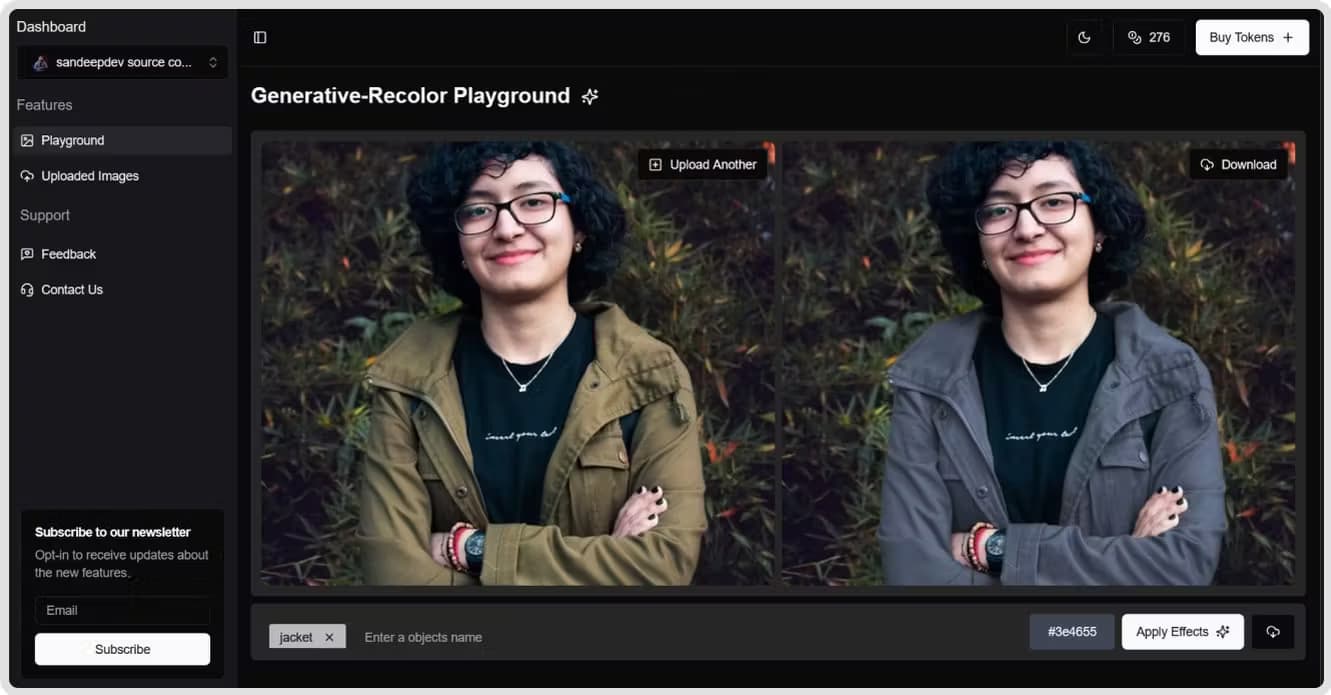
Colorixor is an AI image recoloring tool that changes the color of objects inside a photo. You upload an image, tell it what should shift color, and it repaints that area while keeping the object's texture and lighting in place. The pitch is speed. Skip the selection work that usually eats a Photoshop session.
The tool fits a common bottleneck. Product sellers shoot one photo and need five colorways. Designers sketch in one palette and answer to a client who wants another, which is a familiar headache. Recoloring by hand means lassoing edges, building masks, and matching shadows so the result doesn't look pasted on. That last part is what most people underestimate, and it's where a fifteen-minute job quietly turns into an hour. Colorixor targets exactly that chore. It handles the masking and shade matching for you while you pick the color.
The limits matter too. Recoloring works best on clear, well-lit subjects; busy backgrounds or fine details can leave stray edges. Treat it as a fast first pass, not a replacement for a careful retouch on hero images. After the recolor, check that whites stay white and shadow tones don't drift toward the new hue. Check twice on glossy surfaces.
Getting Started
- Open the Colorixor web app in your browser and upload the image you want to recolor.
- Pick the object or region you want to change. The tool's selection prompts guide you.
- Choose the target color, or type a hex value if you have an exact brand shade in mind.
- Generate the recolored image and compare it against the original.
- Download the result, then do a quick pass on any edges or highlights that need cleanup.
Product Information
A quick look at Colorixor's pricing, supported platforms, and performance.
Best for
The users, tasks, and scenarios where this tool fits best.
Users
- Product sellers
- Graphic designers
- Ecommerce teams
Tasks
- Changing object colors in a photo
- Recoloring product photos
- Testing color options
- Quick visual edits
- Swapping shades across a catalog
Scenarios
- A small shop owner needs five backpack colors by Friday and has one good photo.
- A designer presents three palette directions in a client meeting without rebuilding the asset each time.
- A marketer adjusts a campaign image to match a seasonal color theme in a few minutes.
Key features
AI Object Recoloring
Colorixor finds the object you point at and repaints it in your chosen color. It works on clothing, furniture, accessories, and other solid subjects where the shape is easy to read. Think of it as an AI color editor that skips the tracing. The point is accuracy on the object itself, so you don't have to select every edge by hand.
Automatic Masking
Instead of building a selection yourself, the tool isolates the target region for you. That saves the slowest part of any recolor job. Complex scenes with overlapping objects still need a check afterward, since no automatic mask is perfect.
Hex Color Matching
You can enter an exact hex value rather than eyeballing a color. That matters when a shade has to match a brand guide or a specific paint reference. Type the code, hit generate, and the object takes that color. No guesswork about whether the new shade reads as the right blue.
Preserves Texture and Lighting
A recolored object is only convincing if it keeps its material and shading. Colorixor aims to carry over texture, highlights, and shadows so the new color sits inside the photo instead of on top of it. Check the result closely on glossy or reflective surfaces. That's where mismatches show up first.
Fast Web Workflow
The whole process runs in a browser, so there's nothing to install. Upload, recolor, download. That's it. As an image color changer that lives online, it skips the setup cost of desktop software entirely. For a quick variant or a mood-board test, that speed is the main draw.
Batch Colorway Testing
You can run several colors on the same object to compare them next to each other. This suits sellers weighing which shade to lead with and designers narrowing a palette. It's faster than recoloring the image once per option in a traditional editor.
Pros and cons
Pros
- Cuts out manual masking, which is the slowest part of recoloring an object by hand.
- Runs in the browser, so there's no software to install or learn.
- Hex input lets you hit an exact shade instead of guessing.
- Fast enough for testing several colorways back to back.
- Keeps texture and lighting, which helps the result blend into the scene.
Cons
- Recoloring works best on clean, well-lit subjects; busy or low-contrast images can leave rough edges.
- Fine details and overlapping objects may need manual cleanup after the automatic pass.
- Pricing and current feature details can't be confirmed from the vendor, since the official site is currently offline.
Frequently asked questions
It changes the color of objects in an image using AI. You upload a photo, point at the object you want to recolor, pick a new color, and the tool repaints that object while keeping its texture and shading.
Related content
Explore related tools, skills, and articles for Colorixor.
Colorixor Alternatives

Google EmbeddingGemma 2
Google DeepMind · Writing · Image · CodingGoogle EmbeddingGemma 2 is a 740M-parameter open model that turns text, code, images, audio, and video frames into vectors in one 768-dimension space, running on phones and laptops.

Tractionwave
TractionWave · Image · MarketingTractionWave is an AI attention heatmap tool for static ads. Upload a PNG or JPG and it returns predicted attention, ranked hotspots, and fixes before you spend budget.

Imejis.io
Imejis.io · Image · MarketingImejis.io is an AI design studio for agents and marketing teams. Describe an image in plain words, and it writes the copy, builds the layout, reflows it to every size, then exports a finished file.