

CommonAR
Rohan Vaidya · Productivity
CommonAR is a free AR networking app that overlays attendee profiles and AI match data when you point your iPhone camera at people at an event.
About CommonAR
What Is CommonAR
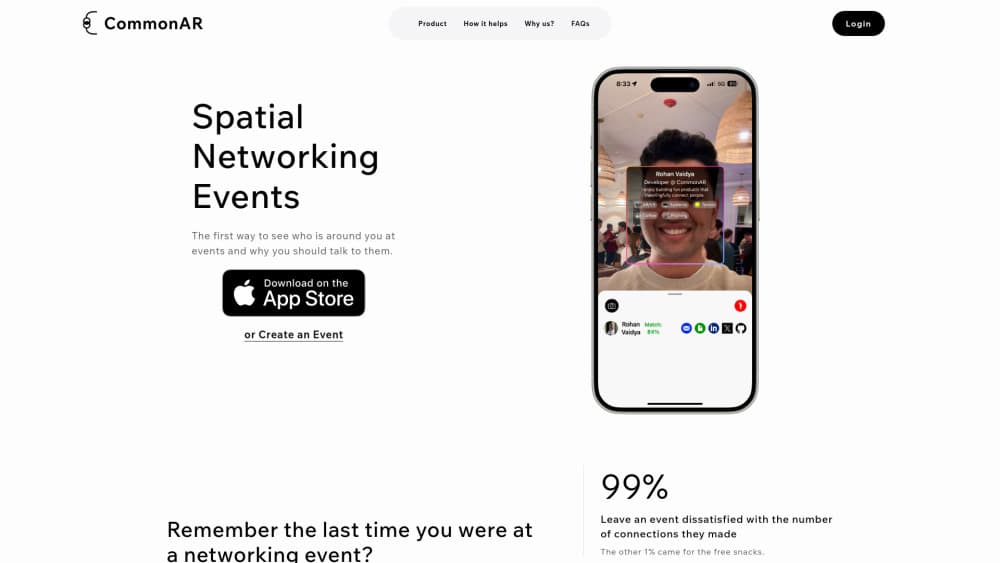
CommonAR is a spatial networking app for in-person events. You point your iPhone camera at a room, and it labels the people in front of you with their profile, their social links, and the things you two have in common. The idea behind this augmented reality networking is simple: skip the small talk and start with something real.
It was built by Rohan Vaidya, an indie developer who released the first version in September 2024. The pitch is narrow on purpose. CommonAR is for networking events, conferences, meetups, and career fairs, not for browsing strangers online. It lives on iOS as an AR experience, while hosts run events from the web at commonar.com, and Android users join through the same web app.
Two things are worth knowing before you download it. The AR part is iPhone-only, so Android attendees get the event details and guest list but not the camera overlay. And every scan is gated by event, time, and location, which means the app only works while you are actually at a place you signed up for.
Getting Started
- Download CommonAR from the App Store on an iPhone running iOS 17.2 or newer.
- Create a profile with your name, photo, and the social links you want to share.
- As a host, create an event at commonar.com and share the link by email or chat; as a guest, open the link someone sent you.
- At the venue, open the camera and point it at the room. Profiles, socials, and shared interests appear over the people you see.
- Tap a match to save the person to your contacts and reach out later.
Product Information
A quick look at CommonAR's pricing, supported platforms, and performance.
Best for
The users, tasks, and scenarios where this tool fits best.
Users
- Conference attendees
- Event hosts and organizers
- Recruiters and sales reps
Tasks
- Breaking the ice fast
- Collecting contacts
- Matching around a theme
Scenarios
- A crowded industry mixer
- A startup demo night
- A university career fair
Key features
AR profile overlay
Point the camera at the people in front of you and CommonAR floats their profile, photo, and social handles over them. Flip the lens inward for a selfie-style scan with someone you just met, or sweep the room to see who is around. It turns a room full of strangers into a set of named faces.
AI compatibility matching
For each person you meet, the app compares both profiles and suggests what you have in common. That's the part that decides whether a conversation is worth starting, so the AI compatibility matching only fires for people actually near you, not a national directory. The matches lean on the theme the host set for the event.
Automatic contact saving
Every scan lands in your contacts with the socials the person chose to share. You don't have to remember a name or dig through a photo roll after the event. This contact management is built for the follow-up, which is where most networking value is actually lost.
Event creation and invites
Hosts create an event on the web and share a link or email invite. Guests who accept become the only people who can be seen inside that event, which keeps the room closed. A Chrome extension also pulls guest lists from Luma so you don't retype a spreadsheet.
Time and location access gates
AR access opens for accepted attendees only, and only at the event's location during the event window. It closes afterward. This is the core privacy design: the camera can recognize just the people who opted into the same event you did. Data is shared with fellow attendees and the developer states it is not sold to third parties.
Social profile links
Each profile carries the social accounts and links a person chooses to show, pulled together in one place on a scan. Instead of swapping handles one by one, a single scan hands you their LinkedIn, X, and whatever else they included.
Pros and cons
Pros
- Free for both hosts and attendees, with the developer stating the plan is to stay free.
- Solves a real problem at networking events: figuring out who is worth talking to before the first sentence.
- Privacy is built around event, time, and location limits rather than open-face search.
- Automatic contact saving keeps the follow-up from falling through the cracks.
Cons
- The AR camera experience is iPhone-only, so Android users can't use the signature feature and get the web app instead.
- It needs iOS 17.2 or newer, which leaves out older iPhones.
- It only works inside a registered event, so you can't use it to identify people in an everyday setting.
- Facial recognition at an event raises obvious consent questions, and the app leans on attendees opting in.
Frequently asked questions
CommonAR is a spatial networking app for in-person events. You point an iPhone camera at attendees and it shows their profile, socials, and the interests you share, so you know who to talk to and why.
Related content
Explore related tools, skills, and articles for CommonAR.
CommonAR Alternatives

Base Code
Base44 (Wix) · Coding · ProductivityBase Code is a shared cloud development environment from Base44. Teammates describe changes to an existing GitHub codebase in chat, preview them live and send them back as pull requests.

Knocket
Knocket (Tencent RTC team) · Productivity · Business · ChatbotKnocket is a free live chat and contact page tool that lets visitors message you from your website, app, or a shareable link, with every reply handled from Telegram or one inbox.

FloorGen
Vinit Kumar (FloorGen) · Productivity · China AIFloorGen is a browser-based floor plan maker that turns a sentence or a sketch into an editable 2D plan and a 3D walkthrough. Export to PDF, DXF or video, and draw without an account.