

CookFast
CookFast · AI Assistant
CookFast is a free AI recipe generator that turns the ingredients in your kitchen into a complete recipe with amounts and step-by-step instructions. No account, no card.
About CookFast
What Is CookFast
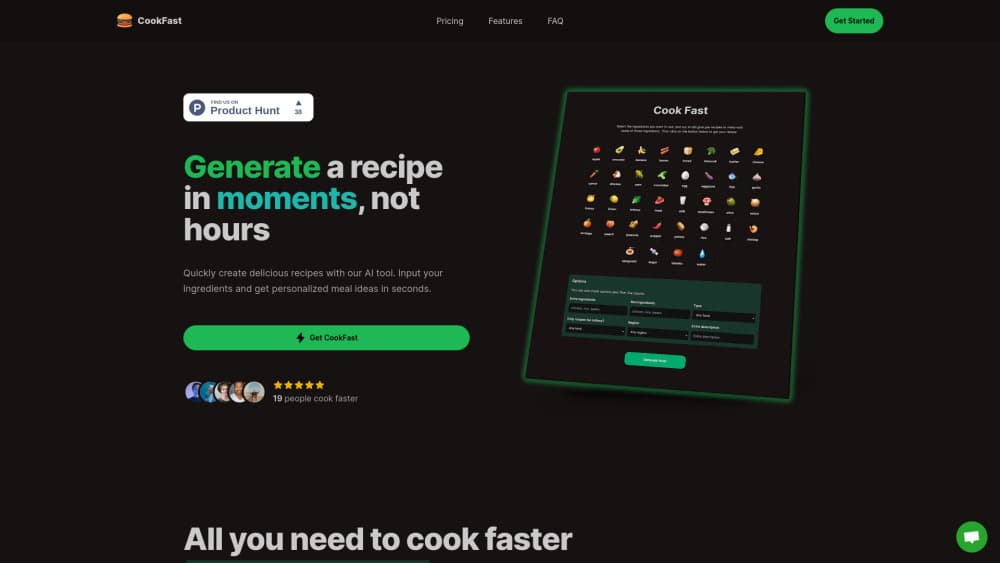
CookFast is a browser tool built around one everyday kitchen problem: you have food, but no plan. You list what's in the fridge, pick a cuisine and a couple of preferences, and the site answers with a recipe card that carries a dish name, timing, an ingredient list with amounts, and numbered cooking steps. The creators describe it as a recipe creator from ingredients, and that's the whole product.
The design pushes speed and waste reduction. Nothing in the flow asks you to shop first. Type "chicken, rice, broccoli, garlic" and you get back something like a garlic chicken rice bowl built for a 25 minute window. For anyone staring into a half-empty fridge at 7pm, that solves a decision problem rather than a browsing problem.
The limits are worth knowing before you start. This is generated output, not a kitchen-tested cookbook, so quantities are starting points that need tasting as you go. There's no nutrition panel, no shopping list export, and no saved collection, because the site runs without accounts at all.
Getting Started
- Open cookfast.org in any browser. The generator loads on the homepage, so there's nothing to install and no form to fill in first.
- Type your ingredients into the input box, one after another, or click the suggestions the field offers for common items.
- Set the preferences under the ingredient list: cuisine, a gluten-free or healthy toggle, servings from 1 to 12, and a time limit of 15, 30, 45, or 60 minutes.
- Press generate and read the recipe card that comes back. It lists what you need, how much of it, and the order of steps.
- Copy the text or screenshot the card before you close the tab. Nothing is stored on the site, so the recipe leaves when the session does.
Product Information
A quick look at CookFast's pricing, supported platforms, and performance.
Best for
The users, tasks, and scenarios where this tool fits best.
Users
- Home cooks with a random fridge
- People cooking gluten-free
- Students and first-time cooks
- Budget-conscious households
Tasks
- Clearing leftovers before they spoil
- Deciding what to cook with what I have
- Building a gluten-free meal
- Portioning for a household
Scenarios
- A weeknight dinner with a 30 minute cap
- Cooking for one after a long shift
- Testing a diet change for a week
Key features
Ingredient-First Recipe Generation
The generator starts from your pantry and works forward, not from a dish name. You supply the raw materials and it returns a titled recipe with amounts and method, which is the reverse of how most recipe sites work. That direction is what makes it useful for leftovers and cheap weeks.
Gluten-Free Mode Built for Coeliac Households
A dedicated gluten-free switch filters the output so recipes avoid wheat, barley, and related ingredients. The site pairs it with a blog library of product checks, including pieces on whether specific chocolate bars and custard powders contain gluten. The pairing helps. The tool can't certify a brand's manufacturing line, so packaging still decides.
Cuisine, Time, and Serving Controls
Before generating, you pick a regional style from American, Asian, Indian, Italian, Mediterranean, Mexican, or Middle Eastern, or leave it on Any. Servings run from 1 to 12, and the time cap is 15, 30, 45, or 60 minutes. Setting all three changes the result substantially, which keeps the same ingredients from producing the same dinner twice.
Healthy Mode
A separate toggle pushes the generator toward lighter, vegetable-forward meals rather than cream and starch heavy ones. It's a coarse filter, not a calorie target, so it won't hit a macro goal. What it does well is keep a run of weeknight dinners from turning into the same heavy pattern.
Complete Recipe Cards, Not Just Ideas
Output includes an ingredient list with quantities, prep and cook times, and numbered instructions. You can cook from the card without opening another tab, which is the difference between an AI cooking tool and a suggestion engine. Longer recipes still need your judgment on heat and seasoning.
No Signup, No Payment, No Limits Shown
The tool runs in the browser with no account, no card, and no visible generation cap. The site states the generator is free to use and stays that way. As a free recipe generator and a gluten-free recipe generator in one, it removes the usual trial wall. It also means there's no profile to store your results.
Pros and cons
Pros
- Free in the plain sense: no account, no card, no credit counter in the way of a second or third recipe.
- The gluten-free and healthy toggles change the output rather than sitting as decoration, and the coeliac angle is treated as a real use case.
- Every result is a full card with amounts and steps, so it works as your only screen while cooking.
- Cuisine, servings, and time controls make repeat runs with the same ingredients feel different.
Cons
- No accounts means no recipe history, so anything you want to keep has to be copied or screenshotted.
- Recipes are generated, not tested: cooking times and seasoning levels need adjusting on the first attempt.
- There's no nutrition breakdown and no export to a shopping list, which rules it out for macro tracking.
- Web only, with no mobile app and no published API for building your own tools on top.
Frequently asked questions
Yes. The generator costs nothing, and the site says it stays that way. There's no subscription, no credit card field, and no account to create before you generate a recipe.
Related content
Explore related tools, skills, and articles for CookFast.
CookFast Alternatives
Agibot
Agibot · Productivity · AI Assistant · ChatbotAgibot is a personal AI agent for Mac that keeps running after you close the window, runs routines on a schedule, and works from Telegram or Slack with your own API keys.

Foley
Hanamori Labs, LLC · Voice & Language · Productivity · AI AssistantFoley is a voice to-do list that turns a spoken sentence into a filed task, complete with project, date and time, then helps you plan the day around what is already there.

Ghost Core
Ghost · Productivity · AI AssistantGhost Core is a $3,499 screenless personal AI computer that runs local AI models on its own hardware, builds context from your apps and devices, and acts without waiting for a prompt.