

Cooraft: Ultimate AI Camera
SeeKoo LLC · Image · Video
Cooraft: Ultimate AI Camera is an iOS app that turns selfies and everyday photos into studio-style portraits, face animations, and AI art with a tap.
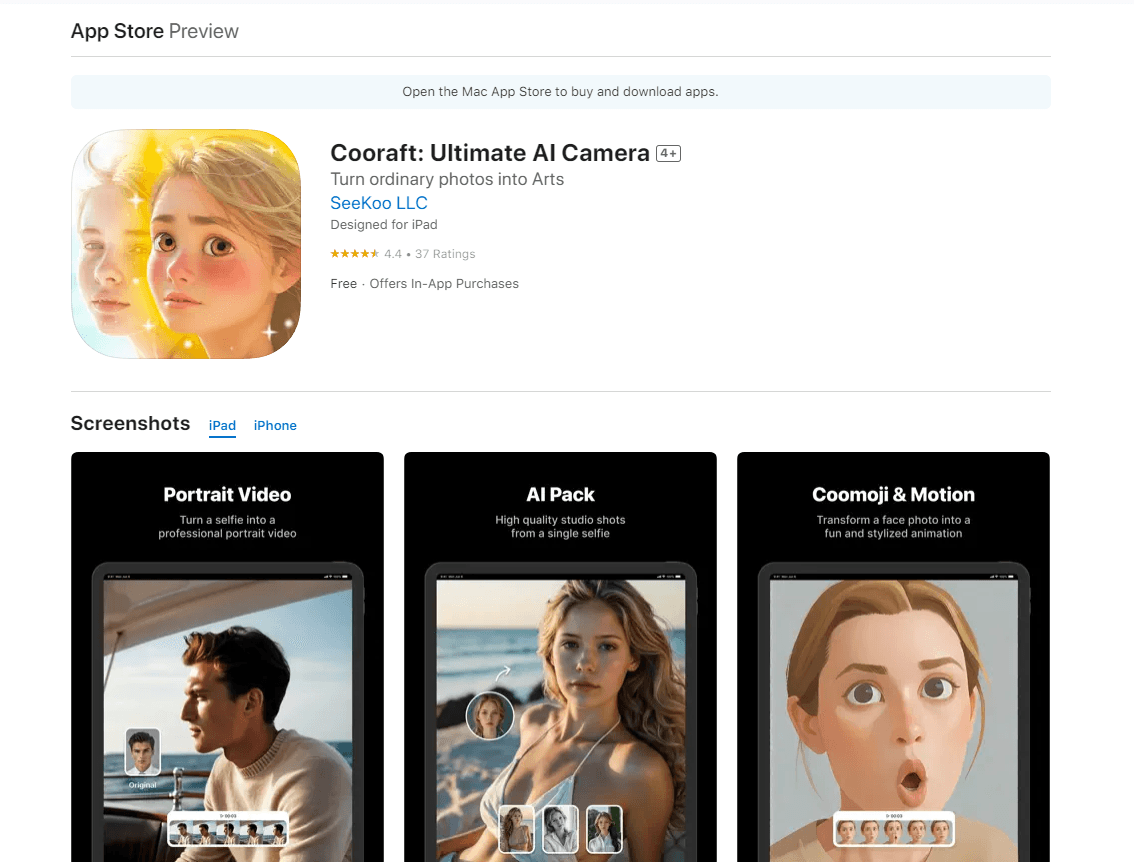
About Cooraft: Ultimate AI Camera
What Is Cooraft: Ultimate AI Camera
Cooraft is a photo and video app for iPhone and iPad built around one idea: you shouldn't need a studio, a photographer, or editing skills to get a polished image. Load a selfie, or any photo, pick a style, and the app does the rest. It leans on AI models that read faces, edges, and lighting, then rebuilds the picture as something more finished. A plain selfie to portrait run takes seconds. So does a photo to video clip.
That puts it in the same lane as an AI art generator or a standard iOS photo editor, but with the emphasis on people and faces rather than landscapes or text.
The app comes from SeeKoo LLC and sits in the crowded AI camera app space, but it aims wider than a single gimmick. Most one-trick apps do face swaps or style filters and stop there, which is why so many people install them once, get bored, and delete them within a week. Cooraft bundles several modes under one roof, including portrait packs, photo styling, animated faces, and sketch-to-real conversions that double as a rough AI art generator. That range is the main reason people install it.
The limits matter as much as the features. It's iOS only, so Android users are out. Output quality depends on the input photo. A blurry or badly lit selfie gives weaker results, which is true of most AI photo tools, and no amount of prompting will rescue a shot that was never usable to begin with. And the better features sit behind a subscription, so free users hit a paywall fast.
Getting Started
- Download Cooraft: Ultimate AI Camera from the App Store on an iPhone or iPad running iOS 16.6 or later.
- Open the app and allow photo library access so it can read the image you want to transform.
- Pick a mode: Portrait Video, Packs, Photo Style, Coomoji, or Face Motion.
- Choose or upload your photo, then select a style or expression from the available options.
- Tap to generate, wait for processing, and save the result to your camera roll or share it straight to social media.
Product Information
A quick look at Cooraft: Ultimate AI Camera's pricing, supported platforms, and performance.
Best for
The users, tasks, and scenarios where this tool fits best.
Users
- Social media creators who need eye-catching portraits and short clips without hiring a photographer or learning editing software.
- People who enjoy AI photo apps and want a single app that covers portraits, styles, and face animation instead of installing five separate tools.
- Casual users on iPhone or iPad who want one-tap results and don't mind paying a subscription for unlimited premium features.
Tasks
- Turning a plain selfie into a studio-quality portrait video for a profile or post.
- Converting a sketch, drawing, or line art into a realistic or 3D rendering.
- Animating a still face photo with expressions to make a short, playful clip.
- Restyling an ordinary photo into a cartoon, painting, or other artistic look.
Scenarios
- Refreshing your dating or social profile with a sharper, more polished headshot you didn't have to book.
- Making a quick animated clip of a family photo to share in a group chat on a birthday.
- Turning a child's pencil drawing into a realistic image as a small surprise.
- Filling a content calendar with styled visuals when you're short on photoshoot time.
Key features
One-Tap Portrait Video
Portrait Video turns a single selfie into a studio-grade clip. You feed it one face photo, and the app generates a moving portrait with professional lighting and framing, the kind of result that would normally take a photographer, a backdrop, and a round of retouching to produce. Think of it as a selfie to portrait upgrade, done in one pass. It's the headline mode, and it's the fastest way to see what Cooraft can do without any editing skill.
Packs for Consistent Portraits
Packs generate a whole set of professional portrait shots from one face image. Instead of one output, you get a series, which helps when you want several usable photos with a consistent look so your profile, your posts, and your clips all match. This is the mode to reach for if you need options rather than a single result.
Photo Style Conversions
Photo Style takes any photo and reworks it into a range of artistic styles, from 3D cartoons to classical painting looks. You pick the target style and the app handles the conversion. It works on portraits and general images alike, so it isn't locked to faces.
Coomoji Emoji Faces
Coomoji turns a facial photo into a stylized emoji. It takes your face and reimagines it as a cartoonish reaction image you can drop into chats. It's a lighter, more playful mode than the portrait tools, and it's quick to make.
Face Motion Animation
Face Motion animates a still face photo with fun expressions. The app generates movement where there was none, turning a flat snapshot into a short clip with a bit of life to it. The results lean expressive rather than realistic, which is the point.
Sketch and Line Art Rendering
Cooraft converts sketches, drawings, paintings, and line art into new renderings that come out realistic, 3D, or artistically styled. It leans toward an AI art generator more than an iOS photo editor here, since the starting point is often a drawing rather than a camera shot. This mode is useful for creators who start with hand-drawn work and want a finished-looking image without redrawing it digitally.
Subscription for Unlimited Access
Unlimited access to the premium features comes through a subscription, offered in weekly and yearly options. You can manage or cancel it from your App Store account settings, and turning off auto-renewal keeps the plan active until the period ends. Payment goes through your iTunes account.
Pros and cons
Pros
- Several distinct modes in one app, so you don't need separate tools for portraits, animation, and art style.
- One-tap workflow keeps the learning curve low for people with no editing background.
- Handles inputs beyond faces, including sketches and line art, which widens its use.
- Runs as a universal app on both iPhone and iPad at no download cost.
- Weekly and yearly subscription options let you test it short term before committing.
Cons
- iOS only, so Android users can't install it.
- Strongest features sit behind a subscription, and free users run into limits quickly.
- Output quality drops with low-resolution or poorly lit input photos.
- No public API, so you can't plug it into a custom workflow or another app.
Frequently asked questions
The app is free to download, and it includes a free tier. Unlimited access to premium features requires a subscription, offered in weekly and yearly plans. You can cancel anytime from your App Store account settings. Want to test it before paying? Run one portrait in the free tier first.
Related content
Explore related tools, skills, and articles for Cooraft: Ultimate AI Camera.
Cooraft: Ultimate AI Camera Alternatives

Google EmbeddingGemma 2
Google DeepMind · Writing · Image · CodingGoogle EmbeddingGemma 2 is a 740M-parameter open model that turns text, code, images, audio, and video frames into vectors in one 768-dimension space, running on phones and laptops.

Tractionwave
TractionWave · Image · MarketingTractionWave is an AI attention heatmap tool for static ads. Upload a PNG or JPG and it returns predicted attention, ranked hotspots, and fixes before you spend budget.

Imejis.io
Imejis.io · Image · MarketingImejis.io is an AI design studio for agents and marketing teams. Describe an image in plain words, and it writes the copy, builds the layout, reflows it to every size, then exports a finished file.