

ChatGPT Cover Letter Builder
CoverLetterGPT · AI Assistant
ChatGPT Cover Letter Builder, the product behind CoverLetterGPT, turns your background and a pasted job description into a tailored cover letter you can edit and export as PDF or DOCX.
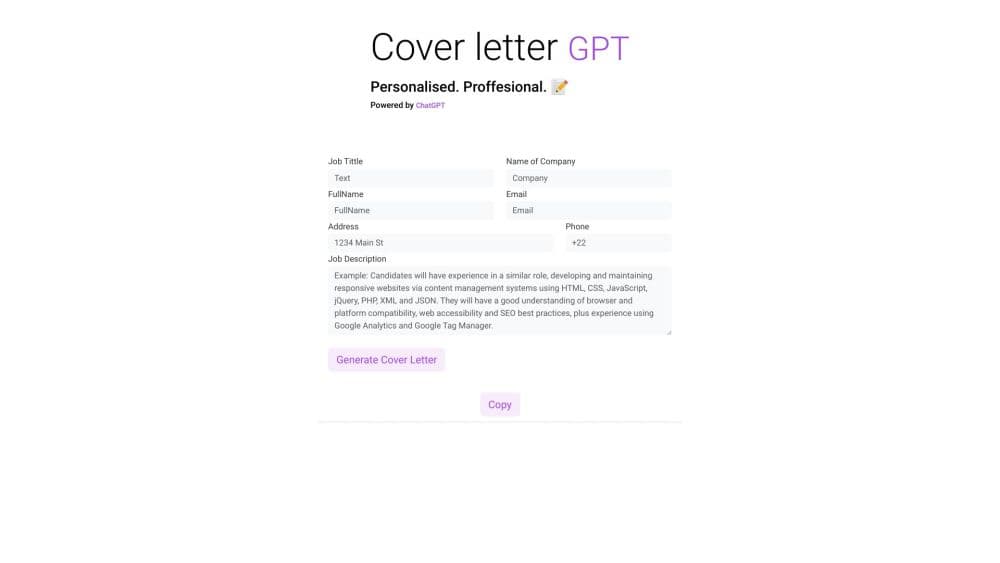
About ChatGPT Cover Letter Builder
What Is ChatGPT Cover Letter Builder
ChatGPT Cover Letter Builder is the listing name for coverletter-gpt.com, a web app that brands itself CoverLetterGPT. You paste a job description, enter details about your background, pick a tone, and the site returns a written letter aimed at that specific posting. There is no resume upload step in the flow: the input is text you type.
The pitch is speed. Instead of staring at a blank page, an applicant gets a full draft in minutes and then reads it through for accuracy. And the tone selector is the part that separates it from a plain ChatGPT session. Nine presets cover everything from Professional or Respectful to Extremely funny, which matters for creative roles and not at all for a law firm.
The constraints are worth knowing before you pay. The site advertises a GPT-3.5 free tier on its FAQ page, while the pricing cards sell GPT-4o mini at $0.99 and GPT-4 Turbo behind the paid bundles. Cover letters are sold as one-time credits rather than a subscription. Free users cannot edit or download; editing and PDF or DOCX export come with a purchase.
Getting Started
- Open coverletter-gpt.com and log in if you want to keep your drafts.
- Paste the job description into the field provided and add the background details you want reflected in the letter.
- Choose a tone preset such as Professional, Confident, or Persuasive, then confirm the model shown in the selector.
- Generate the letter and read it against the posting, correcting anything that does not match your real experience.
- Edit inside the app and export as PDF or DOCX once you have a credit on the account.
Product Information
A quick look at ChatGPT Cover Letter Builder's pricing, supported platforms, and performance.
Best for
The users, tasks, and scenarios where this tool fits best.
Users
- High-volume applicants
- Career switchers
- Non-native English writers
- Creative and casual fields
Tasks
- Drafting a letter for a specific posting
- Rewriting a flat cover letter
- Producing a file for an applicant portal
- Testing a letter's direction before committing
Scenarios
- Weekend application sprint
- Applying in a second language
- Recovering a stalled draft
Key features
Tailoring From the Job Description
The letter is built around the job description you paste, not a template with blanks. This AI cover letter generator reads the posting as the main input rather than asking you to fill in slots. The app reads the duties and requirements and leans the draft toward the skills the employer names, which is the difference between a letter that answers the posting and one that describes the applicant in general terms. You still have to check that the emphasis matches what you have actually done.
Nine Tone Presets
A dropdown offers nine written voices: Professional, Confident, Enthusiastic, Persuasive, Engaging, Respectful, Adaptable, Extremely funny, and Professional yet Personable. Changing the preset regenerates the draft in a different register without you editing a word. For a marketing role that flexibility is useful, and for a compliance role the funny option is best left alone.
Model Choice in the Selector
The generator lists GPT-4o mini and GPT-4 Turbo as options, with the second marked as requiring an upgrade. Higher-tier output tends to hold structure better over a full page, which is where cheaper drafts often sag into repetition. The label is the site's own, so treat the quality difference as the vendor's claim rather than a measured result.
In-App Editing
Paid tiers turn on an edit step, so you can fix the parts the model invented or overstated before exporting. Free credits deliberately leave this off, and that single feature is the main reason to spend $0.99 rather than work with the free tier. Editing is where you remove claims about achievements you cannot back up in an interview.
PDF and DOCX Export
Purchased credits unlock both formats, so you can download the cover letter as PDF for portals that lock layout or as DOCX when you want to restyle it. DOCX lets you adjust spacing and fonts to match a resume style guide. PDF keeps the layout fixed when a portal renders files in its own viewer.
Credit Packs Without a Subscription
Pricing runs as one-time packs: $0.99 for three letters on GPT-4o mini, $2.99 for fifteen on GPT-4 Turbo, and $5.99 for forty, with the last two discounted from $4.99 and $9.99. Nothing renews, so a long job search costs a few dollars at a time rather than a monthly fee. Payments run through Stripe.
Pros and cons
Pros
- Job description input is the primary field, so the draft responds to the actual posting instead of producing a generic letter.
- Nine tone presets cover a wide range, from formal to deliberately comic, without extra prompting skill.
- PDF and DOCX exports on paid credits make the output usable in portal uploads.
- One-time credit pricing means no recurring charge if a job search ends quickly.
- No resume upload is required, which lowers the personal data you hand over.
Cons
- Free users cannot edit or export, so the free tier shows the product rather than doing useful work.
- The FAQ page still describes a GPT-3.5 free tier while the pricing cards list GPT-4o mini, which leaves the exact free model unclear.
- Three letters for $0.99 works out to a poor per-letter price next to the forty-letter pack, and the discount only appears on the larger bundles.
- The letter inherits whatever you type about your background, so an underspecified input produces a letter full of plausible but unverifiable claims.
- There is no resume parsing, so you retype your history for every application.
Frequently asked questions
It is the listing name for CoverLetterGPT at coverletter-gpt.com, a web tool that writes cover letters from a job description and details you supply. The two names refer to the same service.
Related content
Explore related tools, skills, and articles for ChatGPT Cover Letter Builder.
ChatGPT Cover Letter Builder Alternatives
Agibot
Agibot · Productivity · AI Assistant · ChatbotAgibot is a personal AI agent for Mac that keeps running after you close the window, runs routines on a schedule, and works from Telegram or Slack with your own API keys.

Foley
Hanamori Labs, LLC · Voice & Language · Productivity · AI AssistantFoley is a voice to-do list that turns a spoken sentence into a filed task, complete with project, date and time, then helps you plan the day around what is already there.

Ghost Core
Ghost · Productivity · AI AssistantGhost Core is a $3,499 screenless personal AI computer that runs local AI models on its own hardware, builds context from your apps and devices, and acts without waiting for a prompt.